Want to change your voice, add funny effects, or turn your recordings into songs? Voice Changer with Effects by Baviux lets you record your voice, apply different effects, save the result and share it with friends.
The app has 100M+ downloads and around 1.5 million Google Play reviews, with a 4.6-star rating. It contains ads and offers in-app purchases.
Testing Setup & Our Experience
We tested the app setup on a Samsung Galaxy A55 5G running Android 15, focusing on voice recording, effects, saving recordings, importing audio and sharing options.
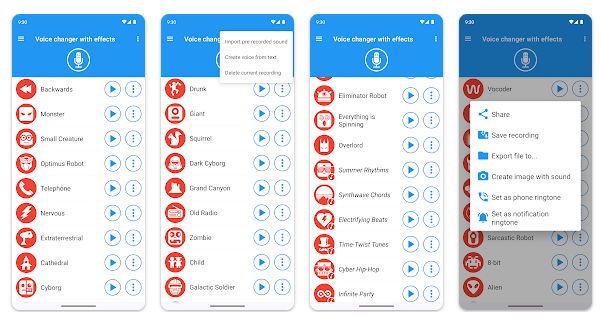
The basic process is simple: record your voice, select an effect and listen to the modified version. You can experiment with effects such as helium, robot, giant, monster, zombie, alien and squirrel. The app offers more than 50 effects in total.
You can also import an existing audio file instead of recording from scratch, giving you more ways to experiment with different sounds.
Key Features
50+ Voice Effects: Transform your voice with a large collection of funny and unusual effects.
Record & Save: Record your voice, apply an effect and save the finished audio for later.
Text to Voice: Create a voice recording from written text and apply effects to it.
Import Audio: Use pre-recorded sounds and apply voice effects to existing audio.
Create Songs: The music effects feature can turn your voice or text into a song.
Share Recordings: Share modified recordings through WhatsApp, email and other supported apps.
Ringtone & Notification Sound: Saved recordings can be set as a ringtone or notification sound.
Audio Controls: Adjust audio quality and use the built-in piano feature for additional experimentation.
Is Voice Changer with Effects Worth Downloading?
If you are searching for a voice changer app, funny voice effects, voice recording effects, or a way to change your voice on Android, this app offers a lot of features in a simple package.
Its biggest advantage is variety. You are not limited to one or two effects; you can experiment with dozens of different voices and sounds. The ability to import audio, create voice from text and turn recordings into songs also makes it more versatile than a basic voice changer.
The app is mainly designed for entertainment and creative audio, rather than professional voice editing. Some recent Google Play reviews also mention frequent ads, while others praise the variety of effects.
Voice Changer Download
If you want to change your voice, create funny recordings, add voice effects or make entertaining audio clips, Voice Changer with Effects is worth trying.
Download Voice Changer with Effects from Google Play
Quick FAQ
Can I change my voice using this app?
Yes. You can record your voice and apply more than 50 different effects.
Can I change an existing recording?
Yes. The app supports importing pre-recorded audio.
Can I share the changed voice?
Yes. Recordings can be shared through supported apps such as WhatsApp and email.
Does the app contain ads?
Yes. The free version contains ads and the app also offers in-app purchases.
TipZoom Verdict
Voice Changer with Effects is a feature-rich entertainment app for users who want to change their voice, create funny audio, experiment with effects and share recordings. Its large selection of effects and additional audio tools make it more than a basic voice changer.
Final Scorecard
- Voice Effects – 9.5/10: More than 50 effects provide plenty of options.
- Features – 9/10: Includes recording, text-to-voice, importing and music effects.
- Ease of Use – 9/10: Simple recording and effect-selection process.
- Sharing – 9/10: Easy to save and share created recordings.
- Overall – 9.2/10: A strong choice for fun voice editing and creative audio.