Is your mobile data running out and you need an internet connection? Instabridge is an Android app designed to help users find free WiFi hotspots nearby, save mobile data, and stay connected while travelling.
Instead of manually searching for WiFi networks everywhere you go, Instabridge provides a WiFi hotspot map that helps you discover available networks around your location. This can be useful when you have limited mobile data, are travelling, or need internet access away from home.
Testing Setup & Our Experience
We tested Instabridge on an Android smartphone, focusing on finding nearby WiFi hotspots, checking network information, using the WiFi map, and exploring its connectivity features.
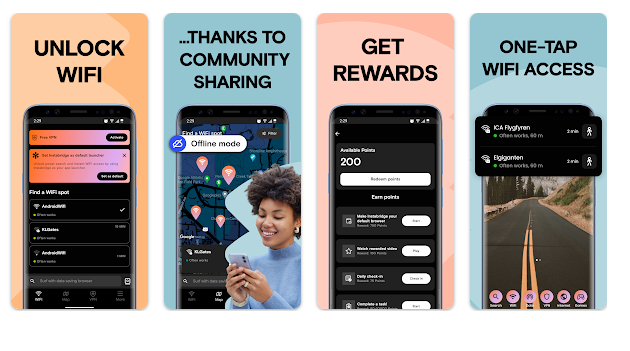
The main process is simple. Open the app and check the available WiFi hotspot information around your location. This can be particularly useful when mobile data is running low and you want to find an alternative internet connection.
We also explored the offline WiFi map, automatic connection options, and internet speed tools. These features make Instabridge more useful than a basic WiFi scanner because it combines WiFi discovery with connectivity information.
However, the results depend heavily on your location. Areas with more public WiFi hotspots are likely to provide better results than locations with fewer available networks.
Key Features
Find Free WiFi Near You
Use the WiFi hotspot map to discover available networks around your location.
Save Mobile Data
Connecting to available WiFi can help reduce your mobile-data usage when browsing, watching content, or downloading files.
Offline WiFi Map
Access downloaded hotspot information when you have limited mobile data or are travelling.
Automatic WiFi Connection
Instabridge can help connect automatically to supported available WiFi networks.
WiFi Speed Information
Check network information and connection quality before depending on WiFi.
Internet Speed Test
Test your current connection to see whether it is suitable for browsing, videos, and downloads.
eSIM Mobile Data
The app also offers eSIM mobile-data options on supported devices, which can be useful when travelling internationally.
Is Instabridge Worth Downloading?
If you are searching for a free WiFi finder, WiFi hotspot locator, free internet connection, or way to save mobile data, Instabridge is worth considering.
Its biggest advantage is solving a common problem: finding an internet connection when mobile data is limited or running out. The WiFi hotspot map can help users discover available connectivity options, especially when travelling or visiting unfamiliar places.
The offline map and connection tools also add useful value for people who frequently travel.
However, Instabridge is not a WiFi hacking app. It does not bypass passwords or break into protected private networks. It helps users discover and connect to available networks through its supported hotspot information.
Instabridge Download
If you want to find free WiFi near you, get internet access when mobile data runs out, save mobile data, or locate WiFi hotspots while travelling, Instabridge is worth trying.
Download Instabridge from Google Play
Quick FAQ
Can Instabridge find free WiFi near me?
Yes. Its WiFi map is designed to help users discover available hotspots around their location.
Can it help save mobile data?
Yes. Connecting to available WiFi can reduce mobile-data usage.
Does Instabridge work while travelling?
Yes. Its WiFi map and travel connectivity options can be useful when visiting unfamiliar locations.
Does Instabridge provide passwords for private WiFi?
No. It should not be used to bypass protected WiFi networks.
TipZoom Verdict
Instabridge is a strong choice for users looking for a free WiFi finder, WiFi hotspot map, travel internet solution, and mobile-data saving tool. Its strongest advantage is helping users find alternative internet connections when mobile data is limited.
Final Scorecard
- WiFi Finder – 9.5/10: Helps discover available WiFi hotspots nearby.
- Mobile Data Saving – 9/10: Useful for reducing mobile-data usage.
- Travel Features – 9/10: Helpful when travelling or visiting unfamiliar places.
- Ease of Use – 9/10: Simple tools for finding available connections.
- Overall – 9.1/10: A useful app for finding WiFi and staying connected.