Finding enough time to look after my health can feel nearly impossible when I am balancing a busy workday, family chores, and everyday routines. Most of the best fitness apps I find in the app store demand hours of commitment, complicated gym setups, or heavy equipment that takes up too much space in my living room.
I often found myself skipping workouts entirely simply because the thought of setting up gear or driving to a local workout center felt like a massive chore. That is exactly why I started looking for a fast, straightforward alternative that could fit into the tiny gaps in my afternoon routine without making me feel overwhelmed.
I decided to try the 7 Minute Workout app by WorkoutInc to see if a quick daily routine could actually help me stay active. The main idea behind this software is to eliminate the usual excuses by offering high-intensity bodyweight routines that take under ten minutes to complete. It promises to give you a full-body physical push using basic items you already have around the house, like a sturdy wall or a living room chair. My goal during this test was to see if the app could truly fit into a hectic routine or if it would just become another forgotten icon sitting on my phone screen.
📱 My Phone Testing Setup
To get a true sense of how this app runs during standard daily routines, I installed it on my personal Redmi Note 13 Pro. My device operates on the latest Android 14 update with the custom HyperOS layout running on top. Throughout my two-day testing period,
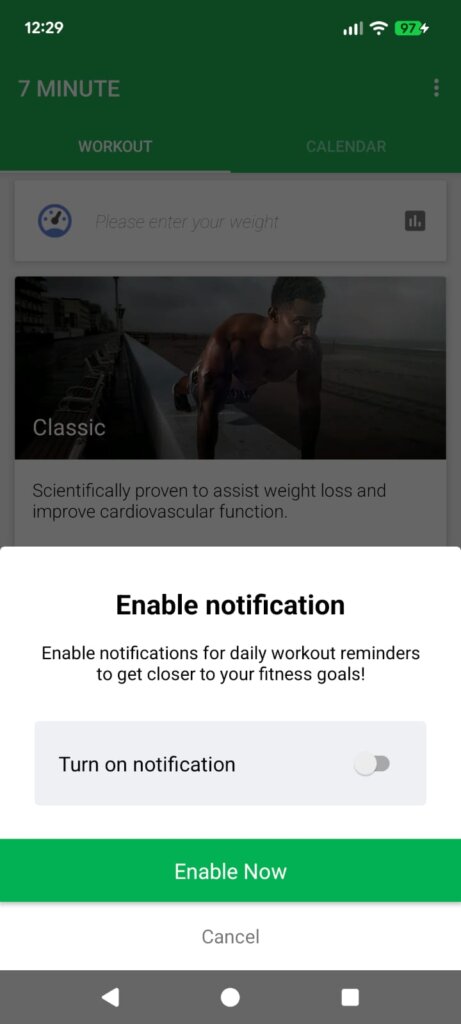
I kept my usual multitasking routines active, keeping messaging apps, email clients, and music players open in the background. I alternated between my home Wi-Fi network and my local 5G mobile data network while moving around to see if the app requires a constant, high-speed internet connection to load its workout animations and voice prompts.
🎬 Real-World Hands-On Analysis
Morning Routine Push
On my first morning of testing, I opened the app right after waking up to try the classic full-body circuit before getting ready for work. The app interface loaded quickly, and I was able to jump straight into the first jumping jack exercise without clicking through a dozen menu layers. The voice coach accurately counted down my remaining seconds while I worked through the movements on my bedroom floor, allowing me to focus entirely on my posture instead of staring constantly at my phone screen.
Mid-Day Office Break
During my lunch break on day two, I wanted to see if I could complete a quick core routine right next to my office desk without attracting too much attention. I selected the targeted flat stomach routine, which uses basic bodyweight movements like planks and abdominal crunches that do not require any extra gym equipment. The application managed the transitions smoothly, giving me exactly ten seconds to rest and shift my position between each exercise segment without lagging or freezing mid-circuit.
Late Night Decompression
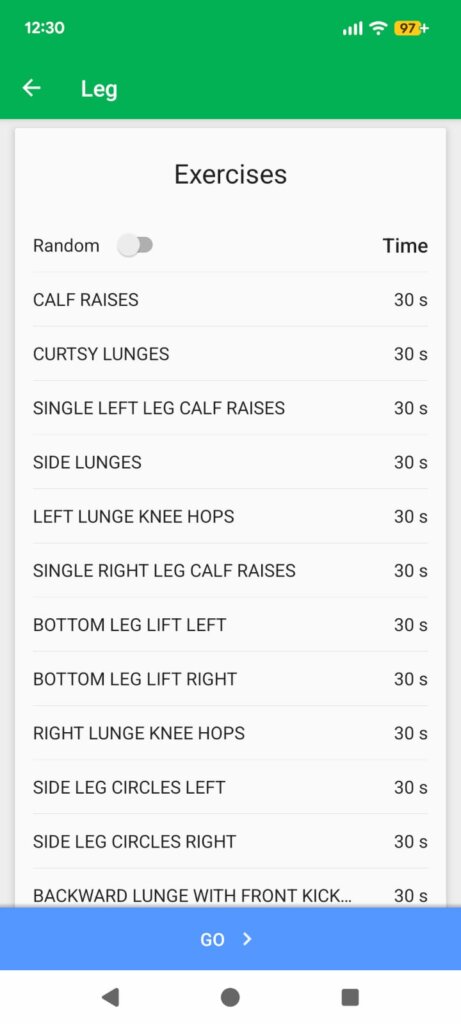
Before going to sleep on my second night, I decided to test the stretching and recovery session to see how well the app handles slow-paced, relaxing routines. I muted the loud audio prompts and relied strictly on the visual countdown timer displayed on the screen while going through simple leg stretches. The app interface stayed completely active without dimming my phone screen or turning off prematurely, which let me finish the full stretching routine without having to constantly tap the display to keep it awake.
📊 App Permissions & Device Safety
When installing any new fitness tool, I always pay close attention to the hardware access requests that pop up on my device screen. During my two days of hands-on use, this application kept its permission requests very minimal, which was a pleasant surprise compared to other fitness tools that want access to everything on your device.
| Permission Type | Required? | True Technical Purpose |
| Storage & Device Media | Optional | During my testing window, the app did not explicitly force storage access, though it can use standard storage folders if you save custom workout logs locally. |
| Microphone & Audio Core | No | The app did not request microphone access at any point, as it relies entirely on one-way voice coaching and visual guides. |
| Camera Hardware Access | No | I did not receive any camera prompt on my screen since the workout routines use pre-made animated guides rather than live video tracking. |
| Network & Wireless Access | Yes | It requested standard network access during my testing window to load the initial workout layouts and sync optional data paths like Google Fit. |
| Location & Proximity Flags | Optional | The app did not show a location request prompt on my screen during my setup, though the store notes that it may use location data for basic region-based configurations. |
📊 Speed & Everyday Performance
I found the overall operation of the app to be highly consistent during my daily usage. The application moves from the main menu to the active exercise tracking screen without any jarring stuttering or lag spikes.
| Performance Test | My Real-World Observation |
| Initial Download & Install Time | Under a few seconds on a standard home Wi-Fi connection. |
| First Open & Setup Speed | Under 10 seconds, bypassing long intro videos or heavy configuration menus. |
| Menu Smoothness & Scrolling | Fluid scrolling when browsing through the 28-day challenge options. |
| Memory Load & Slowdowns | Lightweight on background apps; my phone did not close my open social apps while the workout ran. |
| Battery Drain While Active | Low battery drain during a standard 7-minute circuit session. |
| Phone Warmth & Heating | Remains completely cool to the touch even when running the animation loops. |
| Background Behavior Upon Exit | Pauses cleanly when I press the home button, holding my spot in the workout circuit. |
| Stability & Bug Resilience | Completely stable across my 2 days of routine testing without a single crash. |
💾 Storage Space & Cache Build-Up
Before downloading the app, I checked the exact storage parameters to see how it would affect my phone memory. The initial download package listed on the store is exactly 24.13 MB, making it an extremely small download that will not eat up your monthly data plan. After installation was completed and the core configuration layers were applied to my device, the total space occupied in my system settings menu read exactly 56.42 MB.
Over my two days of regular use, I checked the app info menu to see if the temporary cache was filling up with unnecessary files. The cache build-up was very small, growing by only a few kilobytes after loading several exercise animations. Because the application handles its data files efficiently without saving heavy video clips to your local disk, you do not need to clear it out manually through your phone settings menu on a regular basis. It is perfectly fine to let the app run without worrying about your available storage space shrinking over time.
🔋 Battery Life & Daily Warmth
During my active screen-on testing windows, I kept a close eye on how the application affected my battery life. Running a standard seven-minute circuit consumes a very small amount of energy, mostly because the screen remains on to show the countdown timer and the basic movement illustrations. I noticed that my battery percentage dropped by only about two percent during a full routine, which means you can easily squeeze in a workout even if your phone is running low on power at the end of the day.
When my phone was sitting on my desk in standby mode, the application remained quiet and did not trigger any unusual battery consumption in the background. The processor area near the top camera module on my phone stayed completely cool to the touch, even when I extended my workout session by repeating the circuit three times in a row. There are no intense background processes causing the phone to throttle or warm up during extended exercise sessions.
tipzoom.in Quick Tip: To save even more battery while working out, turn down your screen brightness slightly before starting a circuit, as keeping the display constantly awake for seven minutes straight is the main source of battery drain.
🌐 Network Needs & Data Usage
I wanted to find out if this fitness application could function properly when you are away from an internet connection, such as during an outdoor park workout or inside a concrete basement room. Here is what I observed regarding its network dependency:
- Initial Setup Access Cost: The app requires an active internet connection when you first open it to load the main catalog of challenges and register your basic workout goals.
- Daily Usage Data Footprint: The data consumption during a standard session is incredibly low, as it only exchanges tiny bits of text data to track your daily calendar progress.
- Additional Asset Downloads: The application runs completely from the base package that you download from the store, meaning it won’t surprise you with massive background downloads for new exercise packages later on.
- Offline Support: During my testing, the core 7-minute workout timer and the primary exercise illustrations functioned properly without a Wi-Fi or mobile data connection, though you do lose the ability to sync your progress to external accounts like Google Fit while offline.
🛡️ Monetization & User Security Review
According to the app’s Play Store Data Safety section, the developer states that no user data is shared with third parties, which provides a nice bit of peace of mind when setting up your routine. Since no account registration is strictly forced upon you when you first open the app, you do not need to provide your private email address, name, or phone number just to access the basic timers. This guest-friendly approach makes it simple to protect your basic identity details while still getting full access to the daily fitness calendar.
The monetization approach relies primarily on standard programmatic ads that show up between your exercise segments. While using the app, I encountered occasional full-screen pop-up ads when ending a workout circuit or shifting between major menu sections. Thankfully, these ads did not interrupt the active countdown timer while I was in the middle of doing push-ups or squats. There is also a premium layer that unlocks extra workout variations and advanced tracking metrics, but the free tier remains highly usable if you just want a standard daily fitness reminder.
🛠️ Mistakes I Noticed During Testing
While my overall experience was positive, I did encounter three specific layout mistakes and design flaws during my two days of regular use:
- Text Layout Clipping: When I changed my phone’s system font size to the large setting in my HyperOS accessibility menu, the text labels describing the exercise instructions clipped into the lower edge of the countdown timer, making it hard to read how many seconds were left.
- Audio Prompt Interruption: If a standard text notification arrived on my phone while the voice coach was counting down the last three seconds of a rest break, the app audio would occasionally cut out entirely, forcing me to watch the screen visually to know when to start the next movement.
- Confusing Navigation Loops: When clicking on the button to view my weekly history logs from the main dashboard, tapping the hardware back button did not return me to the home menu; instead, it kept reloading the same calendar grid until I manually tapped the home icon at the bottom of the display.
✨ Main Features Explained
- High-Intensity 7-Minute HIIT Training: The core engine of the application provides a fast circuit of 12 bodyweight exercises performed for 30 seconds each, separated by 10-second rest windows. This rapid pacing keeps your heart rate up without requiring an hour-long commitment.
- Voice and Video Guidance: Every exercise in the circuit is accompanied by a clear animated character guide and a voice coach that calls out when to start and stop. This means you can keep your phone on the floor next to you and still follow along perfectly.
- 28-Day and 30-Day Challenges: The software includes structured multi-week fitness calendars designed to help you build a consistent daily exercise habit over time. It marks off your completed days automatically so you can see your consistency streak growing.
- Adjustable Circuit Timers: Through the settings menu, you can customize the length of your exercise windows and rest breaks to match your personal fitness level. If 30 seconds feels too intense, you can easily dial it back to a more manageable pace.
- Targeted Muscle Groups: Beyond the general full-body routine, the app offers specific sub-routines focused purely on core strength, leg toning, or upper body movements. This allows you to mix up your routines depending on what parts of your body feel sore.
⚖️ Pros & Cons
What I Liked
- Zero Equipment Required: Every single movement inside the core challenge relies entirely on your own body weight, meaning you never have to purchase expensive dumbbells or resistance bands.
- Minimal Storage Footprint: At under 60 MB of total post-installation space, this app is perfect for older phones or devices running low on internal memory.
- No Mandatory Account Sign-up: You can open the application and start your first workout circuit in under a minute without giving away your personal email address.
What Could Be Better
- Frequent Ad Pop-ups: The free version triggers full-screen video ads immediately after you finish an exhausting circuit, which can ruin your post-workout cool-down.
- Limited Custom Playlists: You cannot easily combine multiple different sub-routines into one single continuous workout session without manually starting each one separately.
- Feedback Limits: The app only allows very basic post-workout feedback options, making it hard to track exactly why a particular exercise felt too difficult for your joints.
⚔️ Industry Comparison
When looking at the broader market, finding the right online fitness coaching platform or home workout tracking software can significantly change your routine. Here is how this specific application stacks up against major alternatives:
| App Name | Interface Layout Style | Primary Feature Advantage | Pricing Structure |
| 7 Minute Workout (Review Target) | Clean tab layout with simple animated characters. | Extremely lightweight storage usage and fast setup times. | Free with ads; optional premium unlock. |
| Seven – 7 Minute Workout | Modern gamified design with avatars and achievement badges. | Strong community competition and social sharing elements. | Heavily restricted free tier; relies on ongoing subscriptions. |
| 7 Minute Daily Workout | Minimalist dark mode layout with standard list views. | Allows for deep customization of specific rest intervals. | One-time small payment option to remove ads permanently. |
| J&J Official 7 Minute Workout | Corporate, clinical look with real human video demonstrations. | Workouts designed by professional fitness instructors. | Completely free without ad interruptions. |
👥 Audience Recommendations
Who Should Install It?
- Busy Professionals: If you only have ten minutes of free time between office meetings or household tasks, this application provides an easy way to stay active.
- Owners of Older Devices: The incredibly small system space requirement and low memory footprint make it an excellent choice for budget phones with limited storage.
- Fitness Beginners: The simple movements, clear character animations, and adjustable timers provide an approachable entry point for anyone searching for how to lose weight fast or how to start a home exercise routine.
Who Should Skip It?
- Advanced Athletes: If you already lift heavy weights regularly or require complex high-intensity gym training, these simple bodyweight movements will likely feel too basic for your needs.
- Ad-Averse Users: Those who absolutely detest seeing full-screen pop-up ads right after finishing an exercise session will find the free version frustrating.
- People with Severe Mobility Limits: If you have severe joint issues or require specialized chair-based exercises, the standard circuits might include too many high-impact movements like jumping jacks.
❓ Common FAQs
Can I use this application completely without an internet connection?
Yes, the core seven-minute workout timer and the exercise movement animations are saved directly inside the initial download package, allowing you to complete your daily routine while offline. However, you will need a connection if you want to sync your weekly workout data to external health accounts like Google Fit.
Does the application require me to buy any extra home gym equipment?
No, all of the standard routines in the main challenges are built entirely around bodyweight movements. The only external items you might occasionally need are a standard room wall and a sturdy house chair to complete movements like wall sits and tricep dips.
Is there a way to adjust the duration of the individual exercises if they are too difficult?
Yes, you can navigate to the built-in settings panel to easily adjust both the active exercise circuit time and the length of your rest breaks. This allows you to lengthen your rest windows if you find yourself running out of breath too quickly between movements.
## Official Store Access
Tipzoom.in is an independent review website that provides unbiased analysis of mobile applications; we are not affiliated with the developers mentioned in this article. You can access the official distribution pages for this software through the marketplace options listed below:
- Google Play Store: 7 Minute Workout
🏆 The tipzoom.in Final Verdict
The 7 Minute Workout app by WorkoutInc is an excellent, low-maintenance choice for anyone who wants to remove the usual friction of starting a daily fitness habit. Its tiny storage footprint, quick loading speeds, and straightforward interface make it incredibly easy to open and complete a routine during a short lunch break or right after waking up. While the post-workout ad pop-ups in the free tier can be annoying, the fact that it doesn’t force you to sign up for an account makes it a highly accessible option for casual home fitness.
⭐ Final Scorecard
Overall tipzoom.in Score: 4.3 / 5
Ease of Use [4.5/5]: The interface allows you to start an active workout session in seconds without clearing complex configuration hurdles.
Speed & Performance [4.8/5]: The application runs smoothly on mid-range hardware and loads its animation modules without any annoying lag spikes.
Features [4.0/5]: Includes a solid variety of multi-week challenges and adjustable timers, though it lacks deep playlist customization tools.
Privacy & Safety [4.2/5]: It does not require any personal email registration to use, and its hardware permission requests are kept remarkably low.
Value for Money [4.0/5]: The free tier offers full utility for daily training, making it highly valuable despite the regular commercial interruptions.