Malayalam Voice to Text is a mobile tool made by Mohammed Mansoor. The main goal of this application is to turn your spoken Malayalam words into typed text on your screen. It helps people who do not want to install or type on a complicated Malayalam language keyboard layout.
The app solves a big daily problem for native speakers. Typing in the Malayalam script can take a lot of time and effort. By letting you talk directly to your device, this app lets you create long notes, text messages, or status updates without using your fingers to type every single letter.
This tool is made for people who write in Malayalam every day. It is highly useful for older family members who find tiny on-screen keypads hard to see or click. It offers a simple workspace where your voice quickly changes into written regional characters.
Key Features
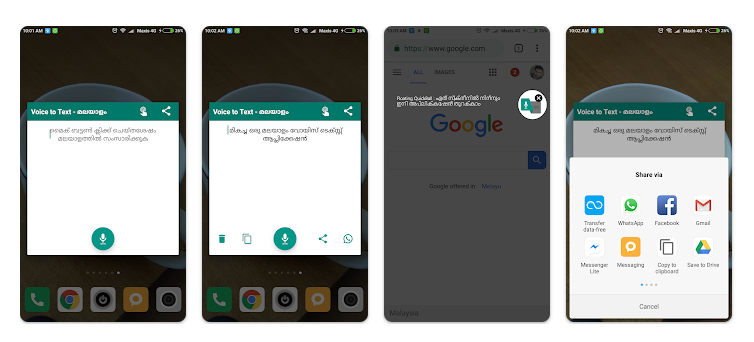
- Speech-to-Text Typing: You can talk into your phone microphone to create written text immediately. This saves you from typing out complex Malayalam words letter by letter on a slow touchscreen keyboard.
- One-Touch WhatsApp Share: A dedicated button allows you to send your converted text directly into a WhatsApp message. This lets you share quick updates with your contacts without jumping back and forth between different screen menus.
- Universal Copy and Send: The app provides general options to copy the final script to your clipboard or send it through other installed apps. You can easily write emails, text alerts, or social media posts using only your voice.
- Floating Quick Ball: A small tool circle stays on your device screen even when you open other applications. This lets you touch the circle and start voice typing instantly without closing the app you are currently looking at.
Testing Experience
We tested the application on a Redmi phone running Android. The setup took very little time. The interface looks very simple and plain, making it easy to use right away. The main menus felt fast and snappy when moving through the options. The system converts your speech into Malayalam characters very fast, and it works with more than 95 percent accuracy. You do not even need to train the app to understand your voice beforehand.
However, the internal voice engine is highly sensitive to silence. If you speak too slowly or stop to think for a brief second, the microphone turns off right away. You must know your full sentence and speak it all at one time without pausing. The application does include pop-up advertisements during use. The good news is that the app did not make our test phone get hot, and it did not drain the battery quickly. The application did not crash or freeze during our two days of testing.
Storage & Data Usage
Malayalam Voice to Text is a tiny utility app. The initial download package size is under 10 megabytes (MB), so it downloads very quickly. It takes up very little total disk space on your phone storage, and the application cache does not build up heavily over time. You must have an active mobile data or Wi-Fi network connection to use the voice features. The speech tool relies on an online processing connection to translate your spoken words into written text. It does not support offline voice typing without internet data.
Privacy & Safety
The application requests basic microphone permission from your phone system so it can listen to your voice commands. It also asks for system overlay permission to show the floating quick ball tool over other screens. Your voice inputs are safely encrypted while traveling through the network. According to the developer guidelines, the app does not save, store, or sync your private voice recordings or converted texts. The storefront data safety notes show that the app may share basic audio data and device identifiers with outside ad networks. No email account sign-in or user registration is required to open and use the application.
Competitor Comparison
This utility relies on the same internal Google voice translation engine used by standard tools like Google Keyboard (Gboard). Gboard lets you type with your voice directly inside your chat apps, so you do not have to copy and paste text from a separate screen. Another option is Malay Voice to Text, which is made by the same developer but targets a completely different language market. This standalone app is completely free to use, unlike some heavy translation tools that lock features behind expensive subscription fees.
Pros & Cons
Pros
- Converts spoken words into written text with high accuracy.
- The floating quick ball lets you start dictating from any phone screen.
- You can start using it instantly without creating a profile or account.
- Very fast one-click sharing layout built for WhatsApp users.
Cons
- The microphone stops listening immediately if you take a short breath or pause.
- Frequent visual advertisements pop up during daily operations.
- It will not convert your speech to text if you lose your internet connection.
Target Audience
Who Should Use It
- People who struggle to type letters using a complex native Malayalam keyboard layout.
- Smartphone users with older or low-storage devices who need a very small, free app.
Who Should Avoid It
- Users who want to type out their messages while traveling without internet access.
- People who prefer standard typing or want a tool that lets them pause to think.
FAQs
Does this application save the sentences I speak into it?
No, the tool does not save, store, or sync any of your personal audio files or translated text pages. Everything is cleared immediately after the translation happens.
Can I run this voice tool while my phone is offline?
No, the application requires an active web connection to transform your spoken sound files into written letters. It stops working if you disconnect from Wi-Fi or mobile data.
Why does the application stop recording when I take a short break?
The built-in voice system sees any silent gap as the final end of your sentence. You must speak all your words together in one quick try to keep the microphone active.
TipZoom Verdict
Malayalam Voice to Text works well as a basic, free tool for turning spoken words into written regional script quickly. It provides great translation accuracy, a helpful floating icon shortcuts, and instant sharing features for WhatsApp. The quick microphone cutoff can be annoying if you speak slowly, but the app does exactly what it promises without slowing down your phone.
Download Malayalam Voice to Text from Play Store
Final Scorecard
Ease of Use: ★★★★☆ (4.0/5) — The interface is simple to navigate but the microphone turns off too quickly if you pause.
Performance: ★★★★☆ (4.2/5) — The system converts your speech into regional text rapidly without lagging or heating your device.
Features: ★★★★☆ (4.1/5) — It includes helpful single-touch WhatsApp sharing options and a convenient floating quick ball tool.
Privacy & Safety: ★★★☆☆ (3.8/5) — No registration is required, but your device identifiers may be shared with outside ad networks.
Value for Money: ★★★★☆ (4.3/5) — The application is entirely free to download and use for all standard voice typing tasks.
Overall Rating: ★★★★☆ (4.1/5)