DiskDigger is a mobile app made by Defiant Technologies. The main goal of this application is to scan your phone storage or SD memory card to find and bring back deleted photos or videos. It serves as a quick first-step tool for people who accidentally wiped important family pictures or media files from their device.
The application fixes a common everyday problem. Losing an important photo by mistake can cause a lot of worry. By installing this utility, you get a simple workspace to search your internal phone blocks for files that were recently erased before new data writes over them.
This tool is designed for standard smartphone owners who need a direct way to search for lost pictures without using a computer setup. It offers a very clear layout that lets you start checking your device memory paths right after you open it.
Key Features
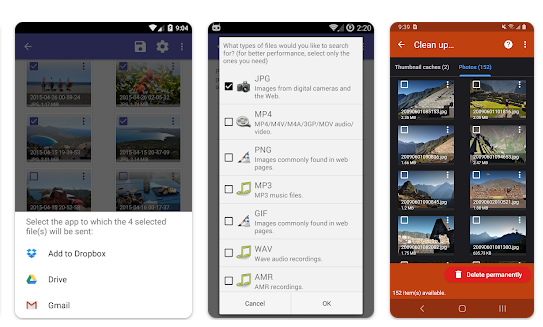
- Basic Scan: This option runs on non-rooted Android phones to search through your active databases, thumbnail caches, and existing folders for pictures.
- Full Deep Scan: A special option for rooted phones that searches every single corner of your phone memory blocks for traces of lost media files.
- File Preview Screen: The tool displays all the found pictures as small images before you restore them, letting you choose exactly what you want to save.
- Flexible Saving Tools: You can save your recovered files straight to another local folder on your device, email them to yourself, or upload them to cloud systems like Google Drive or Dropbox.
- Space Wipe Tool: It features built-in cleanup utilities to permanently erase unwanted images or wipe your free space so deleted files cannot be recovered by anyone else.
Testing Experience
We tested the application on an Android device to check how it performs during a normal recovery task. The setup window is straightforward and easy to navigate without any confusing menus. The basic scan starts moving immediately and loads the first batch of images on the screen in under ten seconds. The interface switches between files quickly, and the preview boxes display found images clearly.
However, the scanning progress can cause mild stutters on your screen if your storage drive holds thousands of files. When running the basic scan on a standard, non-rooted phone, the app often finds thumbnails and lower-resolution preview images instead of the full-size original files. The process also causes moderate battery drain and makes the back of the phone feel warm to the touch because it reads heavy storage paths continuously. The application remained stable during our trial window and did not freeze or shut down unexpectedly.
Storage & Data Usage
DiskDigger is a small and lightweight utility tool. The initial download file takes up very little space, and the app installs on your device in about one minute. It accumulates minimal cache space on your drive during operation. The application works completely offline for the basic search phase, meaning you do not need mobile data or a Wi-Fi link to scan your local folders. You only need an internet connection if you choose to upload your recovered photos directly to cloud apps or send them out via email.
Privacy & Safety
The application requests the “Access all files” permission from your phone system, which is standard for file management and recovery utilities to read internal folders. It does not require any account registration, email sign-in, or personal profile creation to function. According to storefront data safety sheets, the tool uses secure network encryption, and the developer states that no user data is shared with outside companies. The free app version includes minor advertisements at the bottom of the workspace, but they do not block your view or interrupt the main button taps.
Competitor Comparison
This software focuses strictly on local device scans with a highly simplified interface. In comparison, Wondershare Dr.Fone works as a heavier alternative platform that offers broad data recovery features alongside device repair tools. Another option, Stellar Photo Recovery, requires you to connect your phone or SD card to a computer to execute deep sector scans, which delivers higher recovery rates for broken files but demands extra hardware. Unlike many complex recovery tools, DiskDigger provides its core photo lookup tools entirely for free without hidden paywalls.
Pros & Cons
Pros
- Very fast basic scanning speed that pulls up image previews under ten seconds.
- Useful built-in tools to securely wipe free space and clean up phone storage.
- Works without needing an internet connection or creating a user account.
- Clear preview screen lets you select individual items easily before saving.
Cons
- Non-rooted devices usually get low-resolution thumbnails instead of original full-size files.
- Heavy scanning tasks increase device temperature and use battery quickly.
- Cannot recover files that have already been completely overwritten by new phone logs.
Target Audience
Who Should Use It
- People who just deleted a photo by mistake and want a free, immediate way to search their local device memory.
- Users with basic non-rooted or rooted phones who prefer a lightweight utility that opens instantly.
Who Should Avoid It
- Smartphone owners who need to restore non-media documents or complex files using the free version.
- People dealing with physically cracked SD cards or severe memory corruption issues that require professional computer labs.
FAQs
Can the free version of this app recover videos and documents too?
The free basic scan searches mainly for photos and videos, while you will need the Pro version to lookup other non-media document formats.
Why do my recovered pictures look blurry or small?
If your phone is not rooted, the app can only access your thumbnail cache folders, which store smaller, lower-quality copies of your original files.
Can I restore files if I factory reset my entire smartphone?
No, a full device reset wipes the storage blocks and writes new data over them, making it nearly impossible for a basic local app to find the old data.
TipZoom Verdict
DiskDigger works well as a fast, accessible first-aid tool for finding recently deleted photos on your Android phone. It provides a simple, account-free setup and reliable local scanning features that cost no money. While non-rooted users will mostly recover lower-quality thumbnails rather than full-resolution photos, it remains a highly practical and safe choice to try before moving to complex computer software.
Download DiskDigger from Play Store
Final Scorecard
Ease of Use: ★★★★☆ (4.3/5) — The layout is highly straightforward, allowing you to start a scan with a single tap on the main screen.
Performance: ★★★★☆ (4.0/5) — The app finds cache images very fast, though deep scanning causes the phone to warm up and uses battery.
Features: ★★★★☆ (4.1/5) — It offers useful file preview layout grids, multiple cloud upload destinations, and free space wiping tools.
Privacy & Safety: ★★★★☆ (4.2/5) — No personal profile sign-up is required, and your scanned internal data is not shared with outside companies.
Value for Money: ★★★★☆ (4.5/5) — The core photo search utility is completely free to use, offering great practical value for quick rescues.
Overall Rating: ★★★★☆ (4.2/5)