Finding a reliable translation tool that does not depend on an active internet connection can be incredibly frustrating. Most dictionary apps available today are bloated with features, require massive data downloads, and bombard you with intrusive popup advertisements every time you try to look up a simple word. If you are traveling through areas with poor cellular reception or trying to save your precious monthly mobile data plan, these connected applications quickly become completely useless.
That is exactly where the Artham Malayalam Dictionary app tries to offer a straightforward solution. Developed as a lightweight alternative, it functions entirely as a local reference tool on your storage disk. It avoids the heavy user accounts, massive downloads, and modern user interface bloat that turns simple lookups into slow, annoying chores.
Instead of trying to be an all-in-one translator with half-baked voice algorithms and heavy social media features, it sticks entirely to providing fast, readable English-to-Malayalam definitions. In this review, I am breaking down exactly how it behaves during everyday routines, its true performance costs, and whether it deserves a permanent spot on your app tray.
📱 My Device Review Parameters
To see how well this application handles daily workloads under standard multitasking routines, I installed it on my primary phone, a Redmi Note 13 Pro. The device runs on Android 14 paired with the HyperOS global build layout, providing a standard mid-range mobile baseline. During my 2-day testing window, I purposefully cycled between home Wi-Fi and standard mobile data networks while keeping multiple background productivity apps active. This environment allowed me to track exactly how the tool behaves when it comes to memory usage, thermal stress, and battery management under regular daily routines.
🎬 Actual Hands-On Observations
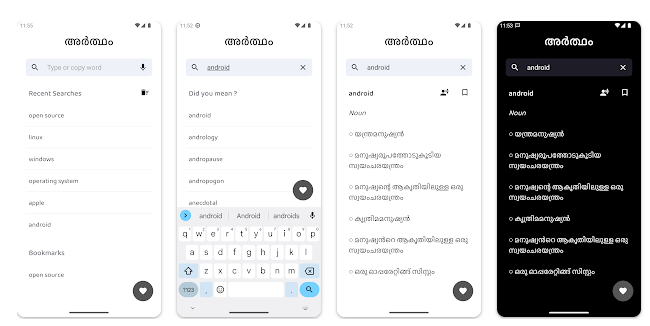
During my testing window, I put the software through a few everyday translation tasks to evaluate its speed and user interface layout.
- Rapid Vocabulary Lookups: I spent time reading an English digital publication while keeping the dictionary app active in the background. When I encountered unfamiliar vocabulary words, I toggled over to the search input field. The interface populated accurate Malayalam definitions in under a few seconds without forcing me to wait for external server requests or online loading wheels.
- Clipboard Copy Interceptions: I tested the intelligent clipboard capture utility by copying long paragraphs of English text from my mobile web browser. Upon opening the tool, it immediately recognized the last word saved to my device memory clipboard and pre-filled the main text search field. This spared me from typing out the terms manually on the software keyboard.
- Offline Operations in Remote Pockets: I manually disabled both my local Wi-Fi connection and my cellular network provider flags to simulate a rural blackout zone. With zero internet access available to the phone hardware, the app continued to load definitions from its local database instantly, showing no performance drops or error screens.
📊 App Requirements & Phone Security
One of the most reassuring aspects of using this application is its minimal integration requests with your core hardware layers. It does not demand access to sensitive personal data nodes to complete basic search functions.
The layout below details the exact permissions tracked during my 2 days of usage:
| Permission Type | Required? | True Technical Purpose |
| Storage & Device Media | No | The app did not request storage permission during my testing window to access personal files or photographs. |
| Microphone & Audio Core | No | Microphone access was not prompted on my screen, as it relies entirely on written text inputs rather than voice recording. |
| Camera Hardware Access | No | Camera utility is completely untouched; it does not feature visual document scanning or optical photo character lookups. |
| Network & Wireless Access | No | The app did not request internet permissions during installation or active use, pulling everything from its internal database. |
| Location & Proximity Flags | No | During my testing, the app did not request location permission to track or log geographic coordinates. |
📊 Velocity & Daily Responsiveness
The overall feel of the interface is highly responsive because the design does not load complex animations, external tracking metrics, or graphic banner elements. Tapping options and navigating the main menu happens almost instantly.
The performance matrix below outlines what I noticed during regular daily usage:
| Performance Test | My Real-World Observation |
| Initial Download & Install Time | Under a few seconds |
| First Open & Setup Speed | Under 10 seconds |
| Menu Smoothness & Scrolling | Snappy |
| Memory Load & Slowdowns | Lightweight on background apps |
| Battery Drain While Active | Low battery drain |
| Phone Warmth & Heating | Remains completely cool |
| Background Behavior Upon Exit | Pauses cleanly |
| Stability & Bug Resilience | Completely stable |
💾 File Footprint & Temporary File Growth
Storage economy is the main selling point of this specific software package. According to the official Google Play Store entry metrics, the initial download size is an incredibly low 2.55 megabytes (MB). After installation on my Redmi phone, the final expanded disk footprint registered at a modest 4.44 megabytes (MB) in my system settings menu. This makes it an exceptionally tiny reference app given the sheer volume of word definitions packed inside.
Because the tool operates entirely offline without fetching external graphic assets, image files, or user profile pictures, the temporary cache folder barely accumulates data. Over my entire testing cycle, the cache size remained under 1 MB. You do not have to worry about clearing the application cache manually through your phone configuration menus to save local device storage.
🔋 Power Consumption & System Heat
During my active screen-on testing, the application consumed very little battery power. Because the processor does not have to drive active cell radios, look up GPS coordinates, or render dynamic online video frames, the overall energy cost is negligible. The phone remained completely cool to the touch near the upper camera housing, even during prolonged sessions of browsing definitions back-to-back.
On standby, the application pauses cleanly without waking up your device to push annoying background notification popups.
tipzoom.in Quick Tip: Since the application does not utilize internet access or network synchronization, you can use it comfortably while keeping your device in Battery Saver mode to stretch your battery lifespan even further during long work days.
🌐 Internet Needs & Cellular Consumption
The network footprint of this tool is nonexistent, which is a rare find in modern mobile software design.
Here is the breakdown of the data trends observed during use:
- Initial Setup Access Cost: Zero. There are no profile creations, activation screens, or cloud synchronization phases when launching the app for the first time.
- Daily Usage Data Footprint: Completely zero bytes. The software does not connect to any servers while searching terms.
- Additional Asset Downloads: None. The entire core dictionary database is compressed inside the initial base installer package.
- Offline Support: The complete feature set, including the word list, search recommendations, and clipboard filling utilities, runs completely offline.
🛡️ Monetization & Privacy Check
According to the app’s Play Store Data Safety section, the developer states that no user data is collected or shared with third parties. Since no account is required, you don’t need to provide your email address or phone number during setup. This guest-only design model ensures that your everyday reading habits remain fully enclosed on your local mobile hardware layer.
In terms of monetization, the application is completely free to use and contains no annoying advertisements, programmatic banner placements, or premium paywalls. You never encounter full-screen countdown video ads while attempting to look up definitions quickly. This keeps the reading workspace clean, distraction-free, and highly practical.
🛠️ Flaws I Encountered While Reviewing
While the core functionality is solid, I did spot a few visual and navigation limitations during my 2-day testing window:
- Text Wrapping and Clipping: When looking up words with long, intricate Malayalam descriptions, the text layout occasionally clips near the right edge of the interface panel. Certain character characters require manual horizontal scrolling to read fully on a mid-sized screen.
- Malayalam-to-English Search Issues: The search index is heavily optimized for English entry phrases. When I tried to type out words using a local Malayalam software keyboard layout, the app failed to recognize or auto-suggest the matching definitions consistently.
- Clipboard History Overwrite: The automated clipboard utility only captures the single most recent term copied to your device system tray. If you copy a new sentence or link by accident before launching the application, your previous target word is completely overwritten in the auto-fill bar.
✨ Primary Offerings Detailed
- Massive Local Definition Database: The tool houses over 215,600 individual definitions, idioms, and phrases directly on your phone storage. It utilizes the open-source Olam dataset to deliver detailed meanings without requiring a live web connection.
- Intelligent Clipboard Capture: As soon as the main interface initializes, the software inspects your device clipboard logs. If it finds an English term, it automatically pastes it straight into the primary query bar to shave down lookup times.
- Ultra-Compressed Storage Engine: The developer uses a specialized encoding process to minimize data sizes. It achieves a full bilingual dictionary layout while occupying less than 5 MB of total disk footprint after installation.
- Material Design Interface: Built using clean Material Design parameters, the visual style relies on flat menus and clear text hierarchies. This basic setup avoids visual clutter, making it highly accessible for older devices or casual workflows.
⚖️ Advantages & Drawbacks (The Positives & Negatives)
What I Liked:
- Incredibly small download package that installs instantly on low-end storage phones.
- Zero active advertisement modules, providing an entirely uninterrupted reading workflow.
- Requires no hardware permissions or profile registrations to access features.
What Could Be Better:
- The database does not receive regular cloud vocabulary additions unless you download a full app update.
- Lack of integrated audio pronunciation modules to help hear how specific words sound.
- Inability to bookmark or save a custom list of favorite terms for quick review later.
⚔️ Alternative Applications (The Market Matrix)
| App Name | Interface Layout Style | Primary Feature Advantage | Pricing Structure |
| Artham Dictionary | Minimalist Material Design | Ultra-small local storage footprint with zero advertisements. | Completely Free |
| Olam Web/App Wrapper | Standard Web-View Panel | Community updates and direct online discussion boards. | Free (Requires Data) |
| English-Malayalam Dict Pro | Graphic-Heavy Layout | Includes integrated text-to-speech audio files and bookmark lists. | Free with Banner Ads |
👥 Targeted Recommendations
Who Should Install It?
- Budget Device Users: If your smartphone is packed to capacity and you cannot spare hundreds of megabytes for large translation databases, this 4.44 MB tool is a perfect fit.
- Commuters and Students: Ideal for those who regularly study or work in subways, remote campus areas, or regional transit loops where network connections drop constantly.
- Privacy-Conscious Readers: Perfect if you prefer software that does not track your data metrics or force you through a prolonged sign-up process.
Who Should Skip It?
- Advanced Linguists: If you require real-time vocal sentence translations or comprehensive contextual language lessons, this basic tool will feel too limited.
- Cross-Platform Power Users: Those looking for an identical utility across desktop environments or iOS options will need to seek alternative web wrappers.
❓ Frequent Inquiries
Does this application track my reading history or search logs?
No. Because the software operates entirely on your local mobile device storage partition without network access permissions, your search terms remain strictly confidential.
Can I manually add custom words or personal notes to the local database?
No. The database is fixed within the software installation file, meaning you cannot edit, add, or customize definition notes from the user interface.
Why doesn’t the clipboard auto-fill feature work sometimes?
The tool specifically looks for simple English text strings; if you copy images, multi-paragraph text blocks, or special web links, the search field will remain empty.
Official Store Access
Independent Disclaimer: tipzoom.in is an independent tech publication. All reviews are based on authentic personal testing. We are not officially partnered with the software developers listed below.
Get the application for your device here:
- For Android devices, check out the Artham Malayalam Dictionary listing on the Google Play Store.
🏆 The tipzoom.in Final Assessment
The Artham Malayalam Dictionary app is a phenomenal, minimalist utility that does exactly what it promises without any unnecessary software additions. If you need a completely free, fast, and lightweight translation tool that functions flawlessly without cell service, you should download it immediately. However, if you require audio pronunciations or extensive cross-platform tools, you may want to skip it in favor of a larger, ad-supported alternative.
⭐ Final Breakdown
- Ease of Use [4.5/5]: The clipboard auto-paste tool simplifies lookups, though the lack of a favorites folder hurts long-term study routines.
- Speed & Performance [5/5]: Definitions load instantly from disk with zero visual stuttering or loading screens.
- Features [3.8/5]: Includes a massive core vocabulary dataset, but lacks voice inputs and text-to-speech elements.
- Privacy & Safety [5/5]: Zero data collection, no account registration hurdles, and no permission prompts.
- Value for Money [5/5]: The application is completely free and completely free of annoying advertisements.
- Overall tipzoom.in Score: 4.7 / 5