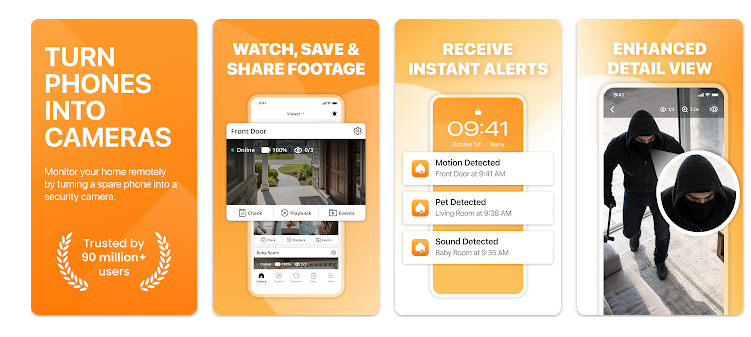
Alfred Home Camera – App to use old phones as CCTV

If you have an old Android smartphone gathering dust in a desk drawer, you are sitting on a surprisingly valuable piece of technology. Most of us upgrade our phones every few years, leaving behind perfectly working camera hardware and wireless components simply because the device feels too slow for daily multitasking. At the same time, purchasing a dedicated home security camera, baby monitor, or dedicated pet cam can become a costly investment. Traditional hardware setups often require complicated mounting, messy wiring, and expensive ongoing monthly subscription contracts just to access your own video archives.

This is exactly where AlfredCamera Home Security enters the equation. Designed to convert any spare mobile device into a fully functioning wireless surveillance camera, this utility aims to eliminate the need for expensive dedicated monitoring gear. By running the same application on both your current personal phone and your repurposed spare device, it creates a direct monitoring link across your network. I wanted to see if this app truly provides a reliable DIY security solution when running on low-end, outdated hardware, or if it presents too many performance hurdles and advertising interruptions to be genuinely useful.

📱 My Phone Testing Setup

To see how this video surveillance platform performs under the absolute limit of standard household conditions, I set up a local testing environment using a low-end, heavily outdated spare phone as my primary camera node. This camera device was a budget phone with only 2GB of RAM, running on an old Android 9 build with a slow quad-core processor. For the viewer dashboard, I used my everyday Redmi Note 13 Pro running on Android 14 with the HyperOS layout. I kept both devices connected to a combination of my home Wi-Fi network and a mobile data connection while testing the remote features. I monitored the setup closely across a 2-day testing window under regular daily routines, placing the low-end camera node in different rooms to observe the latency, alert performance, and general stability under a heavy hardware constraint.

🎬 Real-World Hands-On Analysis

Scenario 1: Setting Up the Low-End Living Room Camera Node

During my first afternoon of testing, I attempted to configure the low-end spare phone as a dedicated camera looking over my main living room entrance. The pairing process took a little longer due to the slower processor on the old phone, but I successfully scanned the presented pairing matrix screen. Once synced, I placed the old phone on a shelf and monitored the feed remotely from my Redmi Note 13 Pro while sitting at a local coffee shop down the street. The real-world video stream loaded within about nine seconds of tapping the monitor view, allowing me to check the room layout over my standard mobile data connection despite the weaker camera hardware.

Scenario 2: Testing the Motion Detection Alerts on Old Hardware

I wanted to see how quickly the app could process motion triggers when relying on an outdated phone’s limited processing power. I enabled the built-in smart intruder alert feature and walked past the active camera lens at a normal pace. Within around one minute, my primary Redmi phone received a push notification indicating motion had been detected. Tapping the alert opened a brief recorded clip of my movement, which was automatically saved to the cloud log. The notification system worked reliably during my 2 days of evaluation, catching every instance of someone walking through the room despite the camera node’s low system specs.

Scenario 3: Using the Walkie-Talkie Feature with Pets

On my second day of testing, I used the setup as a pet monitor while my dog was resting in the kitchen. I noticed him getting restless on the live feed, so I pressed and held the walkie-talkie button on my Redmi screen to speak down the line. Because the camera phone was low-end, there was a noticeable audio lag of around three seconds before my voice came out of the spare phone’s speaker, and the audio stuttered slightly at first. However, the sound was clear enough to catch my pet’s attention, and the transmission functioned adequately without completely dropping the live video feed.

📊 App Permissions & Device Safety

Because a home surveillance tool must record video, stream live audio, and transmit data across the internet, it naturally requires deep access to your phone’s hardware components. During my testing window, I checked the exact permissions requested by the application on my screen to ensure it aligned with its stated surveillance purposes.

Permission TypeRequired?True Technical Purpose
Storage & Device MediaYesIt requested this permission during my testing window to save manual recorded clips and locally cache video thumbnails on your disk.
Microphone & Audio CoreYesIt requested microphone access to capture ambient room sounds for the live stream and to power the two-way walkie-talkie feature.
Camera Hardware AccessYesIt requested full camera hardware access during my testing window because the spare device physically cannot stream video without it.
Network & Wireless AccessYesIt requested constant network access to stream the live video data to the cloud servers and load programmatic elements.
Location & Proximity FlagsOptionalIt requested location access during setup, which the developer states is used to automatically toggle the camera on or off based on your home proximity.

📊 Speed & Everyday Performance

The practical value of a security application relies heavily on how fast it loads the camera feeds and whether the monitoring screen remains stable during long active viewing windows, especially on older devices. I logged its performance metrics generally during regular daily use on my low-end configuration.

Performance TestMy Real-World Observation
Initial Download & Install TimeTakes a couple of minutes on the old low-end phone due to slower storage write speeds.
First Open & Setup SpeedNoticeable loading delay on the low-end device, taking around 1 minute to fully load the configuration menus.
Menu Smoothness & ScrollingOccasional stutters and jumps when navigating the settings on the old phone, though the viewer menu on the Redmi was snappy.
Memory Load & SlowdownsSlows phone down significantly on the low-end camera device, making it impossible to open other apps smoothly.
Battery Drain While ActiveUses battery heavily on the camera device when streaming live video, requiring a constant power plug.
Phone Warmth & HeatingThe low-end camera phone becomes noticeably warm to the touch after running a continuous live stream for over twenty minutes.
Background Behavior Upon ExitThe viewer app pauses cleanly, but the camera node intentionally remains active in the background to monitor alerts.
Stability & Bug ResilienceMostly stable, though the low-end camera device froze once during a long, continuous live-viewing session.

💾 Storage Space & Cache Build-Up

The base installation size of AlfredCamera on a modern device requires about 48 MB for the initial storefront download package. After complete installation and account setup on my low-end test device, the total storage space taken up on the disk measured around 118 MB. This compact installation size is a huge saving grace for older phones that typically suffer from very limited internal storage memory.

During my 2 days of evaluation, the app’s internal data storage did not blow up significantly because the bulk of the auto-recorded motion detection clips are stored directly on the developer’s cloud servers rather than your local phone memory. The local cache folder on the old phone only grew by about 8 MB, mostly filled with tiny image previews for the event log history. Because the app does not create large audio files or fill up your local disk with video files, you do not need to constantly clear out the cache manually to save device space.

🔋 Battery Life & Daily Warmth

When using the app as a mobile viewer to check in on your home, the battery wear on your main phone is relatively moderate and feels similar to watching a video on a standard streaming app. However, if you configure a low-end device to act as the camera node, the battery drain is incredibly intense. Running the camera sensor, microphone, and constant wireless video transmission simultaneously will completely drain an old, degraded smartphone battery in a matter of hours.

Because of this constant processing load on weak hardware, the low-end camera device experiences noticeable heating over long usage windows. The back of the device near the processor area stays warm as long as the camera sensor is actively monitoring the room. This makes it absolutely essential to keep the camera phone connected to a dedicated wall charger at all times to prevent it from shutting down unexpectedly due to a dead battery.

tipzoom.in Quick Tip: If you are leaving an old, low-end phone running as a permanent camera node, lower the display brightness to the absolute minimum setting or use the app’s built-in “Eco-Circle” screen blanking feature to reduce screen power and lower device warmth.

🌐 Network Needs & Data Usage

Streaming real-time video across the internet requires a stable network configuration. If you plan to monitor your home while using a capped cellular data plan, you must watch your consumption closely.

  • Initial Setup Access Cost: Requires an active internet connection to complete the profile account registration and link your two devices together via a secure QR scan.
  • Daily Usage Data Footprint: Active viewing sessions use a significant amount of data, consuming several megabytes per minute when streaming in standard resolution.
  • Additional Asset Downloads: The base package functions completely upon installation without forcing additional plugin files down the line.
  • Offline Support: This app cannot function completely offline; both the camera phone and the viewer phone must have active internet access via Wi-Fi or cellular networks to pass video data.

🛡️ Monetization & User Security Review

Account creation is mandatory before you can begin monitoring your home. Since an account is required, you must provide your email address or link a third-party profile during setup to establish the secure handshake between your two devices. According to the app’s Play Store Data Safety section, the developer states that the app may share specific data types with third parties, including app performance details and device identifiers, which are typically used for analytics and serving advertisements.

The monetization setup splits the user base into free and premium tiers. The free version gives you access to core live streaming, walkie-talkie communication, and motion alerts, but it includes programmatic inline banner ads and full-screen advertisement pop-ups. Furthermore, the free tier restricts your video quality to a lower resolution and limits your cloud storage duration. To unlock high-definition video feeds, digital zoom functions, ad-free viewing workspaces, and extended cloud tracking logs, the app presents a regular monthly subscription payment model.

🛠️ Mistakes I Noticed During Testing

  1. Resolution Downgrade in Free Mode: During my testing, the low-resolution video stream in the free tier made it quite difficult to read fine details or recognize small objects across a wide room, especially when lighting conditions changed.
  2. Sudden Disconnection Bugs: When my viewer phone shifted from my home Wi-Fi network to my mobile data network outside, the video feed regularly failed to transfer cleanly, forcing me to shut down the app completely and reopen it to re-establish the stream.
  3. Over-Sensitive Motion Triggering: The smart intruder alert was highly sensitive even on medium settings, triggering multiple false notifications for minor shadows and small dust particles floating past the camera lens.

✨ Main Features Explained

  • Dual-Device Synchronization: Converts any secondary smartphone into a camera node by scanning a simple pairing code, using your current device as the control viewer dashboard.
  • Real-Time Motion Alert Logs: Monitors the video feed locally and triggers an instant push notification to your primary phone whenever unexpected movement occurs in the frame.
  • Two-Way Walkie-Talkie Audio: Allows you to send live voice clips directly through the remote device speaker to interact with family members, talk to pets, or deter unexpected guests.
  • Low-Light Visibility Filter: Enhances the dark areas of the camera feed electronically to provide better visibility when monitoring a dark room or checking in during late hours.
  • Shared Trust Circles: Enables you to grant access privileges to family members or close friends so multiple people can monitor the same home security feed simultaneously.

⚖️ Pros & Cons (The Good & Bad)

What I Liked

  • Wipes out initial hardware expenses by turning completely unused old smartphones into functioning security gear.
  • The pairing matrix setup takes under two minutes and requires no complicated networking or IP configurations.
  • Cloud event storage means you can still view intruder clips even if someone physically takes the camera device.

What Could Be Better

  • The heavy inclusion of full-screen advertisements in the free tier slows down the monitoring workflow.
  • The video resolution is noticeably blurry unless you agree to pay for the premium monthly subscription plan.
  • It drains the camera node battery extremely fast, making a permanent wall plug mandatory for daily safety.

⚔️ Industry Comparison (The Competitor Matrix)

App NameInterface Layout StylePrimary Feature AdvantagePricing Structure
AlfredCameraClean dashboard layoutIncredibly fast pairing and robust automated cloud event recording logsFree with ads; monthly subscription for HD
IP WebcamTechnical configuration menuProvides a direct local network web stream without mandatory cloud loginsFree with basic layout; very lightweight
AtHome CameraProfessional security gridAdvanced facial recognition and multi-camera split monitoring optionsFree tier with heavy premium gates

👥 Audience Recommendations

Who Should Install It?

  • Resourceful Homeowners: Anyone who wants a quick, zero-cost security camera setup for an apartment or rental property without signing long tracking contracts.
  • Pet Owners: People who want to check in on their dogs or cats during work hours and need a quick voice fallback system to calm them down.
  • Budget-Conscious Users: Users who already own a functional spare smartphone and want to save money on traditional CCTV camera equipment.

Who Should Skip It?

  • High-Definition Surveillance Seekers: Anyone who needs crisp, professional-grade security footage to read license plates or small text from far away without paying a subscription.
  • Offline Security Purists: Users who prefer to keep all their home security video data restricted entirely to a local hard drive without using cloud transmission paths.

❓ Common FAQs

Can I run AlfredCamera if the spare phone has a cracked screen?

Yes, as long as the phone’s main rear camera lens is clean and the device can connect to your local Wi-Fi network, a broken front display will not prevent the app from streaming video.

Does the application support continuous 24/7 video recording to my phone?

The free tier is optimized to record short clips triggered exclusively by motion detection, while continuous looping video capabilities require upgrading to the premium service tier.

Can I connect multiple spare cameras to the same viewer account?

Yes, the control dashboard interface allows you to add multiple camera nodes under a single profile layout, making it easy to monitor different rooms simultaneously.

## Official Store Access

Independent Editorial Disclaimer: tipzoom.in is a completely independent technology review platform. We are not affiliated with the developers of this app, and the direct store choices provided below point exclusively to the official, verified application marketplaces.

🏆 The tipzoom.in Final Verdict

AlfredCamera Home Security offers an excellent, highly practical way to breathe new life into an old device while protecting your home on a budget. The setup process is remarkably simple, and the motion alert system delivers reliable notifications even when running on a low-end phone with weak specifications. While the free version is heavily held back by low-resolution video limits and frequent ad interruptions, it serves as a highly functional entry point for casual monitoring. If you need absolute high-definition video clarity, you might want to invest in dedicated security hardware, but for an easy, no-cost DIY project on an old phone, it remains a top utility option.

⭐ Final Scorecard

  • Ease of Use [4.6/5]: The simple QR pairing system makes setting up a security node effortless for ordinary users.
  • Speed & Performance [3.5/5]: Video streams take a bit longer to load on low-end hardware, and the camera node will cause slower background device speeds.
  • Features [4.2/5]: The combination of real-time motion alerts, cloud logs, and two-way talk tools provides a solid DIY package.
  • Privacy & Safety [3.8/5]: Requires a mandatory account login and shares tracking identifiers for analytics, which limits anonymity.
  • Value for Money [4.0/5]: Provides immense practical utility for zero upfront dollars, even if the subscription upgrade is aggressively pushed.
  • Overall tipzoom.in Score: 4.0 / 5