Trying to learn a new language as an adult is a massive challenge, especially when that language uses an entirely different alphabet and sound system. For many people from Kerala who move to the Gulf region for work or business, picking up spoken Arabic quickly isn’t just a fun hobby—it is an absolute everyday necessity for basic survival, workplace communication, and daily shopping. I have seen so many people struggle with thick, heavy textbooks or expensive online courses that fail to focus on how people actually talk on the street. Most language apps in the store are designed for English speakers, making it incredibly frustrating for someone who wants direct explanations in their native regional tongue.
That is where the Spoken Arabic Malayalam application, commonly known as Arabic Sahayi, enters the picture. Instead of forcing you to learn complex grammar rules or academic writing from scratch, this utility focuses purely on practical communication by bridging Gulf Arabic directly with Malayalam text and audio concepts. I downloaded this app to see if it could genuinely help a native Malayalam speaker pick up daily conversational phrases without getting bogged down by complicated interfaces or hidden paywalls. Over two days of continuous testing, I put its layout through its paces to see how it handles regular, real-world learning routines.
📱 My Phone Testing Setup
To make sure my observations are completely grounded in real-world performance, I didn’t test this app on a high-end flagship device. Instead, I installed it on my personal Redmi Note 13 Pro, running Android 14 with the standard HyperOS layout on top. My device was connected to a mix of standard home Wi-Fi networks and regular 4G mobile data while I went about my daily routines. I kept the app open in the background while switching between messaging tools, web browsers, and social media feeds over a full 2-day testing window to see exactly how it behaves during standard multitasking routines.
🎬 Real-World Hands-On Analysis
Scenario 1: Learning Market and Shopping Phrases
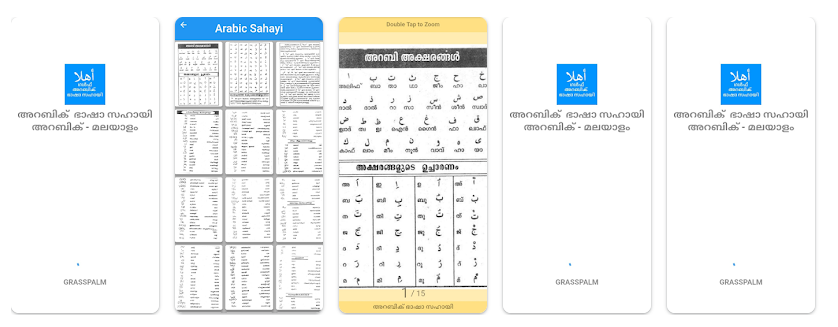
I opened the app during a quick afternoon break to test how easily a beginner could look up common phrases used while buying groceries or bargaining. I tapped into the vocabulary sections and scrolled through the listed terms. The Malayalam translations are displayed right alongside the Arabic words, allowing me to read the pronunciation in my native script. The layout let me find relevant words for numbers and prices within about a minute, making it highly practical for someone standing in a market needing a quick linguistic reference.
Scenario 2: Quick Reference During a Bus Ride
While traveling on a noisy bus using standard mobile data, I opened the app to check how quickly the interface loads when you are on the move. Switching between the different categories of daily sentences took only a single tap each time. Because the text assets are contained inside the initial package, I didn’t experience any annoying loading spinners or buffering delays while jumping from the greeting section to the workplace conversation menu. The text stayed readable even with the phone shaking around during my ride.
Scenario 3: Late-Night Study Session
I spent around thirty minutes before bed reviewing longer conversational sentences within the app. The plain, dark text against the simple light background kept things legible without straining my eyes, though a dedicated dark mode toggle was missing from the main screen. Navigating back and forth between the main dashboard and the sub-categories felt smooth, and the app did not drop out of memory when I briefly locked my phone to grab a glass of water and came right back to my lesson.
📊 App Permissions & Device Safety
When installing any utility tool from the Play Store, tracking what the application can see on your phone is highly important for peace of mind. During my 2-day view, I carefully monitored the authorization prompts that appeared on my screen.
| Permission Type | Required? | True Technical Purpose |
| Storage & Device Media | No | The app did not request storage permission during my testing window and reads its data from its own installation folder. |
| Microphone & Audio Core | No | During my testing, the app did not request microphone access since it does not feature voice-recording or speech-recognition tests. |
| Camera Hardware Access | No | The app did not prompt for camera access at any point because there are no optical scanning or object-recognition tools. |
| Network & Wireless Access | Yes | Required to connect to the internet to load the programmatic inline banner ads that fund the free version. |
| Location & Proximity Flags | No | During my testing, the app did not request location permission as it does not customize lessons based on your physical movements. |
📊 Speed & Everyday Performance
The general performance of this app is highly optimized for older or budget-conscious hardware setups. Tapping through the categories happens almost instantly without the heavy transition lag that plagues more modern, animation-heavy software.
| Performance Test | My Real-World Observation |
| Initial Download & Install Time | Under a few seconds on a standard broadband connection. |
| First Open & Setup Speed | Under 10 seconds; it opens straight into the main menu without registration. |
| Menu Smoothness & Scrolling | Fluid scrolling throughout the word and sentence lists. |
| Memory Load & Slowdowns | Lightweight on background apps; does not bog down device multitasking. |
| Battery Drain While Active | Low battery drain during extended reading sessions. |
| Phone Warmth & Heating | Remains completely cool to the touch even after 30 minutes of continuous use. |
| Background Behavior Upon Exit | Pauses cleanly when minimized and doesn’t run up background processor time. |
| Stability & Bug Resilience | Completely stable across my testing; no random app crashes or freezes. |
💾 Storage Space & Cache Build-Up
One of the biggest issues with modern educational applications is that they slowly eat up your phone’s internal storage by hoarding heavy video lessons or uncompressed audio files. I checked the exact storage properties for Arabic Sahayi within my phone’s system settings to see how much room it actually occupies. The initial download package from the Google Play Store is incredibly small, coming in at just 4.77 MB. This makes it an ideal choice for users who are running out of space or downloading apps over restrictive mobile data limits.
After installation and using the application heavily for two days, the total space taken up on my device storage only grew to 14.24 MB. This minor increase represents the standard unpacked application data and a tiny sliver of temporary cache files from the advertisement scripts. Because the app does not store heavy multimedia content locally, the cache folder does not fill up rapidly. You will not need to constantly go into your phone settings to clear out data manually just to save space on your disk.
🔋 Battery Life & Daily Warmth
During my active screen-on testing windows, the battery consumption of this utility was impressively minimal. Because the app utilizes a simple, flat design without complex 3D renderings, heavy physics engines, or constant background location tracking, it places very little stress on your phone’s mobile processor. Keeping the application open for a continuous 20-minute learning session barely changed my battery percentage indicator, behaving much like a basic e-book reader or notepad app.
On standby, the application sits quietly. It does not send out frequent, irritating push notifications that wake up your device’s screen and drain your battery overnight. Furthermore, my Redmi phone remained completely cool to the touch, with absolutely zero noticeable heating near the top processor area even when I kept the screen active for longer stretches of review.
tipzoom.in Quick Tip: To save even more battery and eliminate mobile data usage while studying, you can turn on Airplane Mode or turn off your cellular data before opening the app; the core text lessons will still open perfectly without loading the banner ads.
🌐 Network Needs & Data Usage
If you are using a capped mobile data package or traveling abroad with expensive roaming rates, managing how much data your apps use is crucial. Here is how this application manages its network needs based on my tracking:
- Initial Setup Access Cost: Zero data cost beyond the tiny initial download. There are no heavy account configuration screens, profile picture uploads, or introduction videos to stream when you first open the app.
- Daily Usage Data Footprint: Very low. The only active data used during normal operation goes toward fetching the small text and image advertisements displayed at the bottom of the screen.
- Additional Asset Downloads: The app runs entirely from the base package. It does not surprise you with prompts to download extra “language packs,” voice databases, or mandatory extension files later on.
- Offline Support: Excellent. The entire library of written Arabic words, Malayalam translations, and phrase categories runs completely offline, meaning you can study anywhere regardless of signal strength.
🛡️ Monetization & User Security Review
From a user privacy standpoint, the structure of this application is highly refreshing. Since no account registration is required to use the software, you don’t need to provide your email address, full name, or phone number during setup. You simply install the package and immediately gain access to the dashboard. According to the app’s Play Store Data Safety section, the developer states that no user data is collected or shared with third parties. This approach minimizes the risk of your personal details or contact information being leaked online.
The monetization strategy relies entirely on programmatic advertising rather than locking content behind expensive monthly subscription tiers or aggressive premium paywalls. When you are connected to the internet, you will notice inline banner ads at the bottom of the interface. Occasionally, a full-screen pop-up ad appears when switching between major learning topics. While these ads can break your study concentration slightly, they are easy to dismiss after a few seconds and ensure that the entirety of the educational material remains 100% free for everyone.
🛠️ Mistakes I Noticed During Testing
While the application is highly functional for quick daily translations, it is not without its design flaws. During my 2 days of hands-on testing, I noticed three specific mistakes or limitations that hurt the overall user experience:
- Repetitive Text Layouts: In some of the sub-menus, the exact same phrase or vocabulary word appears duplicated under slightly different sections, which wastes valuable scrolling space.
- Lack of Audio Pronunciation Buttons: While the Malayalam text transliteration helps you read the Arabic words, there are no built-in audio play buttons to hear how a native speaker pronounces the unique Arabic consonants.
- No Search Bar for Quick Lookups: There is no dedicated search bar at the top of the interface. If you are standing in a store and need to quickly find the specific word for “vegetables,” you have to manually scroll through categories rather than typing it in.
✨ Main Features Explained
- Malayalam-Script Transliteration: Every single Arabic word and conversational sentence is spelled out phonetically using Malayalam characters. This lets you read and pronounce complex words immediately even if you cannot read a single letter of the actual Arabic alphabet.
- Categorized Daily Conversations: The study material is neatly broken down into specific real-world categories like greetings, market shopping, workplace instructions, and emergency terms, helping you jump straight to the scenario you need.
- Complete Offline Reading Library: The entire collection of language lessons is built straight into the light installation package, giving you total access to the vocabulary lists even when deep inside buildings with zero cellular service.
- Gulf-Specific Dialect Focus: Instead of teaching classical or formal script Arabic (Fusha), the phrasing choices target the conversational slang and sentence structures actually used by locals and expats in daily Gulf business environments.
⚖️ Pros & Cons (The Good & Bad)
What I Liked:
- The incredibly tiny download footprint of less than 5 MB makes it accessible for low-end smartphones.
- Completely free access to all learning categories without any hidden premium blocks or payment prompts.
- The interface is completely simple, free of confusing configuration menus, and friendly for older users.
What Could Be Better:
- The placement of full-screen pop-up ads can occasionally interrupt the flow of reading between chapters.
- The visual look of the application feels a bit dated, looking like an older Android utility rather than a modern app.
- The complete lack of spoken audio examples makes it difficult to master proper mouth shapes and vocal accents.
⚔️ Industry Comparison (The Competitor Matrix)
| App Name | Interface Layout Style | Primary Feature Advantage | Pricing Structure |
| Arabic Sahayi (Reviewed) | Simple, text-based list layout | Fully offline text with Malayalam script guidance | 100% Free (Supported by ads) |
| Duolingo | Gamified, brightly animated paths | Interactive listening and speaking exercises | Free tier with heavy paid premium options |
| Learn Arabic Malayalam (Alternative) | Grid-based categories with icons | Includes basic audio clips for common words | Free with banner advertisements |
| Drops: Arabic Language | Highly visual tap-and-drop cards | Excellent vocabulary building via pictures | Very strict daily time limits on free tier |
👥 Audience Recommendations
Who Should Install It?
- Budget Phone Owners: If you have an older Android device with severely limited internal storage space, this ultra-light app will run smoothly without slowing down your phone.
- Total Linguistic Beginners: Native Malayalam speakers who just need to learn how to speak and understand basic sentences quickly without learning how to write the Arabic script.
Who Should Skip It?
- Advanced Learners: Anyone looking to master formal grammar rules, proper reading of the Arabic script, or professional business writing.
- Auditory Learners: People who rely heavily on listening to spoken audio files and conversational podcasts to pick up correct regional accents.
❓ Common FAQs
Do I need a continuous internet connection to use the Arabic Sahayi app?
No, the entire core textbook library of words and Malayalam meanings is saved directly onto your device during installation. Internet access is only utilized by the application to download and display the banner ads when you are online.
Can this application teach me how to read and write the original Arabic alphabet?
No, this utility is focused strictly on spoken communication for daily survival. It uses phonetic Malayalam text to help you speak the words out loud rather than teaching stroke orders or alphabet tracing.
Are there any hidden in-app purchases required to unlock the final chapters?
The entire educational toolkit provided within the application is completely open and free from the moment you install it. The developer funds the project entirely through the ad units displayed on the screen.
## Official Store Access
The application reviewed above can be found directly through official app storefront channels. Please check your specific hardware compatibility before installing.
- Get it on the storefront: Spoken Arabic Malayalam : അറബി
(Note: An official iOS version for Apple devices is not currently listed by the developer; this utility is built specifically for the Android ecosystem).
🏆 The tipzoom.in Final Verdict
If you are a Malayalam speaker preparing to head to the Gulf for a new job and need a fast, zero-fuss reference guide to understand your coworkers and local shopkeepers, Arabic Sahayi is a fantastic, lightweight tool to keep on your device. It completely skips confusing account sign-ups and keeps its file size tiny. However, if you require high-quality audio pronunciation clips or want to learn how to read official documents, you should look elsewhere.
⭐ Final Scorecard
- Ease of Use [4.5/5]: The layout is incredibly straightforward, opening directly into the text lessons without demanding accounts or configurations.
- Speed & Performance [4.8/5]: It switches between text lists instantly and places almost zero strain on your phone processor or battery.
- Features [3.0/5]: While the text lists are highly practical, the total absence of a search bar and spoken audio files hurts its educational depth.
- Privacy & Safety [4.5/5]: Since no account is required, you don’t need to provide your email address or phone number, keeping data exposure minimal.
- Value for Money [5.0/5]: The app provides its entire language learning collection completely free of charge without any locked premium walls.
- Overall tipzoom.in Score: 4.3 / 5