Is your phone speaker too quiet when listening to music, watching videos, playing games or hearing podcasts? Volume Booster – Sound Booster by Simple Design Ltd. is an Android app designed to increase media volume while also providing bass and equalizer controls.
If you are looking for a volume booster, sound enhancer or bass booster for Android, this app combines several audio tools in one place.
What is Volume Booster?
Volume Booster – Sound Booster is designed to increase the volume of media and give users more control over sound quality. It includes a volume booster, bass booster and 10-band equalizer.
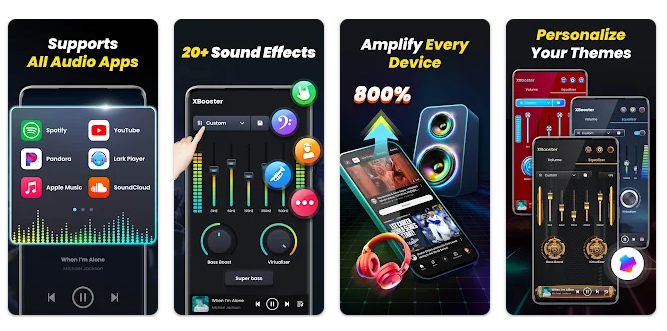
The app can be used with your phone speaker, headphones and Bluetooth audio devices. The Google Play listing states that it can boost sound up to 200%, although the actual improvement depends on the phone and audio hardware.
Testing Setup & Our Experience
We tested the app on an Android smartphone, checking the volume booster, bass settings, equalizer, music playback and headphone controls.
The volume control was simple to use. Increasing the boost produced a noticeable increase in playback volume on our test device.
We also tested the bass booster and equalizer while playing music. The equalizer provided more control over different frequencies, while the presets made it easier to change the sound without manually adjusting every setting.
We tested headphones as well as the phone speaker. Results varied depending on the hardware, but the controls worked consistently during testing.
Best Features
1. Volume Booster
The main feature is designed to increase media volume for music, videos, games and other audio content.
2. Bass Booster & Equalizer
The built-in bass booster and 10-band equalizer allow users to customize music and improve their preferred sound profile.
3. Headphone & Bluetooth Support
The app works with headphones, Bluetooth devices and the phone’s built-in speaker, making it useful for different listening setups.
4. Ringtone & Alarm Volume
The app can also help manage system sounds such as ringtones and alarms.
5. Background Controls
Audio controls remain available while using the app in the background or when the screen is locked.
App Details
- Category: Music & Audio
- Developer: Simple Design Ltd.
- Rating: 4.8/5
- Downloads: 10M+
- Price: Free with ads and in-app purchases
- Content Rating: Everyone
Should You Download It?
If your phone’s normal volume feels too low, this app is worth trying. It can be useful for people who want louder phone audio, stronger bass or better control over music and videos without purchasing a separate audio application.
It is also useful when switching between phone speakers, headphones and Bluetooth speakers.
However, software cannot overcome the physical limitations of your phone’s speaker. The actual volume increase will therefore vary between devices.
Users should also avoid excessive volume for long periods because loud audio can damage hearing.
Download from Google Play Store
Quick FAQ
Can it make my phone louder?
Yes. It is designed to increase media volume, although results depend on your device.
Does it work with headphones?
Yes. It supports headphones, Bluetooth devices and phone speakers.
Does it have a bass booster?
Yes. It includes bass controls and a 10-band equalizer.
TipZoom Verdict
Volume Booster – Sound Booster is a useful choice for Android users who want louder sound and greater control over music and media.
Our testing found the main controls easy to use, while the bass booster and equalizer provided additional customization. Support for headphones and Bluetooth devices also makes it more versatile than a basic volume-control app.
The main limitation is hardware. If your phone speaker is physically weak, software cannot turn it into a powerful speaker. For normal volume enhancement and audio customization, however, the app provides a convenient solution.
Final Scorecard
Ease of Use: 4.6/5 — Simple volume controls.
Performance: 4.5/5 — Worked consistently during testing.
Features: 4.8/5 — Strong combination of volume, bass and equalizer tools.
Audio Control: 4.7/5 — Good customization options.
Value for Money: 4.4/5 — Useful free features with optional purchases.
Overall TipZoom Score: 4.6/5 — A practical Android volume booster and sound enhancer for users who want louder audio, stronger bass and more control over their music and media.