Booking an LPG gas cylinder in India is now very easy. Earlier, people had to call the gas agency or visit the distributor office to book a refill. Now most gas companies have mobile apps that allow customers to book LPG cylinders directly from their phones. These apps also help users pay online and check when the cylinder will be delivered.
The three main LPG gas companies in India are Indian Oil Corporation, Bharat Petroleum, and Hindustan Petroleum. Each company has its own mobile app for LPG booking.
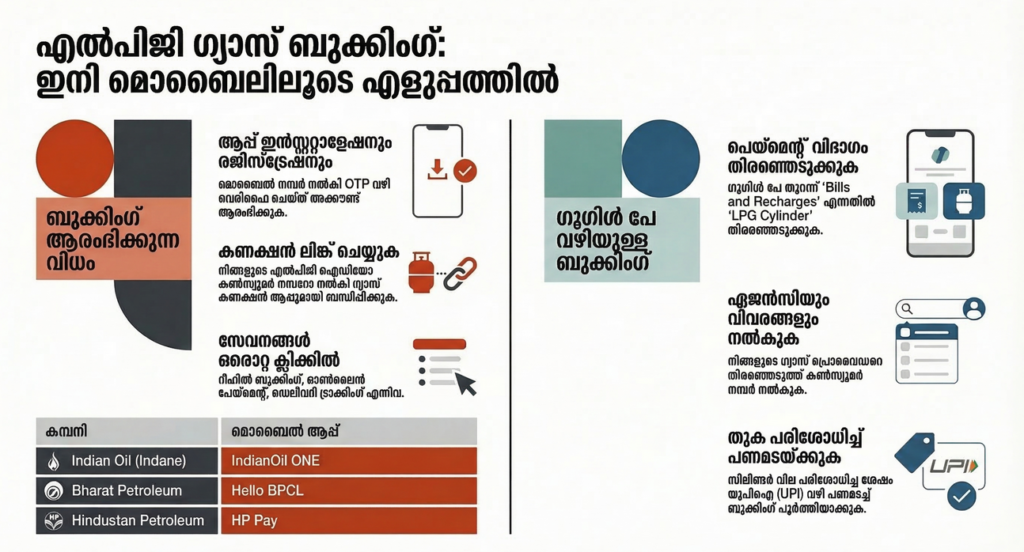
How to Install LPG Booking Apps
Before booking gas through a mobile app, you must first download and install the correct app on your phone. Follow these steps:
- Download the LPG booking app
- Install the app and wait until the installation is complete.
- Open the app after installation.
- Enter your mobile number to create an account.
- Verify your number by entering the OTP (one-time password) sent to your phone.
- Add your gas consumer number or LPG ID.
- Confirm the details to link your LPG connection.
After completing these steps, your LPG connection will be linked to the app and you can book gas cylinders, make payments, and track delivery directly from the app.
Indian Oil – Indane Gas App
People who use Indane gas from Indian Oil Corporation can use the IndianOil ONE app. This app helps customers book gas cylinders very easily.
After installing the app, users need to register with their mobile number. Then they must add their Indane consumer number or LPG ID. Once the account is set up, the app will show a “Book Refill” button.
When the user taps this button, the gas cylinder booking is done. A confirmation message will be sent to the registered mobile number. The app also allows users to pay for the cylinder using UPI, debit cards, or net banking. Customers can also check booking history and see when the cylinder will arrive.
Bharat Gas – Hello BPCL App
Customers who use Bharat Gas from Bharat Petroleum can book cylinders using the Hello BPCL app.
First, users must install the app and register with their mobile number. After that, they need to add their Bharat Gas consumer number. Inside the app there is an LPG section where users can see the “Book Cylinder” option.
By tapping this option, the refill request is sent to the gas distributor. The customer will receive a message confirming the booking. The app also allows users to pay online and check delivery status. Another useful feature is that people can manage more than one LPG connection in the same app.
HP Gas – HP Pay App
Customers of Hindustan Petroleum can use the HP Pay app to book LPG cylinders.
After installing the app, users must register using their mobile number and add their HP Gas consumer number. Inside the app there is an LPG section where customers can choose the “Book Refill” option.
Once the refill is booked, the system sends a confirmation message to the phone. Users can also pay for the cylinder directly through the app using UPI or bank cards. The app also shows booking history and delivery updates. Another feature of the HP Pay app is that it can also be used to pay at HP petrol pumps.
How to Book LPG Gas Using Google Pay in India
Booking an LPG gas cylinder has become easier with digital payment apps. One of the simplest ways to book and pay for LPG is through Google Pay. Many people already use this app for sending money and paying bills, so LPG booking can also be done quickly from the same app.
In India, LPG cylinders are supplied mainly by Indian Oil Corporation (Indane Gas), Bharat Petroleum (Bharat Gas), and Hindustan Petroleum (HP Gas). Google Pay allows users to pay for LPG refills from these companies directly through the app.
What You Need Before Booking LPG on Google Pay
Before booking a gas cylinder using Google Pay, make sure you have the following:
- The Google Pay app installed on your phone
- Your LPG consumer number or LPG ID
- Your mobile number linked to the LPG connection
- A bank account linked with Google Pay
Once these are ready, you can easily book and pay for your LPG refill.
Steps to Book LPG Gas Using Google Pay
Follow these steps to book your LPG cylinder through Google Pay:
- Open the Google Pay app on your phone.
- On the home screen, tap Bills and Recharges.
- Select the option called LPG Cylinder.
- Choose your LPG provider (Indane Gas, Bharat Gas, or HP Gas).
- Enter your consumer number or LPG ID.
- The app will show your LPG connection details.
- Check the amount shown for the refill.
- Tap Pay to complete the payment using UPI.
After payment is successful, the LPG refill request is registered. You will usually receive a confirmation message from the LPG company.