Want to keep personal photos, videos or selected call records away from the normal phone interface? Dialer Vault Hide Photo Video is an Android privacy app that combines a private vault with a dialer and other privacy tools.
It can hide personal media and selected call logs while offering fingerprint access, private notes, a private browser and break-in alerts.
What is Dialer Vault Hide Photo Video?
Dialer Vault Hide Photo Video is developed by VAULTDROID. It provides a private vault for photos, videos and other files while also working as a dialer with contacts, recent calls and a T9 keypad.
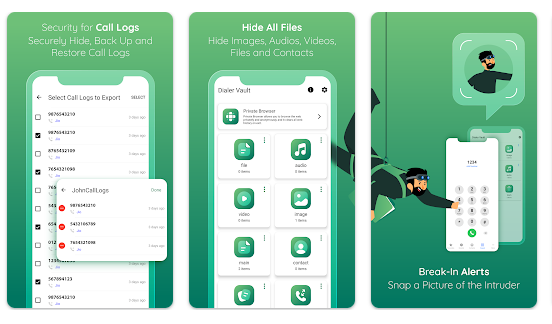
The protected vault can be accessed through the app using a passcode or supported fingerprint authentication.
Testing Setup & Our Experience
We tested Dialer Vault Hide Photo Video on a Redmi Android smartphone running Android 14, using Wi-Fi and mobile data.We checked the photo and video vault, fingerprint unlock, call-log management, private notes, browser and dialer.
We also checked how easily the main privacy features could be found and used.The main functions were straightforward to locate, although new users may need some time to understand the different settings and features.
Best Features of Dialer Vault
1. Hide Photos and Videos
You can move personal photos and videos into the private vault and access them through the app.
2. Hide Call Logs
Selected incoming, outgoing and missed calls can be hidden from the normal phone history and restored later.
3. Fingerprint Unlock
The app supports fingerprint authentication on compatible Android devices, providing another way to access the private vault.
4. Private Browser and Notes
It includes private notes and a built-in browser for users who want additional privacy tools.
5. Break-In Alerts
When an incorrect passcode is entered, the app can take a photo and record the date and time of the attempt.
App Details
- Category: Tools
- Developer: VAULTDROID
- Google Play Rating: 4.5/5
- Reviews: 57K+
- Downloads: 5M+
- Price: Free with ads and in-app purchases
Other Similar Apps
Calculator Hide Photo, Video uses a calculator-style interface for hiding personal media, while AppLock mainly focuses on locking individual apps.
Dialer Vault is more focused on combining private media storage with call-history management.
Should You Download It?
Dialer Vault is worth considering if you want an Android privacy app to keep personal photos, videos and selected call records away from the normal phone interface.
However, it handles sensitive personal information. Review its permissions, privacy policy and Google Play data-safety information before storing important files.
Main Advantages
- Hide photos and videos
- Hide selected call logs
- Fingerprint access
- Private notes and browser
- Break-in alerts
Main Disadvantages
- Handles sensitive personal information
- Contains ads and in-app purchases
- Privacy and data-sharing details deserve attention
Download from Google Play Store
Quick FAQ
Is Dialer Vault free?
Yes. It is free to install, with ads and in-app purchases.
Can it hide photos and videos?
Yes. Hiding personal media is one of its main functions.
Can it hide call history?
Yes. Selected incoming, outgoing and missed calls can be hidden and restored.
TipZoom Verdict
Dialer Vault combines private media storage, hidden call logs and phone privacy tools in one app. Our testing found the main features reasonably straightforward to access.
Its biggest concern is privacy because the app handles sensitive information. Users should review its permissions and data-safety information before storing important files.
Final Scorecard
Ease of Use: 4.2/5 — The main features are accessible, although the number of settings may take time to learn.
Speed & Performance: 4/5 — The main sections worked normally during our basic Android 14 testing.
Features: 4.6/5 — Strong combination of media vault, hidden call logs, fingerprint access, notes, browser and break-in alerts.
Safety: 3.5/5 — The app handles sensitive information, so privacy deserves careful attention.
Price: 4/5 — Core functionality is available for free, with ads and in-app purchases.
Overall TipZoom Score: 4.1/5 — A feature-rich privacy app for hiding personal media and selected call activity, but users should consider privacy implications before storing sensitive files.