Looking for free WiFi near you when your mobile data is running low? Free WiFi Internet Finder is designed to help you discover nearby open or unsecured WiFi hotspots and check their connection quality. The app can also show signal strength and test internet speed after connecting.
The app has 10M+ downloads, a 4.4-star rating and around 39,000 reviews on Google Play. It contains ads and was updated on August 16, 2026.
Testing Setup & Our Experience
We tested the app setup on a Samsung Galaxy A55 5G running Android 15, focusing on finding nearby WiFi networks, checking signal strength and testing connection speed.
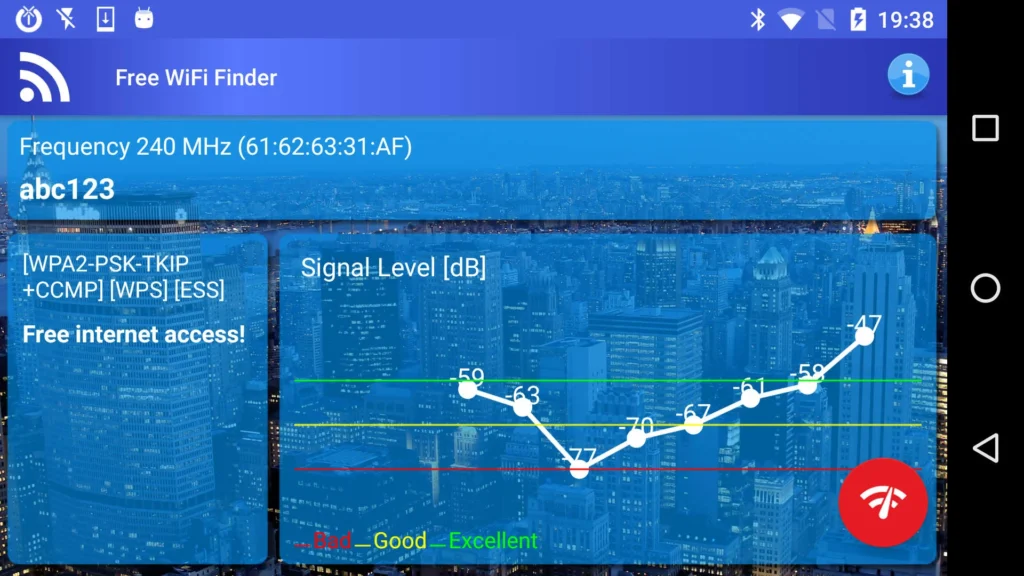
The main purpose is simple: open the app and allow it to scan for WiFi networks in your area. When an available hotspot is detected, the app can notify you and provide signal-level information to help identify a better location for connecting.
After connecting to a network, its built-in speed tester can show the actual transfer rate you may experience while browsing or downloading files.
Key Features
Free WiFi Finder: Discover nearby open or unsecured WiFi networks that provide internet access.
WiFi Signal Map: Check signal strength and find a location where the connection may be stronger.
WiFi Scanner: Explore networks available around your current location.
Internet Speed Test: Test the connection speed of the WiFi network you are using.
Connection Quality: Check the quality of an active WiFi connection before relying on it for browsing or downloads.
Travel Friendly: Useful when travelling or when you want to reduce mobile-data or roaming usage.
Simple Interface: The app is designed for beginners and does not require advanced networking knowledge.
Is Free WiFi Internet Finder Worth Downloading?
If you are searching for a free WiFi finder, WiFi hotspot locator, free internet app, or WiFi speed tester, this app offers several useful functions in one place.
Its strongest use case is finding legitimate open WiFi networks when you are away from home or have limited mobile data. The signal map and speed test can also help you understand whether a connection is worth using.
However, it is important not to assume that the app can provide passwords for private WiFi networks. Its Google Play description focuses on finding open or poorly secured networks, not breaking into protected WiFi.
User feedback is mixed. Some users praise the WiFi scanning and signal information, while others report that the app does not always provide a usable internet connection.
Google Play states that the app may share and collect location, app activity and other data types. Data is encrypted in transit, and users can request deletion.
Free WiFi Internet Finder Download
If you want to find nearby free WiFi, check WiFi signal strength, test internet speed, or reduce mobile-data usage, Free WiFi Internet Finder is worth trying.
Download Free WiFi Internet Finder from Google Play
Quick FAQ
Can it find free WiFi near me?
Yes. It is designed to discover nearby open or unsecured WiFi hotspots.
Can it show WiFi signal strength?
Yes. The app provides signal-level information to help locate a stronger connection.
Can it test WiFi speed?
Yes. Its built-in speed tester measures the connection’s transfer rate.
Can it find private WiFi passwords?
No. The app is intended to find available open or poorly secured networks, not bypass protected WiFi.
TipZoom Verdict
Free WiFi Internet Finder is a useful option for people looking for a WiFi hotspot finder, free WiFi locator and internet speed tester. Its biggest advantage is combining network discovery, signal information and speed testing, although results can vary depending on the networks available in your area.
Final Scorecard
- WiFi Finder – 9/10: Helps discover available WiFi hotspots around you.
- Signal Information – 9/10: Useful for identifying stronger WiFi locations.
- Speed Test – 8.5/10: Lets you check the actual connection speed.
- Ease of Use – 8.5/10: Simple enough for users without networking knowledge.
- Overall – 8.8/10: A useful tool for finding and checking available WiFi connections.