Want to lock WhatsApp, photos, messages or other private apps on your Android phone? AppLock by DoMobile is designed to add an extra layer of protection by requiring a password, PIN, pattern or other supported security method before selected apps can be opened.
If you are searching for an AppLock, app lock for Android, WhatsApp lock, photo lock or privacy protection app, this is a useful option to consider.
What Is AppLock?
AppLock lets you select individual apps and protect them from unauthorized access. Instead of locking the entire phone, you can choose specific applications that contain personal information.
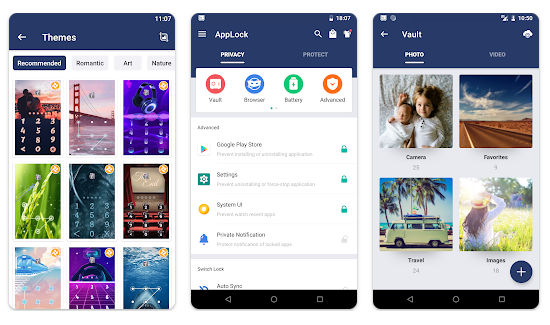
This can be useful for protecting WhatsApp chats, Gallery, Photos, Messages, social media apps and other private applications when someone else is using your phone.
Testing Setup & Our Experience
We tested AppLock on a Samsung Galaxy A55 5G running Android 15, focusing on locking applications, unlocking them and checking the available privacy features.
After installing the app, we created a security method and selected WhatsApp and Gallery as test applications. We then closed and reopened them to check whether AppLock requested authentication before allowing access.
We also explored the settings to check how easily locked applications could be changed.
The basic setup was straightforward. However, users should carefully review the permissions requested by any third-party security application before enabling its protection features.
Best Features
1. Lock Individual Apps
You can choose specific applications that require authentication before opening.
2. WhatsApp Lock
AppLock can be used to add protection to WhatsApp, helping prevent other people from opening your private conversations when they have access to your unlocked phone.
3. Photo & Gallery Protection
Locking your Gallery or photo-related applications can provide an additional privacy layer for personal pictures and videos.
4. Password, PIN & Pattern Protection
The app provides different ways to protect locked applications, depending on the available options and device support.
5. Protect Social Media Apps
You can also protect applications such as Facebook, Instagram and other apps containing personal conversations or account information.
Is AppLock Worth Downloading?
If you are searching for an app lock for Android, WhatsApp lock app, photo lock app, privacy app or application password lock, AppLock is worth trying.
Its biggest advantage is selective protection. You do not have to lock every application on your phone. You can simply choose the apps containing information you want to keep private.
This can be particularly useful when sharing your phone with family members, children or friends, or when you want an additional security layer for messaging, photos and social-media applications.
However, an app-level lock should not be considered a replacement for your phone’s main screen lock. For stronger protection, use a secure device PIN or password as your primary security method.
Download from Google Play Store
Quick FAQ
Can I lock WhatsApp with AppLock?
Yes. You can select WhatsApp as one of the applications requiring authentication.
Can I lock my Gallery?
Yes. You can protect supported photo and Gallery applications.
Can I lock individual apps instead of the entire phone?
Yes. AppLock is designed to let you select individual applications.
Is AppLock a replacement for my phone password?
No. Your device’s main PIN, password or biometric security should remain your primary protection.
TipZoom Verdict
AppLock is a practical Android utility for users who want an additional layer of privacy around specific applications.
During our testing on the Samsung Galaxy A55 5G running Android 15, setting up protection and locking selected applications was straightforward.
Its strongest use case is protecting WhatsApp, photos, messages and social-media apps when other people occasionally use your phone.
For anyone searching for an AppLock, WhatsApp lock, photo lock, app password or Android privacy app, it is worth testing.
Final Scorecard
Ease of Use: 4.5/5 — Simple setup.
App Protection: 4.6/5 — Useful selective locking.
Privacy: 4.4/5 — Adds an extra protection layer.
Features: 4.5/5 — Good range of locking options.
Overall TipZoom Score: 4.5/5 — A practical Android app lock for protecting WhatsApp, photos, messages and other private applications.