Have you ever misplaced your mobile phone right inside your own home and spent hours looking for it? It is a very common and annoying problem when you are running late for work or school.
You try to call your number, but you suddenly remember that the phone is switched to total silent mode.
Fortunately, there is a very easy mobile application that can solve this trouble for you instantly. The app is called Find my Phone – Clap, Whistle .
App Overview & Market Position
Find my Phone – Clap, Whistle is a free utility application built for Android smartphones to track down misplaced devices. It is created by developer Wavez Technology Ltd to act as an acoustic sound detector tool.
The app runs quietly in your device background and listens for specific sharp noises to trigger a loud tracking alarm.
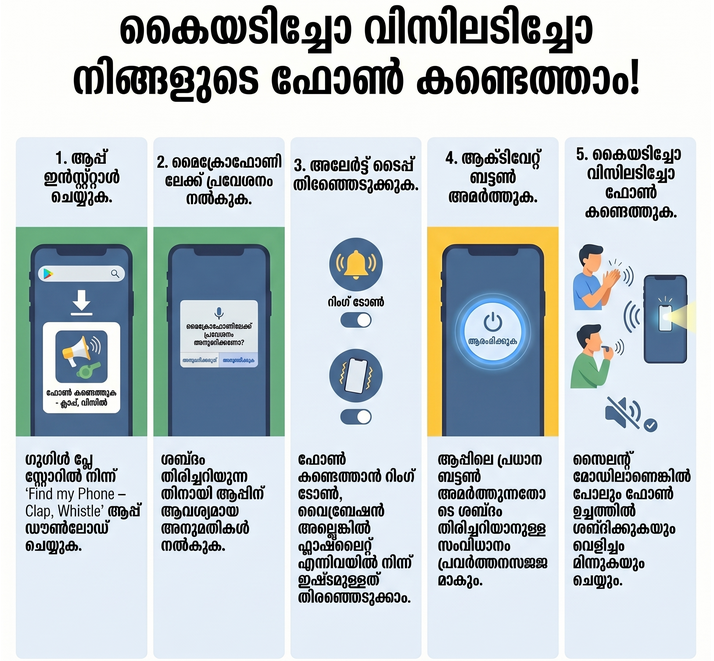
In the busy market of mobile tools, this app stands out because it reacts even when your device is on Do Not Disturb or silent mode. While other trackers require complex GPS map setups, this app keeps things completely basic with a quick one-tap activation system. It gives immediate results for general users who do not want to deal with hard technical steps.
Key Features at a Glance
- Clap Detection: It listens for sharp hand clapping sounds and immediately sets off a loud alarm to show its location.
- Whistle Finder: The app can track sharp whistle sounds if you prefer whistling over clapping your hands.
- Custom Alerts: You can change the response to standard phone ringing, heavy vibration, or bright flashlight blinking.
- Funny Sound Sounds: It lets you pick different funny alert sounds like doorbells, car horns, or pre-recorded human voices.
- Pocket Anti-Theft: This safety feature sounds an alarm if someone tries to slip your phone out of your pocket or bag.
User Data & Market Reach
Below is the current estimated market data for this tool across major mobile app stores.
| Platform | Star Rating | Total Reviews | Downloads |
|---|---|---|---|
| iOS App Store | N/A | N/A | Not Available |
| Google Play | 4.0 / 5 | 150,000+ | 5,000,000+ |
Technical Performance Review
- Storage: The app uses a light file size of around 31 MB, so it takes up very little space in your storage.
- Data Usage: It works completely offline to detect sounds, meaning it does not spend your mobile data data pack.
- Battery/Efficiency: It uses low battery power when the screen is active, but keeping the microphone listening all night might use a bit more power.
Tipzoom.in Advice: Turn on the built-in power-saving mode inside the settings so the microphone only listens when your phone screen is locked.
Head-to-Head Comparison
Here is a fast look at how this clap application compares against default factory tracking options.
| Feature | Find my Phone – Clap, Whistle | Default Google Find My Device |
|---|---|---|
| Internet Needed | No (Works Offline) | Yes (Requires Data or Wi-Fi) |
| Trigger Action | Clapping or Whistling | Logging into another account |
| Silent Mode Bypass | Yes (Rings Anyway) | Yes (Rings Anyway |
Common Questions (FAQ)
- Does this app work if my phone is on silent? Yes, the app will override your silent switch and play your loud alarm sound anyway.
- Will it collect my private voice conversations? No, the software only listens for the specific frequency pattern of a loud clap or whistle.
- Can I use my own music as the tracking ringtone? Yes, you can choose custom sounds or default funny alerts from the option menu.
The Tipzoom.in Final Verdict
Find my Phone – Clap, Whistle is a great tool for forgetful people who always lose their devices around the house or office. It is very simple to understand, though people who want heavy online GPS maps might find it a bit too basic for outdoor tracking.
Google Play Store Link: Download for Android
Rating Scorecard
- Ease of Use: 4.6/5
- Speed & Performance: 4.1/5
- Feature Set: 4.3/5
- Privacy & Safety: 3.9/5
- Value for Money: 4.5/5
- Overall Tipzoom.in Score: 4.3 / 5