Accidentally deleting an important photo, a video from a family gathering, or a critical work document is a massive daily hassle that almost every smartphone user experiences. Standard mobile galleries usually have a basic trash folder, but it frequently clears itself out automatically after a few weeks or fails to catch files deleted from third-party apps and file managers.
When you realize a vital file is missing, the panic that sets in is a genuine daily annoyance that ruins your routine.This is where the Dumpster application by Baloota attempts to offer a practical safety net. It functions essentially as a desktop-style recycle bin for your Android device, running quietly to intercept and temporarily store your deleted media assets before they vanish forever. Instead of requiring you to go through complicated device modification procedures, it targets the simple problem of human error by giving you a straightforward way to undo your mistakes.
Over the past 2 days, I put this application to work under my normal daily routine to see if it genuinely functions as an effective safety net or if it just creates unnecessary clutter on your local storage setup. In this deep-dive review, I will explain exactly what I observed during my hands-on testing window.
📱 My Phone Testing Setup
To ensure my observations are completely realistic, I tested the application on my primary personal device, a Redmi Note 13 Pro. The phone is running on Android 14 with the HyperOS layout active over the top. During my 2 days of continuous evaluation, I switched naturally between my home Wi-Fi network and standard mobile data networks while running regular multitasking routines like checking emails, streaming audio, and receiving chat notifications in the background.
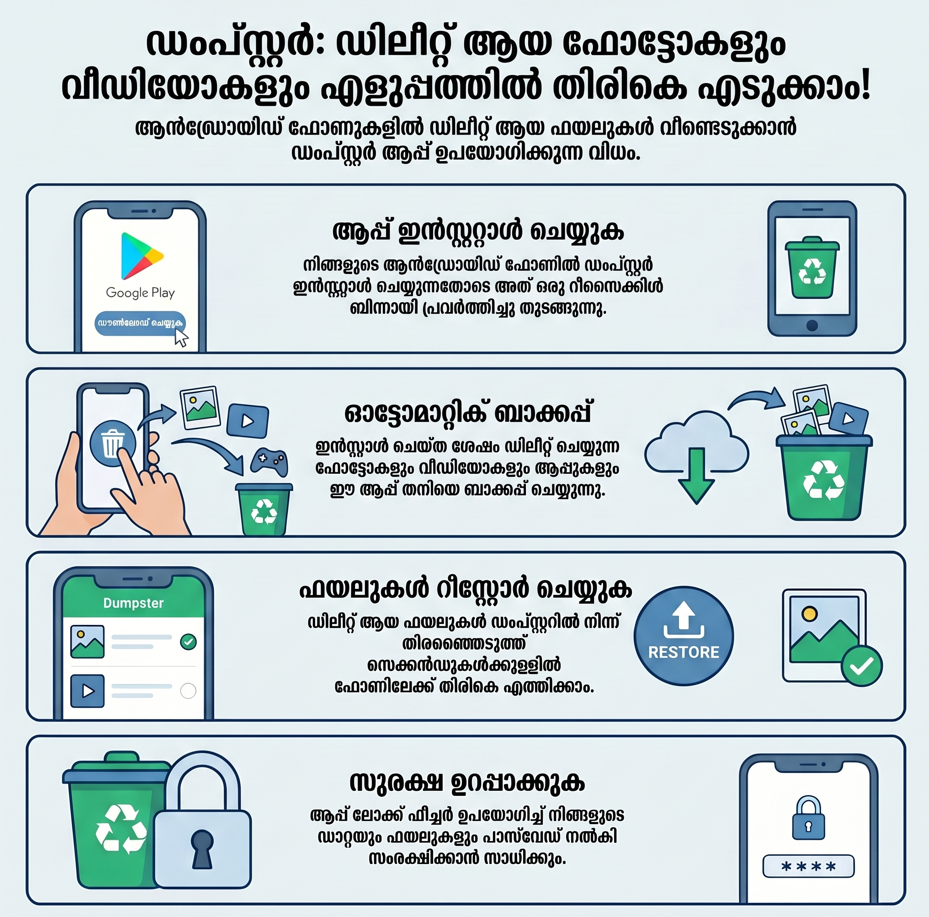
🎬 Real-World Hands-On Analysis
To thoroughly evaluate how the application handles everyday situations, I focused on 3 specific daily scenarios during my testing window.
Scenario 1: Recovering Accidentally Deleted Gallery Photos
I purposely selected a dozen redundant pictures from my device gallery and deleted them using the standard built-in file manager. Upon opening Dumpster, the app interface loaded the deleted images into its internal folder within under a few seconds. I selected three of those images and tapped the restore option; they reappeared in my original gallery folder immediately without any visible loss in original image resolution or file details.
Scenario 2: Restoring Large Video Files
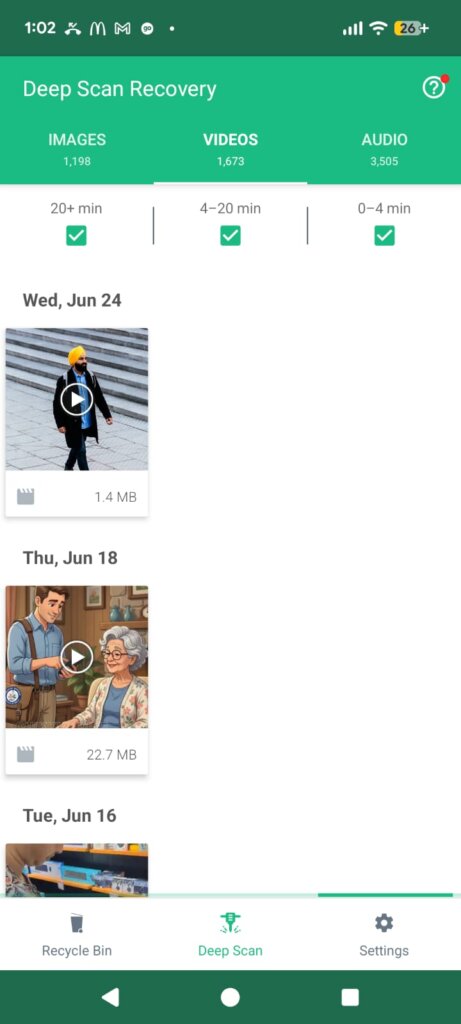
I attempted to clear out a large video file to see how the software manages larger file volumes. The application successfully caught the file upon deletion, though processing the large preview screen caused a slight pause in layout scrolling. When I clicked the recovery button, the file compiled and returned to its original local path in around 1 minute, proving it can handle bulkier video items alongside basic documents.
Scenario 3: Sorting Through Miscellaneous Documents
I tested the utility by deleting a mix of PDF files, audio tracks, and text documents from my local folders. The internal interface let me sort through these items using file type filters, which made it simple to find what I needed without scrolling blindly through thousands of old images. Tapping on a specific PDF item showed a basic preview card, allowing me to verify the contents before finalizing the restoration process.
📊 App Permissions & Device Safety
When you first launch and navigate through the application, it triggers several standard Android hardware access prompts on your phone screen. Below is an objective breakdown of the exact permissions I encountered during my 2-day testing window:
| Permission Type | Required? | True Technical Purpose |
| Storage & Device Media | Yes | Requested during my testing window immediately upon setup so the app can actively scan internal folders, capture files the moment you delete them, and send them back to their original local paths. |
| Microphone & Audio Core | No | The app did not request microphone access during my 2 days of testing, as it focuses entirely on file management rather than recording live audio data. |
| Camera Hardware Access | No | During my testing window, the app did not present any camera hardware prompts on my screen since it does not include a custom camera interface layer. |
| Network & Wireless Access | Optional | Requested to verify your premium license status, sync data with the voluntary cloud storage backup feature, and load in-app functional parameters. |
| Location & Proximity Flags | No | During my 2 days of hands-on evaluation, the application did not request location permission on my screen, indicating it does not monitor your physical movements. |
📊 Speed & Everyday Performance
The overall responsiveness of the interface plays a major role in whether an app feels reliable for daily use. Tapping options and switching between the main recycle bin tab, deep storage scan utilities, and cleanup folders generally feels snappy, though there are specific moments where heavy image caching causes a slight pause.
Here is the structured layout of my performance observations during the testing period:
| Performance Test | My Real-World Observation |
| Initial Download & Install Time | Under a few seconds on a standard broadband Wi-Fi connection. |
| First Open & Setup Speed | Around 1 minute because you must grant comprehensive file storage access permissions and skip tutorial prompts. |
| Menu Smoothness & Scrolling | Fluid scrolling generally, but minor stutters happen when loading high-definition previews of bulk-deleted media files. |
| Memory Load & Slowdowns | Lightweight on background apps; it does not freeze active applications or crash background music players while running its monitoring utility. |
| Battery Drain While Active | Moderate battery consumption during standard file sorting, turning heavier if you run deep storage scans continuously. |
| Phone Warmth & Heating | Remains completely cool during simple photo recovery, changing to mildly warm to the touch after ten minutes of storage deep scanning. |
| Background Behavior Upon Exit | Pauses cleanly when swiped away, but keeps running in background as a quiet file monitor to intercept newly deleted elements. |
| Stability & Bug Resilience | Completely stable during simple tasks, though it froze once when I attempted to process a batch restoration of fifty files simultaneously. |
💾 Storage Space & Cache Build-Up
According to the official listing and my phone’s application settings menu, Dumpster requires an initial download package size of exactly 16 MB. However, once the application is fully installed on your local drive and generates its baseline system directories, it occupies a final expanded space of 51 MB on your internal disk. This number only reflects the base file layout before you begin using the app to intercept real media assets.
During my 2 days of testing, I noticed that the app data folder fills up with temporary cache files and duplicate assets quite quickly. Because the application saves exact copies of every picture, video clip, and audio note you delete from your device, it acts as a secondary storage folder. If you frequently delete large video files, your internal phone space will drop rapidly. To save space, you will need to open your phone settings menu, select the app options, and clear out the accumulated files or empty the app repository manually to prevent your disk from filling up completely.
🔋 Battery Life & Daily Warmth
Battery consumption varies depending on how intensely you use the app to browse, filter, or scan your phone directory. When the phone was sitting on standby on my desk, the background monitoring process caused no noticeable battery drop, showing that the system idles quietly when you are not actively interacting with it or modifying your internal file layout.
Simple operations like restoring a couple of gallery photos or viewing a deleted text document felt lightweight, consuming minimal power over an hour of occasional browsing. However, if you trigger a full storage scan to look for old files deleted before you installed the software, your phone processor has to read your entire storage framework. This heavy tracking action causes a mild amount of warmth near the rear camera module within a few minutes and drains your battery faster until the scan concludes.
tipzoom.in Quick Tip: To save your battery and keep your phone cool, head into your account settings and disable the automatic cloud backup feature if you only plan to store your deleted files locally.
🌐 Network Needs & Data Usage
If you are using a capped or metered mobile data plan, you do not need to worry heavily about your data layout unless you choose to activate the optional cloud tools. The network usage remains highly optimized across these parameters:
- Initial Setup Access Cost: Minimal data need initially since it only requires a brief connection to check startup configuration rules and licenses.
- Daily Usage Data Footprint: Extremely light during regular file operations because local recycling occurs entirely within your internal storage folders without uploading assets.
- Additional Asset Downloads: The application runs completely from the base package, meaning it does not trigger mandatory secondary asset downloads after installation.
- Offline Support: The core file recovery, trash sorting filters, and deep local storage scanning tools run completely offline without any internet connection.
🛡️ Monetization & User Security Review
According to the app’s Play Store Data Safety section, the developer states that user data may be shared with third parties for marketing, advertising, and analytics tracking purposes. The registration process is incredibly user-friendly; the software allows clean guest access right out of the box, meaning no profile account registration is forced upon you. You do not need to provide your email address, phone number, or social media links to begin using the recycle bin tools.
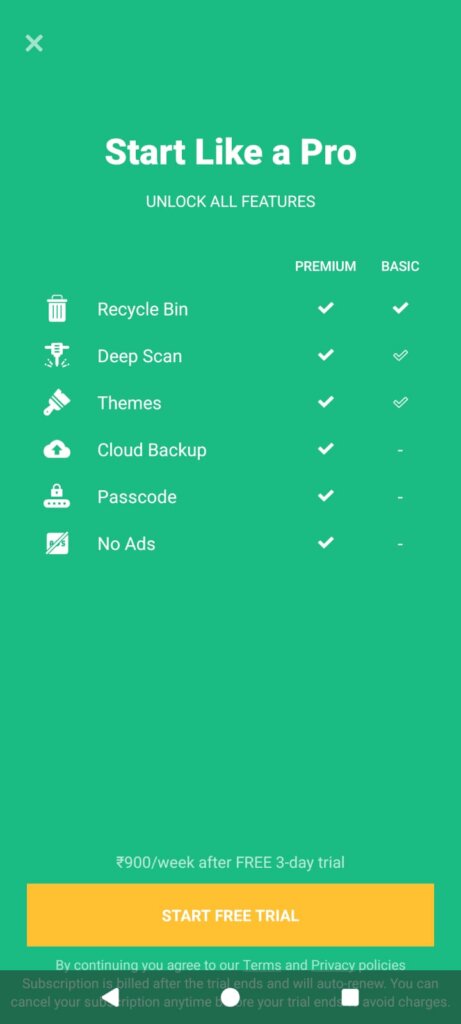
The monetization strategy relies on a traditional ad-supported free model paired with premium upsells. The free version contains a heavy amount of programmatic inline banner ads, full-screen pop-up countdown videos when restoring media, and regular prompts pushing you to buy a subscription. Upgrading to the premium tier removes these advertisements and unlocks the automatic cloud backup feature. If you decide to stay on the free version, you will have to deal with frequent commercial interruptions during your file workflows.
🛠️ Mistakes I Noticed During Testing
While the core functionality of the application is solid, I ran into 3 specific mistakes, layout bugs, and design flaws during my 2-day testing window:
- Thumbnail Loading Lag: When opening the trash repository after deleting a large album of photos, the interface displayed blank gray boxes. I had to wait around 2 minutes for the visual thumbnails to load fully so I could see what I was restoring.
- Confusing Navigation Loop: Tapping the physical back button on my device while viewing an image preview did not return me to the previous folder. Instead, it regularly triggered a full-screen premium upgrade advertisement, creating an annoying navigation loop.
- Button Unresponsiveness: During a bulk-selection task where I picked twenty text documents to permanently delete, the confirmation button became completely unresponsive for a few seconds before the application finally processed the action.
✨ Main Features Explained
- Instant Interception Recycle Bin: Runs silently in the background to automatically catch and store deleted photos, videos, and music tracks without requiring manual backups.
- File Category Filtering: A clean tab layout that divides your deleted assets into specific folders for images, audio tracks, and documents so you don’t scroll blindly.
- Deep Storage Scanner: An advanced searching utility that checks hidden system directories to try and discover older media assets deleted before the app was installed.
- Auto-Clean Scheduler: A configuration tool that lets you set a specific time limit (like 7 days or 30 days) to permanently erase old items automatically to protect your space.
- Secure App Lock Screen: An optional security layer that lets you add a personalized PIN or fingerprint scan over the app interface to protect your deleted items from nosy friends.
⚖️ Pros & Cons (The Good & Bad)
What I Liked
- No Account Barriers: The ability to use the application immediately via guest access without entering private phone numbers or email addresses is a massive win.
- Reliable Offline Functionality: Core file caching and restoration tools operate perfectly without requiring any Wi-Fi or mobile data connections.
- Clean Folder Categorization: Sorting through lost files is incredibly straightforward thanks to the separate media and document filter tabs.
What Could Be Better
- Intrusive Pop-Up Advertisements: The frequency of full-screen video commercials when triggering a restoration can make file management feel tedious.
- Rapid Storage Accumulation: Because it saves exact duplicate copies of deleted assets locally, it can quickly overwhelm lower-end devices if left unmonitored.
- Paywalled Scanning Tools: Several advanced file-carving features and deep-system recovery modes require a steep premium subscription upgrade.
⚔️ Industry Comparison (The Competitor Matrix)
| App Name | Interface Style | Primary Advantage | Overall Pricing Structure |
| Dumpster | Clean media grid layout resembling a desktop recycle bin | Operates completely via guest access with instant local asset catching | Free base version with heavy ads; monthly subscription for cloud |
| DiskDigger | Technical list-heavy design built for data diagnostics | Excellent at performing deep root-level photo carving scans for free | Free for basic image recovery; flat one-time fee for advanced root features |
| Undeleter | Step-by-step partition scanning wizard layout | Broad file support including raw app logs and database files | Free to scan internal partitions; payment required to save recovered assets |
👥 Audience Recommendations
Who Should Install It?
- Accident-Prone Users: Perfect for people who regularly clear out their media folders and want an immediate insurance policy against accidental taps.
- Offline File Workers: Highly suitable if you want a reliable file-catching system that works in remote areas without consuming mobile data packages.
- High-Capacity Storage Device Owners: Ideal for users with modern phones that have plenty of open space to comfortably store temporary background file duplicates.
Who Should Skip It?
- Low-Storage Phone Users: Skip this app if your device is constantly running out of gigabytes, as the double storage copy system will worsen your space limitations.
- Ad-Averse Bloggers: Not recommended if you find frequent full-screen video commercials and recurring upgrade pop-ups highly frustrating.
- Factory Reset Recovery Seekers: If you are trying to recover files after completely wiping or factory resetting your device, this local background monitor cannot help you.
❓ Common FAQs
Does Dumpster require my phone to have root access to restore standard gallery photos?
No, the application runs perfectly fine on standard, unrooted Android devices for all regular photo, video, and audio recovery workflows. Root access is only mentioned if you choose to run advanced, deep-system partition scans to find very old data.
Will the app save media items that I deleted before installing Dumpster on my phone?
The automatic recycle bin feature can only intercept and protect files that are deleted after the application is fully installed and active. To attempt to find files lost prior to installation, you must use the built-in deep storage scanner tool, though total success is never guaranteed.
How do I prevent the application from consuming too much of my phone’s internal storage?
You can head directly into the application settings menu and activate the auto-clean scheduler. By setting an auto-purge limit like 7 days, the app will permanently clear out older trash assets automatically before they take over your open disk space.
# Official Store Access
Disclaimer: tipzoom.in is an independent review blog. All application names, logos, and store links are the property of their respective developers and official storefront platforms.
🏆 The tipzoom.in Final Verdict
Dumpster by Baloota is an incredibly reliable and straightforward utility that successfully solves the daily annoyance of accidental data loss. It works perfectly for basic image, video, and document restoration tasks without forcing you to deal with annoying account registrations or complex profile creation steps. While the high volume of full-screen advertisements in the free tier can test your patience, its local file interception is excellent. If you have some extra storage space to spare and want a trustworthy digital safety net, it is well worth keeping installed.
⭐ Final Scorecard
- Ease of Use [4.5/5]: The grid layout mirrors a standard desktop computer recycle bin, making asset recovery incredibly simple for casual users.
- Speed & Performance [4/5]: Files are caught instantly upon deletion and return to their original folders within a few seconds without causing system lag.
- Features [4/5]: The inclusion of category filters, pin protection, and auto-clean schedules provides a comprehensive file toolkit.
- Privacy & Safety [3.5/5]: Clean guest access ensures you do not have to give up email addresses, though standard device logs are shared for ad management.
- Value for Money [3/5]: The free edition delivers on its core file protection promise, but the high price of the ad-free subscription limits its score.
- Overall tipzoom.in Score: [3.8 / 5]