Getting calls from unknown numbers, telemarketers, or suspected spam callers? Eyecon Caller ID & Spam Block is designed to help identify callers before answering. The app combines caller ID, spam blocking, reverse phone lookup, and contact management in one Android application.
If you are searching for an unknown caller ID app, spam call blocker, or reverse phone number lookup, Eyecon is built around these problems.
Testing Setup & Our Experience
We tested the app setup on a Samsung Galaxy A55 5G running Android 15, focusing on caller identification, spam protection, contact management, and the main calling features.
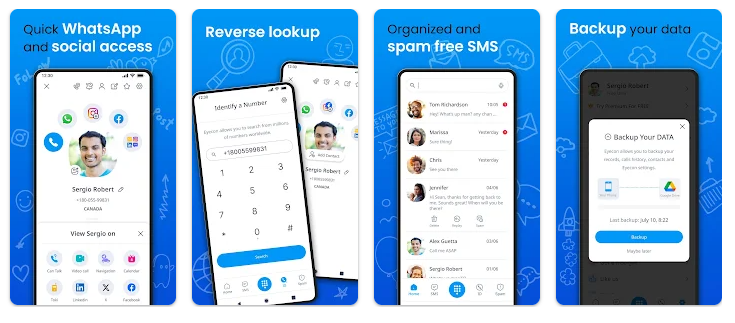
The basic idea is simple. When an unknown number calls, Eyecon can display available information about the caller, including a name and photo when information is available. This can help you decide whether to answer or ignore the call.
The app also provides a visual contact interface and dialer, giving you more information than a standard phone contacts screen.
Key Features
Caller ID: Identify available information about unknown callers before answering an incoming call.
Spam Call Blocking: Eyecon can identify and block unwanted or suspected spam calls, helping reduce repeated interruptions.
Reverse Phone Lookup: Search an unfamiliar number to find available information about the caller.
Spam SMS Blocking: The app also includes features for dealing with unwanted text messages.
Full-Screen Caller ID: Incoming calls can display caller information using a full-screen interface.
Visual Contacts: Contacts can be displayed with photos, making them easier to recognize.
Smart Dialer: Search contacts and make calls through Eyecon’s integrated dialer.
Is Eyecon Caller ID Worth Downloading?
If your main problem is unknown callers and unwanted spam calls, Eyecon is worth considering because it combines caller identification, reverse lookup, and spam protection in one app.
The biggest advantage is being able to check an unfamiliar number before answering. This can be useful when you receive frequent marketing calls, unknown calls, or suspicious numbers.
However, caller identification is not guaranteed for every number. Results depend on the information available for that particular number, so some unknown callers may not be identified.
The free version also contains ads, while Premium provides additional features such as an ad-free experience and unlimited reverse lookups. Users should review the app’s permissions and Google Play data-safety information before using it.
Eyecon Caller ID Download
If you are looking for an unknown caller identification app, spam call blocker, or reverse phone lookup app, Eyecon combines these functions in one place.
Download Eyecon Caller ID & Spam Block from Google Play
Quick FAQ
Can Eyecon identify unknown numbers?
Yes, it can show available information about unknown callers.
Can Eyecon block spam calls?
Yes. Spam call blocking is one of its main features.
Can Eyecon identify every caller?
No. Identification depends on the information available for that number.
Does Eyecon contain ads?
Yes. The free version contains ads, while Premium offers an ad-free experience.
TipZoom Verdict
Eyecon is a useful option for people who want caller ID, spam call blocking, reverse number lookup, and visual contacts in one Android app. Its strongest feature is the combination of unknown-number identification and spam protection, although results can vary between callers.
Final Scorecard
- Caller ID – 9/10: Quickly shows available information about incoming callers.
- Spam Blocking – 8.5/10: Useful for reducing unwanted calls and messages.
- Reverse Lookup – 9/10: Helpful when checking an unfamiliar number.
- Ease of Use – 8.5/10: Calling and caller information are combined in one interface.
- Overall – 8.7/10: A strong choice for identifying unknown callers and managing spam calls.