Want to use two WhatsApp accounts on the same Android phone? Parallel Space is an app-cloning tool that creates a separate space for supported applications, allowing you to sign in with another account.
It can be useful if you want to keep personal and work accounts separate, use different social media profiles, or manage multiple accounts without carrying a second phone.
Testing Setup & Our Experience
We tested the app setup on a Samsung Galaxy A55 5G running Android 15, focusing on app cloning and setting up separate accounts.
The basic process is simple. Open Parallel Space, select a supported application, create its clone, and then sign in using your second account. The original application remains available separately, while the cloned version runs inside Parallel Space.
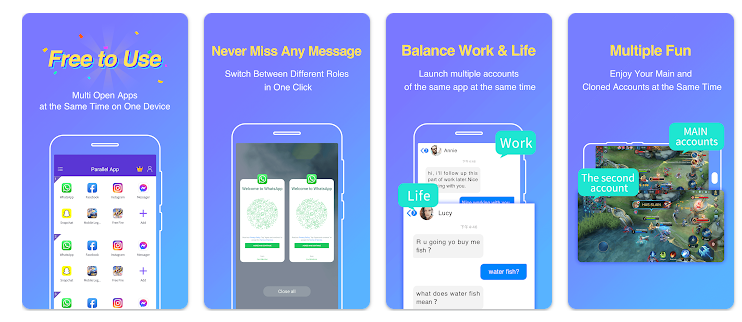
This makes the app particularly useful for people searching for dual WhatsApp, multiple accounts, or an app cloner for Android.
Performance can depend on the phone and the applications being cloned. Running several cloned apps may use additional RAM, storage and battery.
Key Features
Clone Apps: Create separate copies of supported applications without removing the original version.
Dual WhatsApp: One of the main reasons users look for Parallel Space is to run two WhatsApp accounts on one phone, where supported.
Multiple Accounts: Manage separate personal, work, social media or messaging accounts from the same device.
Separate App Space: Cloned applications operate inside Parallel Space while the original app remains on your phone.
Social & Messaging Apps: Supported social networking and messaging apps can be cloned for easier account management.
Is Parallel Space Worth Downloading?
Parallel Space can be useful if you need to clone apps on Android and manage more than one account from a single phone.
It is especially relevant if you are looking for a way to clone WhatsApp, use two accounts, or run multiple social media accounts without switching between logins.
However, cloning applications requires additional system resources. Some apps may not work perfectly inside a cloned environment, and performance can vary depending on your device, Android version and the number of cloned apps.
Before installing Parallel Space, check whether your phone already includes a built-in Dual Apps, App Clone or similar feature. A built-in option may be simpler because it does not require an additional application.
Download from Google Play Store
Quick FAQ
Can Parallel Space run two WhatsApp accounts?
Yes, it can create a separate copy of supported applications for another account.
Can I clone apps other than WhatsApp?
Yes. Supported social, messaging and other applications can be cloned.
Does Parallel Space use extra storage?
Yes. Cloned applications and their data require additional storage.
Can cloned apps affect battery life?
Running multiple app copies can increase RAM, processor and battery usage.
Is it useful for work and personal accounts?
Yes. Separate copies can make managing different accounts more convenient.
TipZoom Verdict
Parallel Space is a practical option for users who need dual WhatsApp, multiple accounts, or an Android app cloner. Its main advantage is convenience, while additional resource usage and app compatibility are the main limitations.
Final Scorecard
- Multiple Accounts – 9/10: Great for managing two or more accounts on one phone.
- Ease of Use – 8.5/10: Simple setup with an easy cloning process.
- App Cloning – 9/10: Useful for creating separate copies of supported apps.
- Performance – 8/10: Works well, but cloned apps can use extra RAM and battery.
- Overall – 8.5/10: A useful choice for users who need dual WhatsApp or multiple app accounts.