Have you ever opened WhatsApp and found “This message was deleted”? WAMR is an Android app designed to save incoming notification content so you can potentially view certain deleted messages and media later.
If you are searching for a deleted WhatsApp message recovery app, deleted message viewer or WhatsApp recovery app, WAMR is designed for this specific problem.
What Is WAMR?
WAMR monitors notifications from supported messaging applications. When a message or media file arrives, it can attempt to save the notification content.
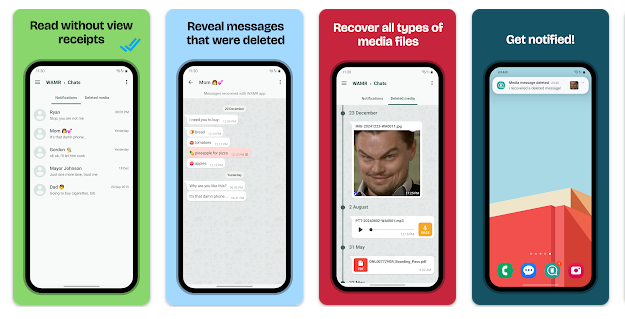
If the sender later deletes the message, WAMR may still have the previously captured content.It is important to understand that WAMR does not directly recover messages from WhatsApp servers. It relies on notification access and must capture the content before it disappears.
Testing Setup & Our Experience
We tested WAMR on a Samsung Galaxy A55 5G running Android 15, focusing on deleted text messages, notification capture and media.
After installation, we enabled notification access and selected the messaging application to monitor. We then sent test messages and checked whether WAMR captured them.
After deleting the test messages from the original chat, we opened WAMR to check whether the captured content was still available.
The setup was straightforward, although results can vary depending on Android settings, battery restrictions and notification behaviour.
Best Features
1. Read Deleted Messages
WAMR can preserve notification content, potentially allowing you to read deleted WhatsApp messages later.
2. Deleted Media
It can attempt to save supported photos, videos, GIFs and other media received through notifications.
3. Notification-Based Recovery
The app captures content before it disappears from the original conversation.
4. Multiple Messaging Apps
WAMR supports several messaging applications, although available features can vary.
Is WAMR Worth Downloading?
If you are searching for a deleted WhatsApp message recovery app, deleted message reader, WhatsApp recovery app or deleted media recovery tool, WAMR is worth trying.
Its biggest advantage is preserving notification-based content when someone deletes a message before you can read it.
However, WAMR cannot recover every deleted message. If no notification was received or the content was not captured, recovery may not be possible. Android battery optimization and notification restrictions can also affect performance.
Because the app uses notification access, review its permissions carefully before enabling it.
Download from Google Play Store
Quick FAQ
Can WAMR read deleted WhatsApp messages?
It can save notification content before a message is deleted.
Can it recover every deleted message?
No. It depends on successfully capturing the notification.
Can it recover deleted photos?
It can attempt to save supported media received through notifications.
Does it require notification access?
Yes. Notification access is essential for its main functionality.
TipZoom Verdict
WAMR is a practical Android utility for users who want to read deleted WhatsApp messages and preserve notification-based media.
During our testing on the Samsung Galaxy A55 5G running Android 15, the setup was straightforward and the notification-based approach was easy to use.
Its main strength is solving a specific problem: checking message content after someone deletes it.
The biggest limitation is that WAMR is not true WhatsApp server recovery. It can only work with content that reaches your notifications and is successfully captured.
For users searching for a deleted WhatsApp message recovery app, deleted message reader or WhatsApp recovery tool, WAMR is worth testing.
Final Scorecard
Ease of Use: 4.4/5
Message Recovery: 4.4/5
Media Recovery: 4.2/5
Reliability: 3.9/5
Overall TipZoom Score: 4.2/5 — A useful deleted-message recovery app for checking notification content after messages are removed.