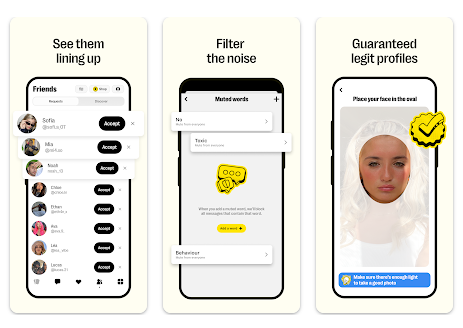
Trying to meet new friends online often turns into a frustrating chore. Most traditional social networks keep you trapped inside your existing social circle, making it surprisingly difficult to find people who actually share your specific interests. If you try to branch out, you are usually met with complex discussion forums, crowded comment sections, or apps that feel far too formal. For anyone who just wants to chat casually, share a hobby, or connect with people globally, the lack of straightforward, conversational options is a constant daily annoyance.
This is exactly where the Yubo application (originally known to many mobile users as Yellow) tries to step in. Developed by Twelve APP, it aims to fix this social gap by shifting the focus entirely toward discovering new relationships through live video rooms and a familiar, casual swiping system. Instead of focusing on accumulating permanent followers or building an artificial profile grid, it positions itself as an open digital hangout spot.
My goal over the last 2 days was to see if the application actually delivers on this promise or if it just adds to the clutter on your device. In this review, I will break down my hands-on experiences, performance measurements, and structural features to help you decide if it is worth your time.
📱 My Phone Testing Setup
To make sure my observations are completely realistic, I tested the application on my primary personal device, a Redmi Note 13 Pro. The phone is running on Android 14 with the HyperOS layout active over the top. During my 2 days of continuous evaluation, I switched naturally between my home Wi-Fi network and standard mobile data networks while running regular multitasking routines like checking emails, streaming audio, and receiving chat notifications in the background.

🎬 Real-World Hands-On Analysis
To thoroughly evaluate how the application handles everyday situations, I focused on 3 specific daily scenarios during my testing window.
Scenario 1: Joining Live Video Chat Rooms
I spent an evening dropping into several public live video chat rooms to check the stability of the live stream feature. The application loaded the video grids relatively quickly, allowing me to view up to nine active participants talking simultaneously. Navigation felt smooth when scrolling past crowded rooms, and the audio stayed synchronized with the video feeds even when my phone switched between different network signal strengths in my house.
Scenario 2: Finding Friends with the Swiping Filter
I spent about thirty minutes using the swipe-based discovery tool to look for people who shared similar tags, such as gaming and music. The layout felt highly responsive as I swiped through different profile cards, instantly loading user bios and interests without freezing the interface. Tapping on a profile to view their uploaded pictures worked smoothly, and text message boxes opened immediately after a mutual connection was made.
Scenario 3: Creating a Custom Group Room
I set up my own public chat room, added custom interest tags, and waited for other online users to join. The interface walked me through the setup process within a few seconds, opening my camera feed and microphone cleanly. As random users dropped into the chat room over a twenty-minute period, the screen layout adjusted its grid automatically without dropping my connection or distorting the microphone audio.
📊 App Permissions & Device Safety
When you first launch and navigate through the application, it triggers several standard Android hardware access prompts on your phone screen. Below is an objective breakdown of the exact permissions I encountered during my 2-day testing window:
| Permission Type | Required? | True Technical Purpose |
| Storage & Device Media | Optional | Requested during my testing window when I attempted to upload a profile picture from my local device storage or save an image from a chat feed. |
| Microphone & Audio Core | Yes | Requested dynamically the moment I tried to join a live video room or send a voice message to a friend so my voice could be broadcasted. |
| Camera Hardware Access | Yes | Requested when I activated the live streaming feature or took a live verification selfie to confirm my profile identity. |
| Network & Wireless Access | Yes | Required continuously by the system to maintain active data connections with live chat servers, update profile swiping feeds, and load messages. |
| Location & Proximity Flags | Optional | Requested during initial profile setup to filter online users and find potential friends who are living within the same country or general geographic area. |
📊 Speed & Everyday Performance

The overall responsiveness of the interface plays a major role in whether an app feels reliable for daily use. Tapping options and switching between the swiping tab, the live streaming feed, and private message windows generally feels snappy, though there are specific moments where data loading causes a slight pause.
Here is the structured layout of my performance observations during the testing period:
| Performance Test | My Real-World Observation |
| Initial Download & Install Time | Under a few seconds on a standard broadband Wi-Fi connection. |
| First Open & Setup Speed | Takes a couple of minutes due to the multi-step identity verification and age selection pages. |
| Menu Smoothness & Scrolling | Fluid scrolling generally, but minor stutters happen when loading high-definition video previews in the live tab. |
| Memory Load & Slowdowns | Average memory load; it does not freeze background apps, but keeping a live video room running makes multitasking slower. |
| Battery Drain While Active | Moderate battery consumption during text chats, which changes to heavy drain during live multi-person video streams. |
| Phone Warmth & Heating | Mildly warm to the touch during normal swiping, turning into noticeable heating after twenty minutes of live video streaming. |
| Background Behavior Upon Exit | Pauses cleanly when swiped away, but continues sending push notifications for new messages unless manually closed. |
| Stability & Bug Resilience | Minor visual glitches occurred where profile text layers briefly overlapped after turning the screen sideways. |
💾 Storage Space & Cache Build-Up
The application package requires an initial download size of exactly 118 MB from the Google Play Store storefront. However, once installed on the disk, the base application takes up a final expanded space of 264 MB on my device storage before accounting for personal user data or media caches.
During my 2 days of testing, I noticed that the app data folder fills up with temporary cache files quite quickly. Every time you scroll through live video feeds or view high-definition profile pictures, the phone saves these assets locally to speed up future loading times. After just a weekend of light use, the cache grew by an additional 45 MB. If you are using a device with limited storage space, you will need to open your phone settings menu and clear out this cache manually every few weeks to prevent it from consuming your available disk space.
🔋 Battery Life & Daily Warmth
Battery consumption varies wildly depending on what features you are actively using inside the application. When the phone was sitting on standby on my desk, the background processes caused no noticeable battery drop, showing that the system idles quietly when you are not interacting with it. Simple text chatting and swiping through profile cards also felt lightweight, consuming a normal amount of power over an hour of casual use.
However, entering a live video room with up to nine streaming participants changes the situation completely. Because your screen stays active, your camera remains turned on, and your phone has to download multiple live video feeds simultaneously, the processor area becomes noticeably warm to the touch within fifteen minutes. This heavy workload leads to rapid battery wear, making it a feature best used when you are near a wall charger.
tipzoom.in Quick Tip: To save your battery while browsing, head into your account settings and disable the auto-play video previews for the live rooms list. This stops your phone from constantly downloading live video feeds before you even tap on them.
🌐 Network Needs & Data Usage
If you are using a capped or metered mobile data plan, you need to monitor your usage carefully while running this application. The network requirements scale directly based on your active features:
- Initial Setup Access Cost: High data need initially due to the compulsory profile creation steps, loading safety guidelines, and completing image-based verification checks.
- Daily Usage Data Footprint: Text messaging is incredibly light, but browsing the live streaming tabs uses substantial data as the app pulls live thumbnails and video data.
- Additional Asset Downloads: The application runs almost completely from the base package, meaning it does not force large secondary downloads after installation.
- Offline Support: Zero offline functionality exists; if you lose your internet connection, the app displays a loading error and prevents you from reading saved chats or viewing profiles.
🛡️ Monetization & User Security Review
According to the app’s Play Store Data Safety section, the developer states that no user data is shared with third parties, though certain data types like location, personal info, and device IDs may be collected for application functionality. The registration process is strict; the software forces full profile account registration, meaning there is no guest access option available for casual browsing. You must provide a verified phone number to receive an SMS code, along with your name, birthdate, and an identity selfie to ensure safety guidelines are followed.
The monetization strategy relies heavily on an optional premium upgrade model. While the application is free to download and use for basic chatting, it features noticeable payment blocks for premium tools. You will frequently encounter pop-ups encouraging you to purchase “Pixel” currency or subscribe to weekly plans to unlock extra visibility, see who liked your profile, or undo an accidental left swipe. On the positive side, because it pushes these premium upgrades, the interface is completely free of aggressive third-party programmatic inline banner ads or full-screen countdown commercials during normal navigation.
🛠️ Mistakes I Noticed During Testing
While the overall interface is clean, I ran into 3 specific layout bugs and design flaws during my 2 days of testing:
- SMS Verification Delay: During my initial registration, the system failed to send the verification SMS text on the first two attempts. I had to wait around 2 minutes for the countdown timer to expire before requesting it a third time, which finally went through.
- Profile Text Clipping: When opening profiles with long text biographies, the layout failed to generate a proper scrolling box. The text clipped directly into the bottom navigation elements, making the final couple of sentences impossible to read.
- Audio Output Routing Glitch: When switching from a live video room to a private message thread while wearing wireless earphones, the application briefly glitched and routed the audio output back through the main phone speaker for a few seconds before correcting itself.
✨ Main Features Explained
- Swipe Discovery: A quick, gesture-based profile card system that lets you swipe right to connect with new people or swipe left to skip to the next profile based on shared interest tags.
- Multi-Guest Live Rooms: Public or private video chat streams where up to nine users can broadcast their video and audio at the same time, while an unlimited number of text viewers watch and comment.
- Interest Tags system: A filtering layout that allows you to attach specific hobbies (like anime, soccer, or music) to your card, ensuring you match with people who actually care about the same topics.
- Real-Time Identity Verification: A built-in security tool that cross-checks your profile pictures with a live 3D selfie to confirm you are a real person, reducing the presence of fake automated profiles.
- Voice Messaging Integration: An updated chat feature that lets you record and send quick audio notes within private chat threads when typing out long stories feels too tedious.
⚖️ Pros & Cons (The Good & Bad)
What I Liked
- No Third-Party Banner Ads: The decision to avoid programmatic pop-up ads makes the scrolling interface feel much cleaner and less distracting than competitor apps.
- Active Community Base: Finding active live video rooms is incredibly easy at any time of day, offering genuine global variety.
- Clean Interface Flow: The bottom navigation tabs make it simple to bounce between swiping, live streaming, and private text inbox folders without getting lost.
What Could Be Better
- Expensive Premium Upgrades: Many basic social features, like seeing who viewed your profile, are locked tightly behind steep weekly subscription walls.
- Heavy Battery Consumption: The live video streaming layout drains device power rapidly and causes noticeable device warmth over extended periods.
- Strict Registration Barriers: The lack of a simple guest mode means you cannot check out the local community vibes without giving up personal registration details first.
⚔️ Industry Comparison (The Competitor Matrix)
| App Name | Interface Style | Primary Advantage | Pricing Structure |
| Yubo | Swipe card grids & Live multi-video rooms | Built-in live group video streaming rooms | Free base version with premium weekly upgrades |
| Bumble BFF | Strict single-profile swiping cards | Highly detailed profile prompts for one-on-one friendships | Free base version with premium spotlight purchases |
| Ablo | Random global video matching | Instant text translation during live video chats | Free with coin purchases for country filters |
| Meetup | Group event bulletin boards | Focuses on organizing physical, real-world local gatherings | Free for attendees; subscription fees for event organizers |
👥 Audience Recommendations
Who Should Install It?
- Younger Social Streamers: Excellent for mobile phone fans who prefer live video communication over basic text messaging.
- Global Hobby Explorers: Ideal if you want to find international friends who share niche interest tags like specific video games or music genres.
- High-Performance Device Users: Works best if you own a phone with good battery capacity and a modern processor that handles multi-person video decoding easily.
Who Should Skip It?
- Privacy-First Browsers: Skip this app if you dislike completing mandatory identity verification checks or sharing phone numbers just to view an app.
- Offline or Low-Data Users: Not suitable if you frequently travel through poor network areas or operate on highly restrictive cellular data plans.
- Purely Ad-Free Seekers on a Budget: If you want to use advanced sorting features without being constantly asked to pay for weekly subscriptions, the layout will feel too restrictive.
❓ Common FAQs
Do I need a continuous internet connection to read my old chat messages?
Yes, the application requires an active network connection to access your account data. If your phone goes completely offline, the system locks the interface and prevents you from loading past conversations or viewing friend profiles.
Can I use the app without uploading a real photo of myself?
No, the platform utilizes a mandatory identity safety framework during setup. You must upload a clear profile picture and complete a live facial scan, or your account will face immediate restriction from the platform.
How do I completely stop the application from running in the background?
Swiping the application away from your recent apps menu pauses active operations, but it may still process background notifications. To stop it entirely, you must navigate to your Android system settings, select the app list, and tap the “Force Stop” option.
# Official Store Access
Disclaimer: tipzoom.in is an independent review blog. All application names, logos, and store links are the property of their respective developers and official storefront platforms.
🏆 The tipzoom.in Final Verdict
Yubo is a highly responsive and active platform tailored perfectly for mobile users who want to find new friendships through live video interaction rather than stagnant profile grids. If you enjoy live streaming, group hangouts, and possess a phone that can handle the heavy battery drain of multi-stream video, it offers real value. However, if you are looking for a simple, quiet text platform, or want to avoid constant pop-ups prompting you to buy premium upgrades, you should skip it completely and look into more traditional messaging alternatives.
⭐ Final Scorecard
- Ease of Use [4/5]: The swipe layout and tab navigation are intuitive, though the detailed registration steps slow down the initial experience.
- Speed & Performance [3.5/5]: Menus open quickly, but live video rooms cause noticeable device warmth and heavy battery wear.
- Features [4/5]: The combination of interest tags, live video grids, and voice notes provides a highly functional communication toolkit.
- Privacy & Safety [3.5/5]: Mandatory face verification helps keep out automated bots, but the app collects several data types according to store logs.
- Value for Money [3/5]: The free version covers the absolute basics, but locking profile views and un-swiping behind weekly premium upgrades feels overly restrictive.
- Overall tipzoom.in Score: [3.6 / 5]