Is your phone speaker volume too low when listening to music, watching videos, playing games, or using headphones? Super Loud Speaker Booster is an Android app designed to increase audio volume beyond the normal device level.
The app can boost sound for your phone speaker and headphones and includes simple controls for increasing volume. According to the app listing, it can boost volume up to 200% without requiring root access.
Testing Setup & Our Experience
We focused on the app’s main purpose: increasing audio volume and making quiet sound easier to hear.
The concept is straightforward. Open the app, adjust the volume booster level, and use it while listening to music, watching videos, playing games, or using headphones.
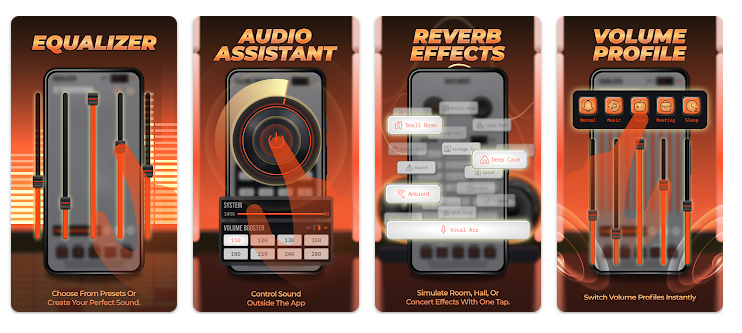
This type of app can be useful when your phone’s normal maximum volume feels insufficient. However, actual results depend on your phone, speaker, headphones, Android version, and the audio being played.
Key Features
Volume Booster: Increase your phone’s audio volume beyond the normal system level.
Up to 200% Volume: The app advertises the ability to boost supported audio up to 200%.
Speaker Booster: Make sound louder when using your phone’s built-in speaker.
Headphone Volume Booster: Increase audio output when using compatible headphones.
Music Booster: Improve volume while listening to songs and other audio content.
Video Sound Booster: Make videos easier to hear when the original audio is too quiet.
Game Audio: Use the volume booster while playing mobile games.
Simple Controls: Adjust the sound level quickly without complicated settings.
No Root Required: The app does not require rooting your Android phone.
Is Super Loud Speaker Booster Worth Downloading?
If you are searching for a volume booster app, speaker booster, sound amplifier, headphone volume booster, or way to make your phone louder, this app is worth considering.
Its biggest advantage is solving a very simple problem: your phone volume is not loud enough.
This can be particularly useful when watching videos with quiet audio, listening to podcasts, playing games, or using headphones that produce lower-than-expected volume.
However, there is an important limitation: a volume booster cannot magically improve poor-quality hardware. Increasing volume too aggressively can cause distortion, crackling, or poor sound quality.
Very high volume can also potentially damage phone speakers, headphones, and your hearing. It is better to increase the volume gradually and stop if the sound becomes distorted or uncomfortable.
How to Use a Volume Booster
- Install and open Super Loud Speaker Booster.
- Start playing music, a video, or other audio.
- Adjust the booster gradually.
- Listen for distortion or crackling.
- Reduce the boost if the sound quality becomes poor.
For headphones, avoid using maximum volume for long periods.
Super Loud Speaker Booster Download
If you want to make your phone louder, boost speaker volume, increase headphone sound, or improve quiet audio, Super Loud Speaker Booster is worth trying.
Download Super Loud Speaker Booster from Google Play
Quick FAQ
Can this app make my phone louder?
Yes. It is designed to boost supported audio beyond the normal device volume.
Can I use it with headphones?
Yes. The app is designed to support headphone audio boosting.
Does it require root access?
No. The app does not require rooting your Android phone.
Can very high volume damage my speakers?
Yes. Excessive amplification can cause distortion and may damage speakers or headphones.
TipZoom Verdict
Super Loud Speaker Booster is a useful option for users searching for a phone volume booster, speaker booster, or headphone sound amplifier. Its simple purpose makes it easy to understand and potentially useful when normal phone volume is too low.
Final Scorecard
- Volume Boosting – 9/10: Designed specifically to increase audio output.
- Ease of Use – 9/10: Simple controls make boosting volume straightforward.
- Compatibility – 8.5/10: Can be useful with speakers and compatible headphones.
- Sound Quality – 8/10: High boost levels may cause distortion depending on the device.
- Overall – 8.6/10: A useful app for making quiet phone audio louder.