Looking for a free photo editing app with more than basic filters and cropping? Snapseed, developed by Google, offers professional editing tools, RAW support, selective adjustments, portrait editing and creative effects.
Google Play lists Snapseed with 100M+ downloads and more than 1.7 million reviews. It is also available without subscriptions, in-app purchases, ads or watermarks.
What is Snapseed?
Snapseed is a powerful photo editor designed for both casual users and people who want greater control over their images.
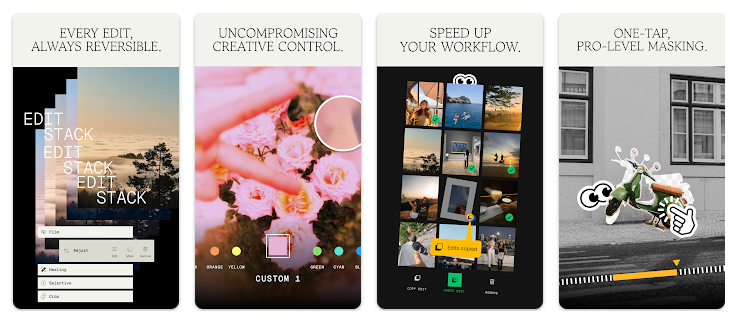
You can make basic adjustments such as brightness, contrast, saturation, cropping and white balance, while advanced tools allow selective editing, curves, healing, portrait adjustments and RAW processing.It can be useful for improving Instagram photos, portraits, travel pictures and everyday smartphone photography.
Testing Setup & Our Experience
We tested Snapseed on a Samsung Galaxy A55 5G running Android 15, using portrait photos, outdoor images and low-light pictures.
We first tested basic adjustments such as brightness, contrast, saturation and white balance. We then used the Healing, Selective, Portrait, Lens Blur and film-effect tools.
The editing controls were responsive and provided precise adjustments without making basic editing difficult. We also tested multiple edits on the same image and used the undo and redo functions to compare changes.
We tested RAW editing with a compatible image as well. Performance can vary depending on the image resolution and phone hardware, but normal editing was smooth during our testing.
Best Features
1. Professional Photo Editing
Snapseed provides more than 30 tools and filters for editing photographs, from simple corrections to advanced adjustments.
2. Selective Editing
The Selective tool allows you to adjust specific areas of an image instead of applying the same changes to the entire photo.
3. Healing Tool
The Healing feature can remove certain unwanted objects and distractions from photographs.
4. Portrait & Background Blur
Portrait tools can enhance faces, while Lens Blur can create a softer background effect.
5. RAW Photo Editing
Snapseed supports compatible RAW files as well as JPG images, making it useful for photographers who want more editing control.
6. Creative Effects
Film-style effects, grain, blur and other creative tools can give photos different visual styles.
App Details
- Category: Photography
- Developer: Google LLC
- Rating: 4.1/5
- Downloads: 100M+
- Reviews: 1.7M+
- Price: Free
- Ads: No
- Watermark: No
Is Snapseed Worth Downloading?
If you are searching for a free photo editor, professional photo editing app, RAW photo editor or photo enhancer, Snapseed is worth considering.
Its biggest advantage is that advanced editing features are available without a subscription, advertisements or watermarks.
It is particularly useful for social media photos, portraits, travel photography and everyday image enhancement.
However, Snapseed is primarily a photo editor. If you need extensive graphic design, advanced text layouts or poster creation, another app may be more suitable.
Download from Google Play Store
Quick FAQ
Is Snapseed free?
Yes. It is available without subscriptions or in-app purchases.
Can Snapseed edit RAW photos?
Yes. It supports compatible RAW images along with JPG files.
Can I remove objects from photos?
Yes. The Healing tool can remove certain unwanted elements.
Does Snapseed add a watermark?
No. Edited photos do not require a Snapseed watermark.
TipZoom Verdict
Snapseed is a strong choice for users who want a professional photo editor without a monthly subscription.
During our testing on the Samsung Galaxy A55 5G, basic editing was easy while advanced tools provided considerably more control. The combination of selective editing, healing, portrait adjustments, RAW support and creative effects makes it suitable for both casual photography and more detailed editing.
For users searching for a free Android photo editor, photo enhancer, RAW editor or professional photo editing app, Snapseed is one of the better options to try.
Final Scorecard
Ease of Use: 4.5/5 — Powerful but manageable controls.
Editing Features: 4.9/5 — Excellent range of tools.
Performance: 4.6/5 — Smooth during testing.
Value: 5/5 — Free without ads or watermarks.
Overall TipZoom Score: 4.7/5 — A powerful free photo editing app for Android with advanced editing tools, RAW support and creative effects.