Phone Cleaner for WhatsApp – Best App To Clean Junk In Whatsapp

If you use WhatsApp every single day, you already know the nightmare of the disappearing storage space. Every morning, family groups flood your phone with heavy morning greetings, videos, and multi-megabyte audio notes. Over a few weeks, these tiny files quietly pile up in hidden folders inside your device. Your phone storage fills up to the brim, and you suddenly notice that your entire device is lagging when you try to open the camera or swap between apps. Hunting down these buried files manually using a standard file manager takes ages because you have to dig through dozens of confusing media folders just to find what is taking up space.

This is exactly where the Cleaner for WhatsApp app comes into the picture. Built specifically to tackle this exact daily annoyance, this utility acts as a specialized visual dashboard that sifts through your device storage to pull out every single piece of media WhatsApp has saved. Instead of forcing you to hunt down hidden folders, it groups everything neatly so you can wipe out junk files in just a few taps. I wanted to see if it actually makes this chore easier or if it just adds another layer of clutter to my phone.

📱 My Phone Testing Setup

To get a completely accurate picture of how this utility handles real-world cleanup tasks, I installed it directly onto my personal Redmi Note 13 Pro. My device is running on Android 14 with the HyperOS layout on top, and I kept it connected to a mix of my home Wi-Fi network and standard mobile data while moving around. I monitored the app closely across a 2-day testing window under my normal daily multitasking routines, letting my WhatsApp account pile up with new group messages, images, and voice notes so I could observe exactly how the tool handles a clogged storage setup in real time.

🎬 Real-World Hands-On Analysis

Scenario 1: Clearing Out Old Voice Notes

During my testing window, I wanted to tackle the massive pile of audio clips that accumulate from regular voice chats. I opened the audio section of the app, and it immediately listed out dozens of individual voice recordings that I had completely forgotten about. Tapping through the list allowed me to play the clips directly inside the interface to check what they were before hitting delete. In less than 2 minutes, I selected and wiped out over fifty old voice notes that were just taking up space, and the app processed the bulk removal without any stutters.

Scenario 2: Hunting Down Duplicate Images

Forwarded images are the biggest storage hogs on my phone because the same meme often gets sent to three or four different group chats. I used the app’s dedicated duplicate file finder during my second day of testing to see if it could flag these identical files. The layout presented the matching images side by side, making it easy to see which pictures were repeated across my device memory. I was able to check the boxes for the unnecessary copies and delete them all at once, which immediately freed up room without touching my original photos.

Scenario 3: Sorting Through Received Videos By Size

WhatsApp videos can drain your phone storage faster than anything else, so I put the app to work sorting my received videos. I opened the video cleanup module and sorted the files by size so that the largest, heaviest video clips appeared right at the top of my screen. This allowed me to immediately spot a couple of long video files that I had already watched weeks ago. The interface let me tick those specific large files and clear them out in a few seconds, preventing my phone from running out of disk space.

📊 App Permissions & Device Safety

When you open an app designed to clean up files, it naturally needs to interact with your phone’s storage system to find what needs to be deleted. During my 2-day testing window, I paid close attention to the exact pop-up permission prompts that appeared on my Redmi screen to make sure the app wasn’t asking for access to components it didn’t actually need to touch.

Permission TypeRequired?True Technical Purpose
Storage & Device MediaYesIt requested this permission during my testing window so it could scan the internal storage folders where WhatsApp saves images, videos, and audio.
Microphone & Audio CoreNoIt did not request this permission during my testing window because it does not record any live audio or voice inputs.
Camera Hardware AccessNoIt did not request this permission during my testing window since it has no features for taking photos or recording video.
Network & Wireless AccessYesIt requested network access during my testing window to load internal elements and display the programmatic advertisements built into the interface.
Location & Proximity FlagsNoIt did not request location permissions during my testing window because tracking your physical movements is completely unnecessary for file cleanup.

📊 Speed & Everyday Performance

The general usability of a utility app depends entirely on how quickly it loads your files and how responsive the buttons feel when you are trying to clean things up quickly. I monitored how this application behaved during regular usage sessions to see if it caused any slowdowns on my phone.

Performance TestMy Real-World Observation
Initial Download & Install TimeUnder a few seconds on my home Wi-Fi connection due to the compact package size.
First Open & Setup SpeedUnder 10 seconds, moving straight past the introductory screen directly into the main dashboard.
Menu Smoothness & ScrollingFluid scrolling when moving through small folders, though I noticed minor visual stutters when loading lists with hundreds of photos.
Memory Load & SlowdownsFeels lightweight on background apps and did not cause my other active apps to close down or reload.
Battery Drain While ActiveLow battery drain during standard scanning tasks, showing no unusual power drops in my battery menu.
Phone Warmth & HeatingRemains completely cool to the touch during regular use, even when deleting multiple files at once.
Background Behavior Upon ExitPauses cleanly when you swipe away from it, meaning it does not hang around actively draining your system resources.
Stability & Bug ResilienceMostly stable, though the interface froze once when I tried to delete a massive batch of heavy video files simultaneously.

💾 Storage Space & Cache Build-Up

When looking at the official store listing, the initial download size for Cleaner for WhatsApp is incredibly small, taking up just about 4.6 MB of data to download. After installation on my Redmi Note 13 Pro, the base app size expanded slightly to around 13.5 MB on my device disk space. This tiny footprint is a huge plus for anyone who is already struggling with a completely full phone because you do not need to delete your existing apps just to make room for this utility.

However, as you use the tool to scan through large volumes of media files, its internal cache folder will inevitably begin to accumulate data. During my 2 days of heavy use, the cache grew by a few extra megabytes as it cached image thumbnails to show them on my screen. Based on what I saw in my system settings menu, this cache build-up is relatively modest, but if you have thousands of WhatsApp media items, I highly recommend going into your phone’s app management settings every couple of months to clear out the cache manually to keep your storage pristine.

🔋 Battery Life & Daily Warmth

Throughout my 2-day evaluation period, the app proved to be very gentle on my phone’s battery life. Because it does not run continuous background syncing jobs or track your GPS coordinates in the background, it only consumes power when you actively open the dashboard to run a cleanup scan. Even when I spent roughly fifteen minutes sorting through old images and playing back voice notes to see what could be thrown away, my phone’s system battery graph barely registered the power draw.

The phone processor area remained perfectly cool during these cleaning sessions. The only time the back of the device felt mildly warm to the touch was when I pushed the tool to scan and wipe out a massive archive of heavy video files all at once, which forces the device storage controller to work a bit harder. Outside of those heavy delete actions, it operates quietly without causing performance degradation or overheating issues.

tipzoom.in Quick Tip: To keep the app from drawing extra battery power, avoid leaving it open on the media thumbnail preview screens for long periods. Close the app completely using your phone’s recent apps menu as soon as you finish your storage cleanup session.

🌐 Network Needs & Data Usage

You do not need an expensive high-speed data plan to make use of this tool, as its core file-sorting features operate entirely on your local device storage. Here is how its network data footprint looks in daily practice:

  • Initial Setup Access Cost: Very minimal data needed for the setup phase since there are no lengthy profile setup requirements or heavy account registrations to complete.
  • Daily Usage Data Footprint: It uses a small amount of mobile data during active sessions solely to load the programmatic banner ads that pop up at the bottom of the menus.
  • Additional Asset Downloads: Completely self-contained; it runs entirely out of the base package and does not force you to download extra internal plugins later.
  • Offline Support: The file scanning, sorting, duplicate discovery, and media deletion features run completely offline, meaning you can clean your phone even without an active internet connection.

🛡️ Monetization & User Security Review

Data boundaries are quite straightforward here. Since no account is required to use the utility, you don’t need to provide your email address, phone number, or personal details during setup. You simply open it up and start cleaning. According to the app’s Play Store Data Safety section, the developer states that no user data is collected or shared with third parties. This gives peace of mind since your personal WhatsApp conversations and phone media remain local to your own device storage during the entire scanning process.

The monetization strategy relies heavily on in-app advertisements. Because the app is completely free to use, you will see programmatic inline banner ads at the bottom of the screen, along with full-screen pop-up ads that appear when you switch between different media categories. While these advertisements can feel a bit intrusive when you are trying to move quickly between menus, they are the reason the developer can offer the full cleanup toolset without demanding an upfront premium subscription payment or enforcing strict paywalls.

🛠️ Mistakes I Noticed During Testing

While the utility does a great job of sorting out junk, my 2 days of hands-on testing revealed three specific design flaws and layout bugs that modern users should look out for:

  1. Thumbnail Loading Lag: When I opened the images category, the app took an unusually long time to generate the visual thumbnails for older photos. I had to wait on a blank screen for several seconds before I could actually see what the pictures were, which slows down the manual selection process.
  2. Accidental Ad Taps: The full-screen pop-up ads sometimes appear instantly right as you are about to tap a media checkbox. On two separate occasions, this sudden loading caused me to accidentally tap on an advertisement link instead of selecting the file I wanted to delete.
  3. Bulk Deletion Freeze: When I selected a massive collection of over two hundred audio files and tried to delete them all in a single batch, the interface became completely unresponsive and froze for a brief moment before it finally finished clearing out the files.

✨ Main Features Explained

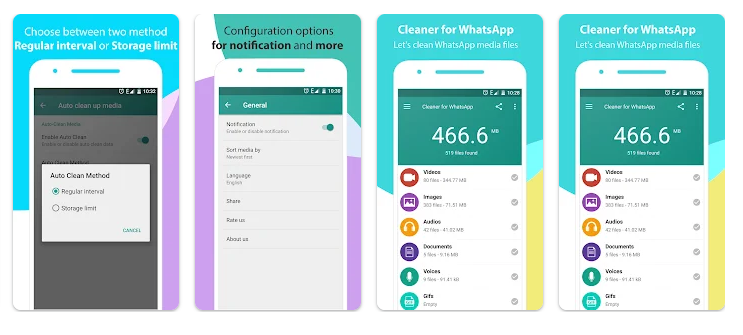
  • Categorized Media Dashboard: The app automatically divides your WhatsApp data into neat, isolated buckets for Images, Videos, Audio, Voice Notes, Documents, and Wallpapers. This allows you to target specific types of junk files immediately without having to look through everything at once.
  • Duplicate File Locator: It scans your WhatsApp directories specifically to find identical photos or videos that have been saved multiple times. It shows these files side-by-side so you can wipe out the redundant copies and save space.
  • Internal Audio & Video Player: You can preview videos and listen to voice notes directly inside the application interface before deleting them. This ensures you never accidentally erase an important family message or a clip you wanted to save.
  • Size-Based Sorting Filter: The interface allows you to sort all your files by their physical disk size. This is incredibly helpful because it lets you bubble the absolute heaviest media items straight to the top of your list for immediate removal.
  • One-Tap Storage Purge: For users who simply want to wipe the slate clean, it features a quick selection system that lets you check entire categories of junk and erase them all with one tap.

⚖️ Pros & Cons (The Good & Bad)

What I Liked

  • The initial download package is incredibly small and takes up almost no space on your device.
  • The interface is very simple and easy to understand, even for people who aren’t tech-savvy.
  • It lets you listen to voice notes before deleting them so you don’t lose important memories.

What Could Be Better

  • The full-screen advertisements pop up quite frequently when moving between different folders.
  • The app can experience brief stuttering or freezing when processing very large batches of files.
  • There is no built-in search bar to look for specific file names within the document clean-up list.

⚔️ Industry Comparison (The Competitor Matrix)

App NameInterface Layout StylePrimary Feature AdvantagePricing Structure
Cleaner for WhatsAppClean, category-based grid menusExcellent local duplicate photo matching and audio previewingFree with ad support
Files by GoogleFull system file manager layoutCleans all phone apps, not just WhatsApp media filesCompletely free, no ads
CCleaner MobileSystem optimization dashboardComprehensive RAM clearing and deep cache cleaning toolsFree with premium upgrade options

👥 Audience Recommendations

Who Should Install It?

  • Owners of Budget Phones: If your device only has 32GB or 64GB of internal storage, this tool is excellent for keeping your limited space from filling up with WhatsApp junk.
  • Active Group Chat Members: People who belong to multiple active family or work groups that receive hundreds of forwarded images and morning greetings every single week.
  • Casual Users: Anyone who wants a simple, straightforward button layout to clean their chat media without dealing with complicated system settings.

Who Should Skip It?

  • Ad-Averse Users: If you absolutely cannot stand full-screen pop-up advertisements appearing while you work, you will find this app’s monetization layout annoying.
  • Users Needing Full Phone Cleaning: If you need a tool to clean up your web browser history, system cache, and other social media apps, this WhatsApp-only utility will feel too limited.

❓ Common FAQs

Do I need to root my Android phone to use this cleanup tool?

No, the app works perfectly on standard, unrooted devices because it only accesses the public media folders that WhatsApp creates on your standard internal storage storage card.

Will using this app accidentally delete my actual chat text conversations?

No, this utility is built exclusively to manage and delete media files like photos, videos, and voice clips; it cannot touch or erase your actual text message histories or chat logs.

Can I use this application to clean up files if I am completely offline?

Yes, the entire scanning, sorting, and file deletion process happens locally on your phone’s memory chip, so it functions perfectly even when you have no internet connection.

## Official Store Access

Independent Editorial Disclaimer: tipzoom.in is a completely independent technology review platform. We are not affiliated with the developers of this app, and the direct store options provided below point to the official, verified application marketplaces.

🏆 The tipzoom.in Final Verdict

Cleaner for WhatsApp is a highly practical, focused utility that does exactly what it says on the tin. If you are constantly running out of phone storage space because your family group chats flood your device with unwanted memes, videos, and voice notes, this app provides a simple and incredibly lightweight way to regain your disk space. However, if you want a completely ad-free experience or need an all-in-one tool to clean your entire phone system, you should look elsewhere. For the average user looking for a quick, free storage fix, it is well worth a download.

⭐ Final Scorecard

  • Ease of Use [4.5/5]: The grid layout is incredibly straightforward, making it easy for anyone to sort media without navigating complex menus.
  • Speed & Performance [3.8/5]: While scans are generally quick, the interface can stutter slightly when loading massive image galleries or processing large file batches.
  • Features [4.0/5]: The built-in duplicate finder and the ability to preview voice notes add great real-world value to the cleaning process.
  • Privacy & Safety [4.2/5]: It runs without forcing any account creation or profile sign-ups, keeping your personal contact details safe from collection.
  • Value for Money [4.0/5]: It costs absolutely nothing to use the full toolset, though you do have to deal with frequent full-screen pop-up ads.
  • Overall tipzoom.in Score: 4.1 / 5