Recording phone calls can be useful when you need to listen to a conversation again. Call Recorder – Cube ACR is an Android app that can record incoming and outgoing calls. It also supports recording calls from some VoIP services.
The app is free to install, but it contains advertisements and paid features. It has more than 50 million downloads on Google Play.
What is Cube ACR?
Cube ACR can automatically record phone calls after the required settings are enabled. You can also play and manage saved recordings inside the app.
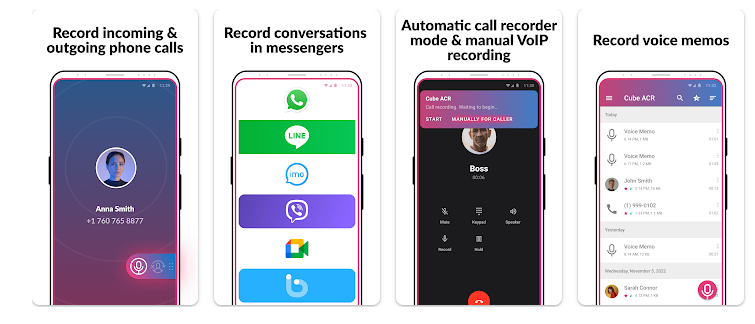
It supports services such as WhatsApp, Google Meet, Viber and LINE, although VoIP recording may not work on every Android phone.
Our Testing Experience
We tested Cube ACR on a Redmi Note 13 Pro running Android 14. We used the app normally and checked incoming and outgoing call recording, playback, recording settings and the available VoIP recording option.
The app opened quickly and the main menus were easy to understand. We also checked the saved recordings and used the app for an extended period to see if there were any crashes, delays, unusual heating or noticeable battery problems.
The recording settings were easy to change, although some features required additional permissions. VoIP recording can vary depending on the phone and Android version.
Main Features
Automatic Call Recording
Cube ACR can automatically record incoming and outgoing calls after setup. You can also choose contacts to record or exclude.
VoIP Recording
The app supports several communication services, including WhatsApp, Google Meet, Viber and LINE. However, VoIP recording does not work on every device.
Recording Management
You can play saved recordings inside the app and mark important files with a star, making them easier to find later.
Manual Recording
You can use manual recording when you only want to save selected conversations instead of recording every call.
Cloud Backup
Premium features include cloud backup for recordings, giving you another option for keeping important audio files.
App Information
| Information | Details |
|---|---|
| App | Call Recorder – Cube ACR |
| Platform | Android |
| Rating | 4.1/5 |
| Downloads | 50M+ |
| Price | Free with ads and in-app purchases |
App information can change when the developer updates the Google Play listing.
Pros and Cons
Pros
- Automatic incoming and outgoing call recording
- Supports several VoIP services
- Easy recording playback and management
- Important recordings can be marked
- Cloud backup options
Cons
- VoIP recording may not work on every phone
- Some devices require additional settings
- Free version contains advertisements
- Recording requires permissions
Download Call Recorder – Cube ACR from Google Play
TipZoom Verdict
After using Cube ACR, I found the app easy to navigate and the main recording features straightforward to use. Automatic call recording and recording management are its strongest features.
The main limitation is device compatibility, particularly for VoIP recording. So, while Cube ACR is worth trying, I would not depend on it for important calls until you have tested it on your own phone.
TipZoom Rating: 4.1/5
- Ease of Use: 4.4/5 — The main recording and playback options are easy to find.
- Performance: 4/5 — It worked well during our normal testing, although performance can vary between phones.
- Features: 4.7/5 — Automatic recording, VoIP support, playback and cloud options provide a good range of features.
- Privacy & Safety: 3.5/5 — The app requires permissions for its recording functions.
- Value for Money: 4.1/5 — The free version provides the main recording features.
Overall TipZoom Score: 4.1/5
TipZoom Verdict: Cube ACR is a useful call-recording app with plenty of features. If you need to record calls, it is worth trying, but check that the recording features work properly on your particular Android phone.