Accidentally deleting an important photo or video can be frustrating. Dumpster is an Android app designed to work like a recycle bin and help users restore recently deleted files.
It can back up and restore photos, videos, apps and other files, making it useful for people who want an extra layer of protection against accidental deletion.
Dumpster is a file recovery and recycle-bin app from Baloota. It is designed to back up recently deleted files so users can restore them later.The main recovery features do not require root access. According to Google Play, the app supports photos, videos, apps and other files.
My Testing Setup
For this review, I tested Dumpster on a Redmi Note 13 Pro running Android 14 with HyperOS. I focused on normal everyday use, including deleting and restoring photos and videos, checking the app interface, and looking at its storage and recovery options.
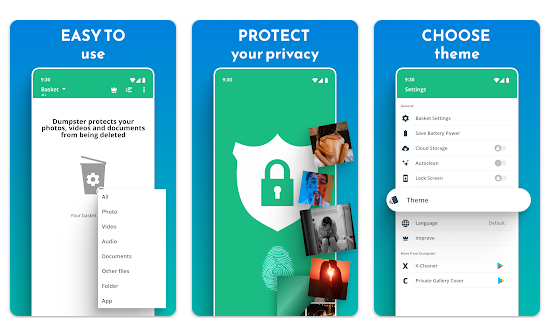
Best Features of Dumpster
1. Android Recycle Bin
Dumpster gives Android users a recycle-bin style feature. Deleted files can remain available in the app so you can restore them when needed.
2. Photo and Video Recovery
Photos and videos are among the main types of files supported. This can help when you accidentally delete an important picture or video.
3. Deleted App Recovery
The app can also keep backups of deleted applications, giving users another way to restore apps they removed.
4. Cloud Backup
Premium users can use cloud storage to keep deleted files backed up.
5. App Lock
The premium version includes an app-lock feature that can protect files stored in Dumpster with a four-digit access code.
App Rating, Downloads and User Feedback
The Google Play listing currently shows a rating of around 4.3/5 from more than 7 lakh reviews and 5Cr+ downloads. The app contains advertisements and in-app purchases. It was updated on March 2, 2026.
User feedback is mixed. Some users report successful photo recovery, while others complain about unsuccessful recovery, advertisements, subscriptions and customer support.
Other Similar Apps
DiskDigger is a popular alternative focused on deleted-file recovery. It offers scanning tools for photos and other files, with deeper recovery options on rooted devices.
Deleted Photo Recovery App is another option focused mainly on recovering deleted images.
Should You Download Dumpster?
Main Advantages
- Simple recycle-bin style recovery
- Supports photos and videos
- Main features work without root
- Premium cloud backup and app lock
Main Disadvantages
- Free version contains advertisements
- Recovery is not guaranteed
- Some features require premium
Dumpster is more useful as a preventive safety net than as a tool for recovering files permanently deleted before installation. Installing it before an accident gives it a better chance of protecting deleted files.
Download Dumpster from Google Play
Quick FAQ
Is Dumpster free?
Yes. It is available with advertisements and in-app purchases. Some features, including cloud storage, require premium.
Does Dumpster require root access?
No. The developer says its main backup and recovery functions work without root access.
Can Dumpster recover deleted photos?
Yes. Photo and video recovery are among its main functions.
Is Dumpster safe to use?
Google Play says data is encrypted in transit and users can request deletion. However, some app information, performance data and device or other IDs may be shared with third parties.
Final Thoughts
Dumpster is a useful Android recycle-bin app for people who frequently delete photos, videos and other files by mistake. Its biggest advantage is the ability to restore recently deleted files without root access. However, recovery is not guaranteed, and the free version contains ads while some features require premium.
Ease of Use: 4.2/5
Speed & Performance: 4/5
Features: 4.2/5
Privacy & Safety: 3.5/5
Price: 3.5/5
Overall TipZoom Score: 3.9/5
Dumpster is worth considering if you want a recycle-bin style safety net on your Android phone, but it should not replace regular backups.