KSMART is a mobile app created by the Kerala Government to put your local Panchayat or Municipality office directly inside your smartphone. Instead of taking leave from work and traveling to a physical office, you can open this app to pay your house tax, apply for building permits, and download official birth, death, or marriage certificates from home.
The app works by linking your active phone number straight to your local municipal server through a quick one-time password (OTP). Once you log in, you can search for your property details and clear your pending house tax bills in two minutes using standard options like Google Pay, PhonePe, UPI, or a bank debit card.
Every tax receipt and civil certificate you request is generated as a secure, digitally signed PDF file right inside the app window. This delivers legally valid government paperwork instantly to your screen, eliminating long office queues, complicated paper forms, and middleman fees entirely.
⚠️ IMPORTANT SETUP WARNING (READ BEFORE INSTALLING):
The state payment server occasionally times out during peak daytime hours. To make sure your UPI payments do not fail, follow these simple safety rules:
- Check your internet connection: Switch off public cafe or railway Wi-Fi. Always use your personal 4G/5G mobile data before opening the payment screen.
- Limit background battery drain: During your initial sign-up, your phone will ask for your location. Set the permission to “Only while using the app” to stop it from eating your battery.
- Keep this guide open: Keep this exact page open on your browser so you can follow our setup advice while you navigate the new menus.
Fast Performance: Does It Actually Work?
Developed by the Information Kerala Mission Society, KSMART acts as a pocket digital office. During real-world testing, the user interface felt very clean and straightforward. It gets straight to the point without pushing any annoying outside advertisements or useless promotional pop-ups.
At roughly 90 MB, the storage footprint is light enough for mid-range Android phones and iPhones. It does not hog mobile data during basic browsing, though downloading large PDF files does require a stable internet connection. We noticed zero thermal heating or heavy phone lag during multitasking. Just remember to close the application completely from your recent apps menu when you finish paying your tax.
Key Features at a Glance
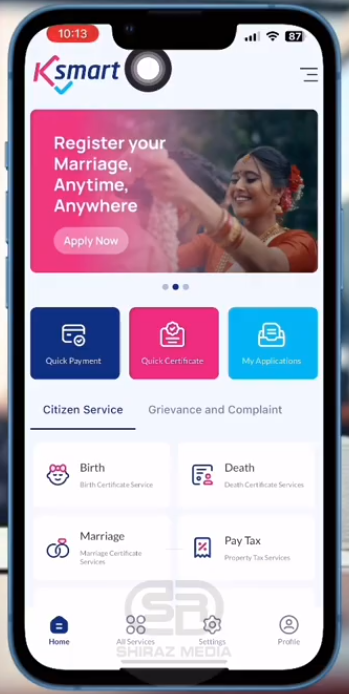
- Quick House Tax Payments: Instantly pay your residential building or land tax using Google Pay, PhonePe, UPI, or bank debit cards without visiting the physical office.
- Instant Certificate Downloads: Search and pull down digitally signed birth, death, and marriage certificates in PDF format in just a few clicks.
- Building Permit Tracking: Property owners and contracted engineers can submit architectural plans and check the live desk approval progress directly on their screen.
- Public Grievance Desk: File complaints regarding local civic issues (like broken streetlights or stagnant water) and track the departmental response right from your main dashboard.
- Secure Profile Vault: Link your profile securely using your Indian PAN card credentials to keep all your municipal land records locked in one centralized account.
📥 Direct KSMART App Download
Now that you know how to protect your battery and internet data, use the verified gateway below to install the lightweight 90 MB file directly to your smartphone.
Easy Citizen Setup Guide
- Find the File: Open your app store using the links above, verify the developer says Information Kerala Mission, and tap the install button.
- Select Your Language: Open the application and choose your preferred reading language—either English or Malayalam—from the welcome screen.
- Verify Your Identity: Complete the citizen sign-up by typing in your active mobile number and entering the One-Time Password (OTP) sent via SMS.
- Lock Down Permissions: Allow basic camera and file storage access only when the app specifically asks you to upload an ID proof or download a finished PDF certificate.
Real User FAQs
Can Non-Resident Keralites (NRKs) in the Gulf pay house tax using KSMART?
Yes. NRKs living abroad can easily log into the app using their active Indian SIM card to catch the login OTP, allowing them to settle their land taxes from anywhere in the world.
What should I do if my downloaded birth certificate has a spelling mistake?
Do not apply for a brand new certificate. You can submit a formal application for a name correction directly through the app’s self-service menu by uploading a photo of a valid government ID.
Is the mobile application completely free to use?
Yes. Downloading the software and checking old records is completely free. You only pay the exact official statutory government fees when you actively pay a tax or request a permit.
The Tipzoom.in Final Verdict
This tool is a massive time-saver for busy citizens, NRKs, and property owners who want to skip physical government queues entirely.
- Ease of Use: 4.5 / 5
- Speed & Performance: 4.0 / 5
- Feature Set: 4.5 / 5
- Overall Tipzoom Score: 4.4 / 5