Typing Malayalam on a smartphone can be difficult, especially when switching between Malayalam and English. Malayalam Keyboard (Bharat) is designed to make Malayalam typing easier with direct Malayalam input, Manglish transliteration, voice typing, stickers, GIFs and emojis.
If you are searching for a Malayalam keyboard, Malayalam typing app, Manglish keyboard or Malayalam voice typing app, this is an option worth checking.
What Is Malayalam Keyboard (Bharat)?
Malayalam Keyboard (Bharat) is a third-party Android keyboard that lets you type Malayalam across messaging and social media apps.
You can type Malayalam directly or enter Malayalam words using English letters through Manglish-style transliteration. The keyboard also includes voice typing, allowing you to speak instead of manually entering longer sentences.
Testing Setup & Our Experience
We tested the keyboard on a Samsung Galaxy A55 5G running Android 15, focusing on Malayalam typing, Manglish input, voice typing and customization.
After installing the app, we enabled the keyboard and selected it as the input method. We then opened a messaging app and tested both Malayalam and English typing.
We also entered Malayalam words using English letters to check the transliteration feature. Finally, we tested voice input and explored the available themes, stickers, GIFs and emojis.
The keyboard offers many features, although users looking only for a basic Malayalam keyboard may not need all of them.
Best Features
1. Malayalam Keyboard
You can directly type Malayalam characters using the dedicated keyboard, making it useful for everyday messages and social media posts.
2. Manglish Typing
The Manglish option lets you type Malayalam words using English letters and convert them into Malayalam text.
3. Malayalam Voice Typing
You can use voice input to create Malayalam text without manually typing every character. This can be especially useful for longer WhatsApp messages and posts.
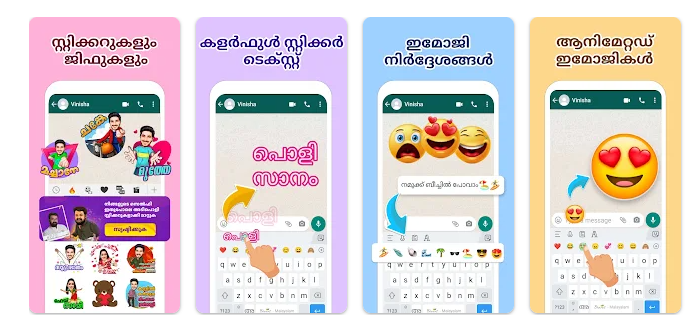
4. Stickers, GIFs & Emojis
The keyboard includes Malayalam stickers, GIFs and emojis that can be used to make conversations more expressive.
5. Themes & Fonts
You can customize the keyboard with different themes and stylish fonts. Some options also allow you to personalize the keyboard’s appearance.
Is Malayalam Keyboard (Bharat) Worth Downloading?
If you are searching for a Malayalam keyboard for Android, Malayalam typing app, Manglish keyboard, Malayalam voice typing keyboard or Malayalam keyboard for WhatsApp, this app is worth trying.
Its main advantage is that several Malayalam input methods are available in one keyboard. You can type Malayalam directly, use Manglish, speak through voice typing or add stickers and GIFs without opening a separate app.
This makes it useful for people who regularly type Malayalam on WhatsApp, Facebook, Instagram and other messaging platforms.
However, because it is a third-party keyboard, you should review the permissions and privacy information before enabling it as your default keyboard.
Download from Google Play Store
Quick FAQ
Can I type Malayalam using English letters?
Yes. The keyboard supports Manglish-style Malayalam input.
Can I type Malayalam by speaking?
Yes. It includes voice typing for creating Malayalam text.
Can I use it for WhatsApp?
Yes. You can use the keyboard while typing messages in WhatsApp and other compatible applications.
Can I customize the keyboard?
Yes. The app provides themes, fonts and other customization options.
TipZoom Verdict
Malayalam Keyboard (Bharat) is a useful option for Android users who want multiple ways to type Malayalam on their phone.
During our testing on the Samsung Galaxy A55 5G running Android 15, the keyboard was straightforward to enable and provided direct Malayalam typing, Manglish input and voice typing.
Its biggest advantage is flexibility. You can switch between Malayalam typing, Manglish, voice input, stickers, GIFs and emojis depending on what you need.
For users searching for a Malayalam typing app, Malayalam keyboard, Manglish keyboard or Malayalam voice typing app, it is worth testing.
Final Scorecard
Ease of Use: 4.4/5 — Easy after setup.
Malayalam Typing: 4.5/5 — Multiple input options.
Voice Typing: 4.3/5 — Useful for longer text.
Features: 4.5/5 — Stickers, GIFs, emojis and themes.
Overall TipZoom Score: 4.4/5 — A versatile Malayalam keyboard for Android with Manglish and voice-typing options.