Typing Malayalam on a phone can be difficult, especially when you need to enter long sentences or complex Malayalam കൂട്ടക്ഷരങ്ങൾ (koottaksharangal). If you are looking for an easier way to write Malayalam, Malayalam Voice Typing by One Screen Apps lets you speak and convert your words into Malayalam text.
It can be useful for WhatsApp messages, social media posts, notes and everyday Malayalam typing.
What Is Malayalam Voice Typing?
Malayalam Voice Typing is a simple Malayalam speech-to-text app. Instead of typing every Malayalam letter manually, you tap the microphone and speak. Your speech is converted into Malayalam text that you can edit and share.
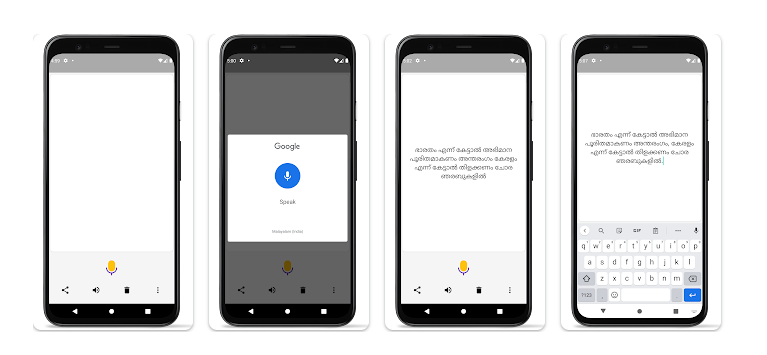
The app uses a simple single-screen interface, so you can start voice typing without dealing with complicated keyboard settings.
Testing Setup & Our Experience
We tested the app on a Samsung Galaxy A55 5G running Android 15, focusing on Malayalam voice typing, text editing, text-to-speech and sharing.
First, we opened the app and tapped the microphone button. We spoke several Malayalam sentences and checked how quickly the spoken words appeared on the screen.
We then corrected the generated text manually using the phone keyboard. After that, we tested the speaker option to hear the text and used the sharing feature to send the finished Malayalam text to another application.
Best Features
1. Malayalam Voice Typing
Speak Malayalam into the microphone and the app converts your speech into written Malayalam. This is the main reason to download the app.
2. Easy Text Editing
You can edit the generated Malayalam text before sharing it, which is useful when the voice recognition makes an occasional mistake.
3. Long Malayalam Text
The app can be used for longer sentences and paragraphs, making it more practical than typing every word manually.
4. Text-to-Speech
The speaker option can read the generated Malayalam text aloud. This can help you check the text before sending it.
5. Share Malayalam Text
After creating your text, you can share it with WhatsApp, social media and other compatible apps.
App Details
- Category: Tools
- Developer: One Screen Apps
- Downloads: 100K+
- Price: Free with ads
- Platform: Android
Is Malayalam Voice Typing Worth Downloading?
If you are searching for a Malayalam voice typing app, Malayalam speech-to-text app, Malayalam typing app or Malayalam voice-to-text tool, this is a useful option to try.
The biggest advantage is that you do not have to manually type complicated Malayalam letters. Simply speak Malayalam, review the text and share it.
Voice recognition accuracy can vary depending on pronunciation, background noise, internet connection and the speech-recognition service available on your phone. It is therefore a good idea to quickly check the generated text before sharing it.
Download from Google Play Store
Quick FAQ
Can I type Malayalam by speaking?
Yes. Tap the microphone and speak Malayalam to convert your speech into text.
Can I edit the Malayalam text?
Yes. You can manually correct the generated text before sharing.
Can I use it for WhatsApp?
Yes. You can create Malayalam text in the app and share it with WhatsApp and other applications.
Can it read Malayalam text aloud?
Yes. The app includes a text-to-speech option.
TipZoom Verdict
Malayalam Voice Typing is a practical Android tool for anyone who finds traditional Malayalam typing difficult.
During our testing on the Samsung Galaxy A55 5G, the simple interface made it easy to start speaking, review the generated Malayalam text and share it.
For users searching for a Malayalam voice typing app, Malayalam speech-to-text app, Malayalam typing app or Malayalam voice-to-text tool, it is worth trying.
Final Scorecard
Ease of Use: 4.7/5 — Simple interface.
Voice Typing: 4.4/5 — Convenient Malayalam dictation.
Features: 4.2/5 — Covers the essential tools.
Sharing: 4.5/5 — Easy to share generated text.
Overall TipZoom Score: 4.4/5 — A useful Malayalam voice-to-text app for writing messages, posts and other Malayalam content without lengthy keyboard typing.