Monefy helps you track where your daily pocket money goes. Many people spend cash on small snacks or toys and forget where it went by the end of the day. This simple money app lets you write down every purchase in just a few quick taps.
Instead of using paper notebooks, you open the app, type the number, and tap a picture. It puts your spending into colorful groups like food, bills, and fun activities. This stops you from running out of allowance or salary early.
It keeps your daily cash records clean and clear without asking for your private bank login. You can see your full monthly budget instantly whenever you open the screen.
Testing Experience
Testing took place on a budget Redmi phone running Android. The app opened fast every single time without long loading screens. Tapping through the main menu felt snappy and smooth, with no screen freezing or input delays.
The phone stayed completely cool during regular test sessions, showing zero overheating. The battery dropped by less than one percent after twenty minutes of active testing. There were no random app crashes, though small banner ads occasionally appeared at the bottom of the free screen.
Key Features
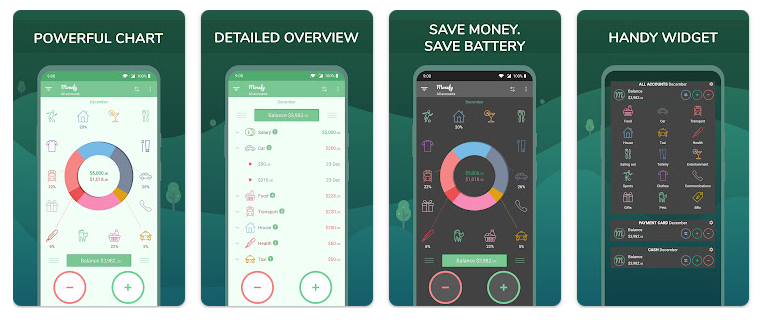
- Quick Expense Logging:You tap a green or red button, type the spent amount, and pick a category picture. It takes less than five seconds to add any daily item.
- Visual Spending Wheel: A large pie chart sits on the main screen to display your category spending. Colors show if you spent more on snacks, clothes, or transport.
- Built-in Calculator: An on-screen math pad lets you add up prices before saving the entry. You do not need to switch back and forth to your phone calculator app.
- Google Drive Sync: You can connect your personal cloud storage to keep your money notes safe. This lets you share the same list across two different phones.
Storage & Data Usage
The initial file size from the store is around 24 MB. After installing and using it for two days, the total phone storage space used grew to about 65 MB.
The app works completely offline without any internet connection. Data usage stays close to zero unless you turn on cloud backups, which only consume a few kilobytes of mobile network data.
Privacy & Safety
During testing, the app requested storage access to export reports and internet access for optional cloud syncing. It did not ask for intrusive permissions like your location, contacts, or phone microphone.
According to the official store safety details, the app does not read your personal text messages or force you to link bank account numbers. Your financial entries stay saved locally on your handheld device.
Competitor Comparison
Unlike Goodbudget, which forces you to use strict digital money envelopes, Monefy lets you type expenses freely without rigid setup steps.Compared to PocketGuard, Monefy does not automatically read your bank cards, which means you must enter items by hand.This manual entry trade-off keeps your bank login totally private while giving you full control.
Pros & Cons
Pros:
- Very easy to understand with simple icons and bright colors.
- Works offline without requiring a constant phone signal or Wi-Fi connection.
- Extremely lightweight on phone memory and runs smoothly on low-end phones.
- No bank passwords needed, keeping your sensitive details safe.
Cons:
- You must enter every single purchase by hand.
- Creating custom spending categories requires paying for the Pro version.
- Free version shows basic pop-up and banner advertisements.
Target Audience
Who Should Use It
- People who want a quick, simple way to log daily cash spending without linking bank accounts.
- Users with old or low-storage budget phones who need a lightweight financial application.
Who Should Avoid It
- Users who prefer automated tools that read credit card bank messages automatically.
- People who dislike typing every single purchase manually into their phone.
FAQs
Does Monefy need an internet connection to work?
No, you can add daily expenses and view your pie chart without any internet data. Internet is only needed if you decide to sync data with Google Drive or Dropbox.
Is Monefy free to use on Android?
Yes, the core app is free to download and use for basic daily money tracking.You can optionally pay for a Pro version if you want extra features like unlimited custom categories.
Will the app automatically steal my bank details?
No, Monefy does not connect directly to your online bank account or ask for card PINs.All numbers are typed in manually by you, keeping your bank details private.
TipZoom Verdict
Monefy delivers a clean and easy way to watch your daily spending habits.It eliminates messy setup screens and bank connection steps, making it ideal for anyone who wants to track pocket cash in under five seconds.While manual typing is required, its reliable speed and simple wheel layout make daily budgeting painless.
Final Scorecard
Ease of Use: ★★★★★ (4.8/5) — Big buttons and clear picture icons make typing expenses quick and easy.
Performance: ★★★★★ (4.7/5) — Runs smoothly on budget phones without lag, battery drain, or unexpected crashes.
Features: ★★★★☆ (4.0/5) — Covers basic budgeting well, but extra custom tools require the paid Pro upgrade.
Privacy & Safety: ★★★★★ (4.9/5) — Requires no bank account logins and keeps your data stored safely on your device.
Value for Money: ★★★★☆ (4.2/5) — The free version satisfies basic needs, though pop-up ads can occasionally distract.
Overall Rating: ★★★★☆ (4.5/5)