Accidentally deleted an important photo from your phone? DiskDigger is an Android app designed to help users search for and recover deleted photos and videos from their device storage.
Whether you deleted photos by mistake, lost images while cleaning your phone, or want to check if deleted files can still be recovered, DiskDigger provides a straightforward recovery tool for Android users.
Testing Setup & Our Experience
We tested DiskDigger on an Android smartphone, focusing on scanning storage, finding recoverable photos, previewing results, and saving recovered files.
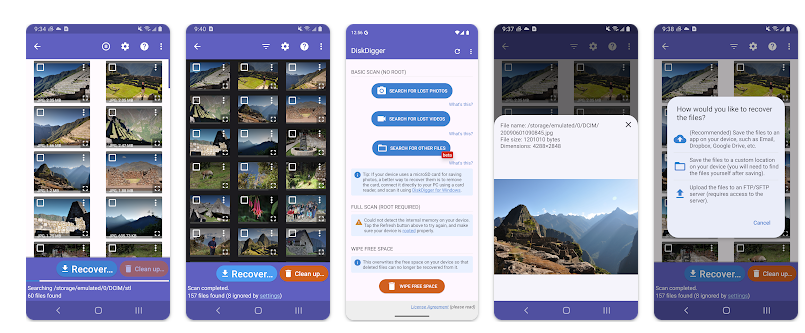
The main process is simple. Open the app, select the type of scan available on your device, and allow DiskDigger to search for deleted or recoverable image files.
One important limitation is that recovery results depend on your Android device and whether the phone has root access. The app’s basic scan can work without root on supported devices, but deeper scanning and broader recovery capabilities may require a rooted device.
This is important because users should not expect every deleted photo or video to be recovered successfully.
Key Features
Recover Deleted Photos
DiskDigger can scan your device storage and search for deleted or recoverable photos.
Photo Preview
Preview discovered images before deciding which files you want to recover.
Recover Deleted Videos
The app also offers video recovery features, although available recovery options can depend on the device and version being used.
Scan Internal Storage
Search your Android phone’s internal storage for recoverable files.
SD Card Support
DiskDigger can also be useful for scanning supported external storage such as SD cards.
Save Recovered Files
Recovered photos can be saved to your device or other supported locations.
Upload Recovered Files
Depending on the available options, recovered files can be uploaded to supported cloud-storage services.
No Root Basic Scan
A basic photo scan can be performed without rooting on supported Android devices. However, deeper recovery options may require root access.
Is DiskDigger Worth Downloading?
If you are searching for a deleted photo recovery app, recover deleted photos from Android, deleted video recovery app, or Android file recovery tool, DiskDigger is worth considering.
Its biggest advantage is that it addresses a very common problem: accidentally deleting important photos.
However, it is important to understand how file recovery works. Once files are deleted, recovery is not guaranteed. Continuing to use your phone and saving new photos, videos, or apps can overwrite the storage space where deleted files were located.
For the best possible chance of recovery, it is sensible to avoid heavily using the affected storage immediately after discovering that important files were deleted.
Rooted devices may provide better recovery possibilities because the app can access more of the storage system. On non-rooted phones, recovery capabilities can be more limited.
DiskDigger Download
If you accidentally deleted important photos and want to recover deleted images, search for lost files, or check your Android storage for recoverable photos, DiskDigger is worth trying.
Download DiskDigger from Google Play
Quick FAQ
Can DiskDigger recover deleted photos?
It can scan for and recover supported photos, but successful recovery is not guaranteed.
Does DiskDigger require root access?
Basic scanning can work without root on supported devices, while deeper recovery features may require root access.
Can it recover deleted videos?
Video recovery options are available, but results depend on your device and storage situation.
Should I continue using my phone after deleting important photos?
Heavy phone use may overwrite deleted data, potentially reducing the chances of recovery.
TipZoom Verdict
DiskDigger is a useful app for users who have accidentally deleted photos and want to try recovering them. Its simple scanning and preview features make it accessible, but users should understand that recovery success depends heavily on the device, storage conditions, and whether root access is available.
Final Scorecard
- Photo Recovery – 9/10: Useful for searching for recoverable deleted images.
- Ease of Use – 9/10: Simple scanning and recovery process.
- Recovery Features – 8.5/10: More advanced recovery may require root access.
- Practical Value – 9.5/10: Addresses the common problem of accidentally deleted photos.
- Overall – 9/10: A strong option for attempting Android photo recovery.