Saving useful online videos can be difficult when a website does not provide an obvious download option. Video Downloader by InShot Inc. is an Android utility designed to save supported videos for offline viewing and manage them from one place.
The app combines a built-in browser, download manager and video player. It can be useful for users who regularly save videos or manage media files on their phones.
What is Video Downloader?
Video Downloader is an Android utility app from InShot Inc. It can detect supported video links while browsing and provide options to download them.
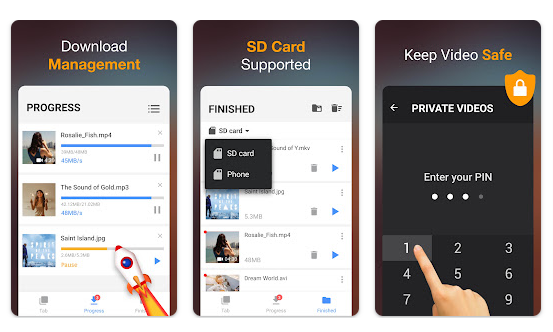
It also provides tools for managing downloaded files and playing saved videos. Availability depends on the website and its restrictions.
Testing Setup & Our Experience
We tested Video Downloader on a Redmi Android smartphone running Android 14, using Wi-Fi and mobile data.
We checked video detection, the built-in browser, download quality options, download management and video playback. Supported videos were detected during testing, and starting a download was straightforward.
We also checked active downloads and saved-file playback. Navigation remained responsive during normal use.
Best Features of Video Downloader
1. Download Supported Videos
The app can detect supported video content and provide a download option. Available formats and quality depend on the source.
2. Built-in Browser
The browser lets you find supported content without switching between different apps.
3. Download Manager
You can manage active and completed downloads from one place, which is useful when handling several media files.
4. Multiple Formats
The app supports several video and media formats depending on the source content.
5. Built-in Video Player
Saved videos can be played directly inside the app without opening another media player.
App Details
- Category: Tools
- Developer: InShot Inc.
- Google Play Rating: 4.6/5
- Downloads: 100M+
- Price: Free with ads and in-app purchases
Google Play ratings and download numbers can change over time.
Other Similar Apps
1DM is a download manager with broader file-downloading features.
ADM (Advanced Download Manager) focuses on general file downloads and management.
Video Downloader is more focused on saving supported online videos.
Should You Download It?
Video Downloader is worth considering if you regularly save supported videos for offline viewing and want simple tools for managing downloaded media.
It may also help users who want to reduce repeated streaming and manage video files on their Android phone.
However, it is not a universal downloader. Some websites restrict downloads, so users should follow copyright rules and each platform’s terms.
Main Advantages
- Simple video downloading
- Built-in browser
- Download management
- Multiple supported formats
- Offline playback
Main Disadvantages
- Download availability varies by website
- Free version contains advertisements
- Some features depend on the source website
Download from Google Play Store
Quick FAQ
Is Video Downloader free?
The app is free to install, with advertisements and possible in-app purchases.
Can it download videos from every website?
No. Downloading depends on website compatibility and platform restrictions.
Can downloaded videos be watched offline?
Yes, successfully saved videos can generally be played without an active internet connection.
TipZoom Verdict
Video Downloader by InShot Inc. is a practical option for saving supported online videos and managing them on an Android phone. Our testing showed straightforward navigation and a simple download workflow.
Its main limitation is that downloading is not supported on every website, while advertisements may affect the free experience.
Final Scorecard
Ease of Use: 4.4/5 — The browser and download controls are straightforward.
Speed & Performance: 4.3/5 — Navigation and download management worked normally during Android 14 testing.
Features: 4.4/5 — Browser, downloading, format support, download management and playback provide useful tools.
Safety: 3.8/5 — Users should be careful about downloaded files and the websites they access.
Price: 4/5 — Basic functionality is available for free, although advertisements and paid features may apply.
Overall TipZoom Score: 4.2/5 — A useful Android downloader for supported websites, particularly for users who want simple offline video and media management.