Is your WiFi slow, unstable or weak in certain parts of your home? WiFi Analyzer (open-source) is an Android tool that helps you check nearby WiFi networks, compare signal strength and identify crowded channels.
Instead of simply running an internet speed test, the app helps you understand your WiFi connection and wireless environment.
If you are searching for a WiFi analyzer app, WiFi signal strength meter, WiFi channel scanner or WiFi optimizer, this app is worth trying.
What Is WiFi Analyzer?
WiFi Analyzer scans nearby wireless networks and displays information about their signal strength and channels. Its graphs can help you identify networks using the same or overlapping channels.
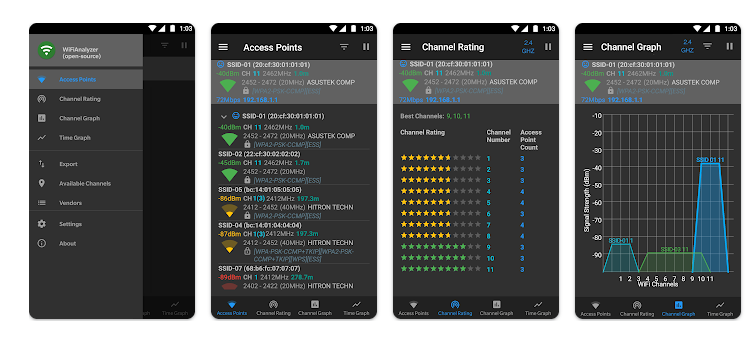
The app supports 2.4 GHz, 5 GHz and 6 GHz bands, depending on your phone’s hardware and Android support. It is open-source and does not require internet access for its main analysis functions.
Testing Setup & Our Experience
We tested WiFi Analyzer on a Samsung Galaxy A55 5G running Android 15, focusing on WiFi signal strength, nearby networks, channel graphs and channel analysis.
After opening the app, we granted the required location permission and enabled location services. Android requires these settings for WiFi scanning on supported versions.
The app quickly displayed nearby access points and their signal information. We then opened the channel graph to see how surrounding WiFi networks were distributed.
The graph made it easier to identify areas where several networks were using overlapping or crowded channels.
Best Features
1. WiFi Signal Strength
The app displays signal strength for nearby access points, helping you identify stronger and weaker WiFi signals.
2. WiFi Channel Scanner
The channel graph shows surrounding networks and can help you find crowded WiFi channels.
3. 2.4GHz, 5GHz & 6GHz
Supported phones can analyze different WiFi frequency bands, including newer 6GHz networks.
4. Signal History
You can monitor access-point signal strength over time instead of relying on one measurement.
5. Filters
Networks can be filtered using information such as WiFi band, signal strength, security and SSID, making it easier to find specific networks.
Is WiFi Analyzer Worth Downloading?
If you are searching for a WiFi analyzer app, WiFi signal strength app, WiFi channel scanner, WiFi optimizer or app to fix slow WiFi, this is a useful option.
Its biggest advantage is that it provides information about your wireless environment. For example, if many nearby routers are using the same channel, you can use the information to decide whether changing your router’s channel could help.
However, the app does not automatically increase your internet speed. It is an analysis tool rather than a speed booster.
It is most useful for people who want to check WiFi signal strength, troubleshoot connection problems or optimize their home WiFi setup.
Download from Google Play Store
Quick FAQ
Can WiFi Analyzer improve my WiFi speed?
It can help identify channel congestion and signal issues, but it does not directly boost internet speed.
Can it show WiFi passwords?
No. It is designed for analyzing wireless networks.
Does it support 5GHz WiFi?
Yes, when supported by your phone and Android version.
Why does it need location permission?
Android requires location permission for WiFi scanning on supported versions.
TipZoom Verdict
WiFi Analyzer (open-source) is a useful Android tool for anyone trying to understand why their WiFi is slow, weak or unstable.
During our testing on the Samsung Galaxy A55 5G running Android 15, the app quickly displayed nearby networks and provided useful signal and channel information.
Its strongest feature is the WiFi channel analysis, which can help you identify crowded channels and make better router configuration decisions.
For users searching for a WiFi analyzer, WiFi signal strength meter, WiFi channel scanner, WiFi optimizer or WiFi troubleshooting app, it is worth testing.
Final Scorecard
Ease of Use: 4.3/5 — Clear information once configured.
WiFi Analysis: 4.7/5 — Detailed network information.
Features: 4.6/5 — Strong analysis tools.
Privacy: 4.8/5 — Open-source and privacy-focused.
Overall TipZoom Score: 4.6/5 — A practical Android WiFi analyzer for checking signal strength, channel congestion and nearby wireless networks.