Running out of mobile data while traveling or streaming can be frustrating. Recharge plans are getting costlier, and constantly buying extra data boosters adds unnecessary monthly expenses. Finding an open public Wi-Fi network nearby is often the simplest way to save your mobile plan.
Free WiFi Internet Finder is an Android app designed to help you locate and connect to available free Wi-Fi networks around you. It continuously scans your surroundings for open access points and alerts you when a usable hotspot is in range.
If you travel often, use a limited daily mobile data plan, or carry a Wi-Fi-only Android tablet, this app aims to keep you connected without extra costs.
What is Free WiFi Internet Finder?
Free WiFi Internet Finder is a network scanning utility developed by kapron-ap. Its main purpose is to locate open, public, or unsecured Wi-Fi hotspots in your vicinity.
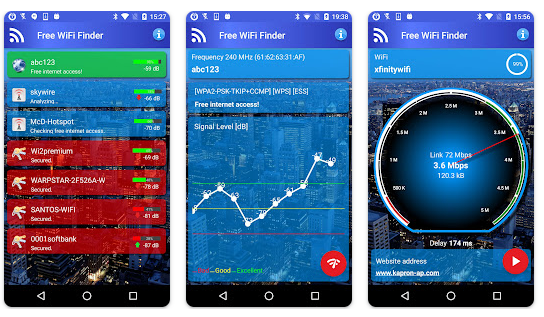
Instead of searching manually through phone settings, the app actively monitors nearby signals and displays them in a clear, organized list. It also offers tools to test network speed and connection stability before you start browsing.
Best Features of Free WiFi Internet Finder
1. Automatic Hotspot Scanning
The app runs in the background and scans for open Wi-Fi networks as you walk around. You receive a direct notification whenever a free hotspot with internet access is detected within reach.
2. Color-Coded Network Indicators
Available networks are categorized visually in real time. Green indicates networks you are currently connected to, blue highlights free open hotspots, and red marks password-protected private networks.
3. Integrated Speed and Signal Quality Tester
Once connected to a hotspot, you can run a real-time speed test. It displays actual download and upload transfer rates so you know if the network is fast enough for video streaming or downloading files.
4. Signal Level Guidance
The app features a visual signal strength indicator that guides you toward areas with stronger Wi-Fi coverage. This helps you find the best physical spot for maximum browsing speed.
App Size, Rating, and Downloads
- App Size: Approximately 6.9 MB
- Google Play Rating: 3.9 out of 5 stars (based on over 38,000 reviews)
- Downloads: Over 10 Million downloads on Google Play Store
What Users Are Saying
Many users praise the app for its lightweight footprint and simple signal strength guidance. It is particularly appreciated by travellers who want to save on roaming data usage.
On the downside, some users note that the app contains banner advertisements. Other users point out that it cannot grant access if there are no open, public Wi-Fi networks nearby.
Other Similar Apps
- WiFi Map: Uses a community-driven database to share public Wi-Fi locations and community passwords worldwide.
- Instabridge: Provides an extensive list of public Wi-Fi spots along with offline maps for finding internet access without data.
- Wiman: Offers an interactive map showing free Wi-Fi hotspots in major towns and cities.
Should You Download It?
This app is ideal if you want a automatic free internet finder when visiting public places like cafes, airports, or railway stations.
Main Advantages
- Small app size that uses minimal phone storage.
- Easy visual indicators to identify free Wi-Fi quickly.
- Built-in speed test verifies connection quality before use.
Main Disadvantages
- Includes in-app advertisements.
- Cannot unlock or bypass password-protected private networks.
- Completely reliant on open Wi-Fi availability in your area.
Verdict: It is a helpful tool to connect to public Wi-Fi networks, but it will not create internet access where no open hotspots exist.
Download Free WiFi Internet Finder on Google Play
Quick FAQ
Is Free WiFi Internet Finder free?
Yes, the app is free to download and use, though it includes advertisements.
Does it unlock private Wi-Fi passwords?
No. The app does not hack or bypass secured Wi-Fi networks. It only connects to open or public hotspots.
Why does the app need location access?
Android OS requires location permissions for apps to scan and detect nearby Wi-Fi network names accurately.
Important Safety Information
The app requests Location access to scan for nearby Wi-Fi routers. Whenever you connect to public Wi-Fi, remember that unsecured networks carry risks. Avoid conducting banking transactions or logging into sensitive accounts on open public connections.
Final Thoughts
Free WiFi Internet Finder provides a practical way to locate open public hotspots and test Wi-Fi signal strength tester performance. Its primary strength is automatic background scanning, while its main drawback is ad clutter and dependence on open network availability. It is a useful utility for budget-conscious users who travel frequently.
TipZoom.in Rating Scorecard
- Ease of Use: 4.2/5
- Speed & Performance: 3.8/5
- Features: 3.7/5
- Safety: 3.5/5
- Price: 5/5
- Overall TipZoom Score: 3.8/5
Free WiFi Internet Finder is a lightweight, reliable app for finding open Wi-Fi networks and saving mobile data on the go.